
Docs Hotkey
Create hotkeys for Google Docs
As of June 2026, Docs Hotkey has 10,000 users and a 4.56/5 rating from 90 reviews in the Productivity category.
Usersno change0%
10.0K
10,000
Ratingup 0.2 percent+0.2%
4.56
90 reviews
Reviewsup 4.7 percent+4.7%
90
Version
0.24
Manifest V3
History
4 snapshotsTracking since Apr 16, 2026.
View as table
| Date | Users | Rating | Reviews | Version |
|---|---|---|---|---|
| Apr 16, 2026 | 10.0K | 4.55 | 86 | 0.24 |
| Apr 22, 2026 | 10.0K | 4.55 | 87 | 0.24 |
| Apr 27, 2026 | 10.0K | 4.55 | 88 | 0.24 |
| May 11, 2026 | 10.0K | 4.55 | 89 | 0.24 |
| Now | 10.0K | 4.56 | 90 | 0.24 |
Permissions & access
- Permissions
- storage
- Host access
- None declared
Screenshots

About
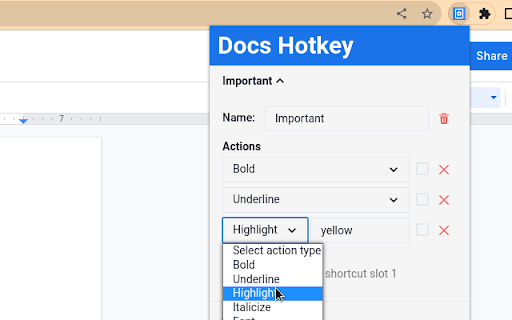
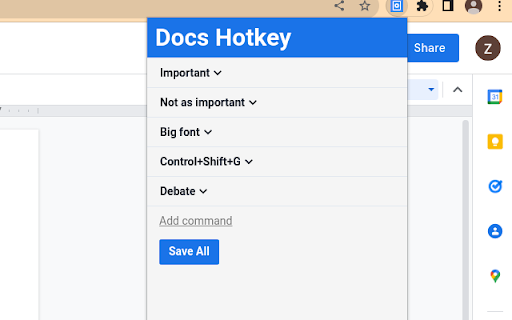
Docs Hotkey allows for complex hotkey setups with simple configuration. Hotkeys can be created to do the following:
- Highlight in any color
- Bold
- Underline
- Italicize
- Change text color
- Change fonts
- Change font size
- Set heading type (e.g., Heading 1, Normal Text, Title)
- Strike through text
- Change alignment and indentation
- Add emoji reactions
- Add bulleted lists and set their spacing
- Clear all styles and remove specific styles
- Execute add-ons
- Insert search menu components (e.g., building blocks)

A single hotkey can be configured to do several of these at once.

Docs Hotkey was originally created solely for the addition of a highlight shortcut, but it has since expanded to many others. If you'd like to see a new shortcut added or if you encounter a bug, feel free to contact me.

Also supports Google Slides and Google Classroom!

Documentation: https://docs-hotkey.zackmurry.com
Technical
- Version
- 0.24
- Manifest
- V3
- Size
- 790KiB
- Min Chrome
- 88
- Languages
- 1
- Featured
- Yes
Metadata
- ID
- npkpplmpfeaeemeecniaikpjjfbfefhh
- Developer ID
- u17f1c314f26ea3ff69f0fefa92388437
- Developer Email
- [email protected]
- Created
- Jul 14, 2022
- Last Updated (Store)
- Mar 4, 2026
- Last Scraped
- Jun 6, 2026
- Website
- —
- Support URL
- https://docs-hotkey.zackmurry.com
- Privacy Policy
- —
Similar extensions
Alternatives to Docs Hotkey, ranked by description similarity.

Hotkey Hero
Learn keyboard shortcuts as you work! Get helpful suggestions and reminders for shortcuts in Google Docs.
3

SnapKeys - custom shortcuts for Google Suite
Create custom keyboard shortcuts for Google Sheets, Docs, and Slides.
32
★ 5.0

New Thing - speed dial for your web apps
Keyboard shortcuts to start AI chats, create Google Docs, etc.
4

Sheets Row Highlighter
Highlight a row (and column) of current cell in Google Sheets and Microsoft Excel Online.
70.0K
★ 4.9

Smart Keyword Highlighter
Smart keyword highlighting to improve focus. Uses CSS Custom Highlight API, adaptive contrast, and persistent registry.
2

Web Highlighter & Sticky Notes | Sitespedia - Annotate Websites and PDFs
Highlight and manage important words on websites and add them to sticky notes. You can also change the highlight colors.
23

Chrome Highlighter — Free Text & Word Highlighter for Webpages
Highlight words on any webpage with custom colors. Manage your list easily and boost focus while studying or researching.
145
★ 3.7

Word Highlighter
Highlight user-defined words on every page with customizable background color
5
Data sourced from the Chrome Web Store · last verified Jun 6, 2026.