
Markdown Viewer Enhanced
在浏览器中渲染 Markdown 文件,支持 Mermaid 图表、语法高亮、目录导航、多主题等功能。
As of June 2026, Markdown Viewer Enhanced has 96 users in the Productivity category.
Usersno change0%
96
96
Ratingno change0%
—
— reviews
Reviewsno change0%
—
Version
1.3.1
Manifest V3
90-day change · In the last 90 days this extension 1 version update.
History
10 snapshotsTracking since Apr 17, 2026.
View as table
| Date | Users | Rating | Reviews | Version |
|---|---|---|---|---|
| Apr 17, 2026 | — | — | — | 1.1.0 |
| Apr 22, 2026 | — | — | — | 1.1.0 |
| Apr 27, 2026 | 1 | — | — | 1.1.0 |
| May 4, 2026 | 3 | — | — | 1.3.1 |
| May 10, 2026 | 4 | — | — | 1.3.1 |
| May 15, 2026 | 18 | — | — | 1.3.1 |
| May 21, 2026 | 35 | — | — | 1.3.1 |
| May 28, 2026 | 47 | — | — | 1.3.1 |
| Jun 4, 2026 | 63 | — | — | 1.3.1 |
| Jun 9, 2026 | 79 | — | — | 1.3.1 |
| Now | 96 | — | — | 1.3.1 |
Changelog
- Apr 27, 2026description
A browser extension that elegantly renders Markdown files with Mermaid diagrams, syntax highlighting, KaTeX math formulas, table of contents navigation, multiple themes, and more.

## ✨ Key Features

### 🎨 Multiple Themes & Code Highlighting
- **Three page themes** — Light / Dark / Auto (follows system preference)
- **14 code highlight themes** — GitHub, Monokai, VS 2015, Atom One Dark, Dracula, Nord, Tokyo Night, and more
- Code theme can be set to "follow page theme" for automatic switching

### 📊 Mermaid Diagram Rendering
- Full support for Mermaid syntax: flowcharts, sequence diagrams, Gantt charts, class diagrams, state diagrams, and more
- Diagrams automatically adapt their color scheme to the current page theme
- **Click to zoom** — open diagrams in a fullscreen overlay with mouse wheel zoom, drag-to-pan, and keyboard shortcuts (`+` / `-` / `0`)
- One-click "fit to window" and "reset zoom" controls
- Copy Mermaid source code with a single click

### 💻 Enhanced Code Blocks
- Powered by highlight.js with **180+** supported programming languages
- Code blocks display a **language label** and a **one-click copy** button
- Optional **line numbers** for easy code referencing
- Code highlight theme is independent of page theme — use dark code themes on light pages

### 🔢 KaTeX Math Formulas
- Supports LaTeX **inline** (`$...$`) and **block-level** (`$$...$$`) formulas
- High-performance rendering powered by KaTeX with automatic CDN font loading
- Smart detection to distinguish math formulas from currency symbols

### 📑 Table of Contents Navigation
- Automatically generates a **TOC tree** from document headings
- Supports **left / right** sidebar layout
- Click any TOC item to **smooth-scroll** to the corresponding section
- Current reading position is **automatically highlighted** and tracked in real time
- Toggle the TOC sidebar on or off at any time
# Markdown Viewer Enhanced

> This document contains the English copy for the Chrome Web Store / Edge Add-ons listing page.

---

## Short Description (132 chars max)

```
Render Markdown beautifully in your browser — with diagrams, code highlighting, math, TOC, themes, file browser, and more.
```

---

## Detailed Description

**Markdown Viewer Enhanced** turns your browser into a powerful, beautiful Markdown reader. Open any `.md` file — local or remote — and it's instantly rendered with rich formatting, diagrams, syntax highlighting, and a full table of contents.

### 🎯 Why This Extension?

Most Markdown viewers only handle basic formatting. **Markdown Viewer Enhanced** goes further — it supports Mermaid flowcharts, PlantUML diagrams, Graphviz graphs, KaTeX math formulas, 15+ code themes, and a built-in file browser for navigating local directories. All in a clean, customizable interface with light and dark themes.

---

### ✨ Features

**📁 File Browser Sidebar**
Browse your local file system with a directory tree. Expand/collapse folders, open files in new tabs, and navigate with breadcrumbs — all without leaving the browser.

**🎨 Multiple Themes**
Choose from Light, Dark, or Auto (follows your system). Pick from 15 code highlighting themes including popular choices like GitHub, Monokai, Dracula, and more.

**📊 Mermaid Diagrams**
Render flowcharts, sequence diagrams, Gantt charts, pie charts, and more. Click any diagram to zoom in with drag & pan support and keyboard shortcuts.

**🌱 PlantUML Diagrams**
Render UML class diagrams, sequence diagrams, activity diagrams, and more via the PlantUML online server. Click to zoom in a lightbox.

**🔗 Graphviz (DOT) Graphs**
Render DOT language graphs locally using the built-in Viz.js WASM engine. Click to zoom with a scale control bar — no external server needed.

**💻 Syntax Highlighting**
Powered by highlight.js with support for 180+ programming languages. Includes line numbers, one-click copy, and diff syntax highlighting.

**🔢 Math Formulas (KaTeX)**
Write inline math with `$...$` and display math with `$$...$$`. Full LaTeX formula rendering powered by KaTeX.

**📑 Table of Contents (TOC)**
Auto-generated heading tree with fold/expand support. Place it on the left or right sidebar. Scroll tracking highlights the current section, and URL hash navigation lets you link directly to any heading.

**📐 Typography Controls**
Fine-tune your reading experience: adjust font size, line height, content width, and font family. Drag to resize the sidebar to your preferred width.

**🖼️ Image Lightbox**
Click any image to zoom in. Scroll-wheel zoom (0.1x–20x), drag to pan, double-click to reset. Keyboard shortcuts: `+`/`-` to zoom, `0` to fit, `R` to reset, `Esc` to close. Zoom percentage indicator included.

**📝 Extended Markdown Syntax**
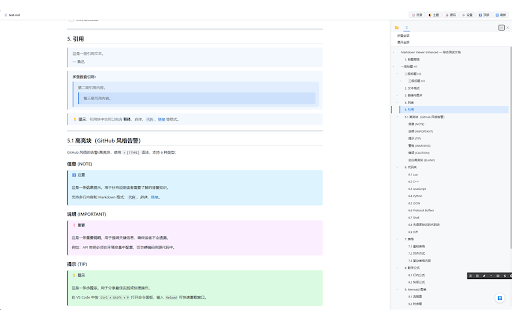
- GitHub-style alerts (`NOTE`, `TIP`, `IMPORTANT`, `WARNING`, `CAUTION`)
- Task lists / checkboxes
- Footnotes
- Definition lists
- Enhanced tables
- `==highlight==`, `^superscript^`, `~subscript~`, `++underline++`
- `:emoji:` GitHub-style emoji shortcodes

**🔄 File Change Detection**
Working on a Markdown file? The extension auto-detects when the source file changes and shows a pulsing "File updated" badge. Click to reload instantly.

**⚙️ Flexible Settings**
Quick-access popup panel for common settings, plus a full Options page for advanced customization. Changes push to all open tabs in real time.

**🌐 Multi-Language Interface**
Switch between English and Chinese (中文) in settings. The entire UI — popup, settings panel, options page — adapts to your language choice.

---

### 📋 Supported File Formats

| Extension    | Description              |
|-------------|--------------------------|
| `.md`       | Markdown                 |
| `.mdc`      | Markdown Component       |
| `.markdown` | Markdown                 |
| `.mkd`      | Markdown                 |
| `.mdown`    | Markdown                 |
| `.mdtxt`    | Markdown Text            |
| `.mdtext`   | Markdown Text            |

Local files (`file://`) support all extensions above. Remote files (`http://` / `https://`) support `.md`, `.mdc`, and `.markdown`.

---

### 🚀 Getting Started

1. **Install** the extension from the Web Store
2. **Open** any `.md` file in your browser
3. **Enjoy** — the extension detects and renders Markdown automatically
4. **Customize** — click the extension icon to adjust themes, fonts, and more

#### 📂 Local File Access

To render local Markdown files, enable file access:

1. Go to `chrome://extensions/` (or `edge://extensions/`)
2. Find **Markdown Viewer Enhanced** → click **Details**
3. Enable **"Allow access to file URLs"**

> 💡 **Tip**: The latest version is always available on [GitHub](https://github.com/LetitiaChan/markdown_viewer_enhanced). Web Store reviews may take time, so for the newest features, you can install via Developer Mode — download the source and load it as an unpacked extension.

---

### 🔒 Privacy & Permissions

- **Does NOT collect** any user data
- **Does NOT track** browsing activity
- **Does NOT send** information to external servers (except PlantUML diagram rendering via plantuml.com and KaTeX font loading via CDN)
- All settings are stored locally in your browser (`chrome.storage.sync`)
- **Permissions used**:
  - `activeTab` — to detect and render Markdown on the current tab
  - `storage` — to save your preferences
  - `scripting` — to support the local file browser feature

---

### 🛠️ Powered By

- [Marked.js](https://github.com/markedjs/marked) — Markdown parsing
- [Mermaid](https://github.com/mermaid-js/mermaid) — Diagram rendering
- [highlight.js](https://github.com/highlightjs/highlight.js) — Syntax highlighting
- [KaTeX](https://github.com/KaTeX/KaTeX) — Math formula rendering
- [Viz.js](https://github.com/nicknisi/viz.js) — Graphviz rendering (local WASM)
- [DOMPurify](https://github.com/cure53/DOMPurify) — HTML sanitization for security

---

### 📬 Feedback & Support

Found a bug? Have a feature request? We'd love to hear from you!

- 🐛 [Report Issues on GitHub](https://github.com/LetitiaChan/markdown_viewer_enhanced/issues)
- ⭐ If you find this extension useful, please leave a rating — it helps others discover it!

---

*Markdown Viewer Enhanced — Make Markdown reading elegant.* ✨
- Apr 27, 2026short_description
Render Markdown in your browser with Mermaid diagrams, syntax highlighting, TOC navigation, multiple themes, and more.
在浏览器中渲染 Markdown 文件,支持 Mermaid 图表、语法高亮、目录导航、多主题等功能。
Permissions & access
- Permissions
- activeTabstoragescripting
- Host access
- None declared
Screenshots

About
# Markdown Viewer Enhanced

> This document contains the English copy for the Chrome Web Store / Edge Add-ons listing page.

---

## Short Description (132 chars max)

```
Render Markdown beautifully in your browser — with diagrams, code highlighting, math, TOC, themes, file browser, and more.
```

---

## Detailed Description

**Markdown Viewer Enhanced** turns your browser into a powerful, beautiful Markdown reader. Open any `.md` file — local or remote — and it's instantly rendered with rich formatting, diagrams, syntax highlighting, and a full table of contents.

### 🎯 Why This Extension?

Most Markdown viewers only handle basic formatting. **Markdown Viewer Enhanced** goes further — it supports Mermaid flowcharts, PlantUML diagrams, Graphviz graphs, KaTeX math formulas, 15+ code themes, and a built-in file browser for navigating local directories. All in a clean, customizable interface with light and dark themes.

---

### ✨ Features

**📁 File Browser Sidebar**
Browse your local file system with a directory tree. Expand/collapse folders, open files in new tabs, and navigate with breadcrumbs — all without leaving the browser.

**🎨 Multiple Themes**
Choose from Light, Dark, or Auto (follows your system). Pick from 15 code highlighting themes including popular choices like GitHub, Monokai, Dracula, and more.

**📊 Mermaid Diagrams**
Render flowcharts, sequence diagrams, Gantt charts, pie charts, and more. Click any diagram to zoom in with drag & pan support and keyboard shortcuts.

**🌱 PlantUML Diagrams**
Render UML class diagrams, sequence diagrams, activity diagrams, and more via the PlantUML online server. Click to zoom in a lightbox.

**🔗 Graphviz (DOT) Graphs**
Render DOT language graphs locally using the built-in Viz.js WASM engine. Click to zoom with a scale control bar — no external server needed.

**💻 Syntax Highlighting**
Powered by highlight.js with support for 180+ programming languages. Includes line numbers, one-click copy, and diff syntax highlighting.

**🔢 Math Formulas (KaTeX)**
Write inline math with `$...$` and display math with `$$...$$`. Full LaTeX formula rendering powered by KaTeX.

**📑 Table of Contents (TOC)**
Auto-generated heading tree with fold/expand support. Place it on the left or right sidebar. Scroll tracking highlights the current section, and URL hash navigation lets you link directly to any heading.

**📐 Typography Controls**
Fine-tune your reading experience: adjust font size, line height, content width, and font family. Drag to resize the sidebar to your preferred width.

**🖼️ Image Lightbox**
Click any image to zoom in. Scroll-wheel zoom (0.1x–20x), drag to pan, double-click to reset. Keyboard shortcuts: `+`/`-` to zoom, `0` to fit, `R` to reset, `Esc` to close. Zoom percentage indicator included.

**📝 Extended Markdown Syntax**
- GitHub-style alerts (`NOTE`, `TIP`, `IMPORTANT`, `WARNING`, `CAUTION`)
- Task lists / checkboxes
- Footnotes
- Definition lists
- Enhanced tables
- `==highlight==`, `^superscript^`, `~subscript~`, `++underline++`
- `:emoji:` GitHub-style emoji shortcodes

**🔄 File Change Detection**
Working on a Markdown file? The extension auto-detects when the source file changes and shows a pulsing "File updated" badge. Click to reload instantly.

**⚙️ Flexible Settings**
Quick-access popup panel for common settings, plus a full Options page for advanced customization. Changes push to all open tabs in real time.

**🌐 Multi-Language Interface**
Switch between English and Chinese (中文) in settings. The entire UI — popup, settings panel, options page — adapts to your language choice.

---

### 📋 Supported File Formats

| Extension    | Description              |
|-------------|--------------------------|
| `.md`       | Markdown                 |
| `.mdc`      | Markdown Component       |
| `.markdown` | Markdown                 |
| `.mkd`      | Markdown                 |
| `.mdown`    | Markdown                 |
| `.mdtxt`    | Markdown Text            |
| `.mdtext`   | Markdown Text            |

Local files (`file://`) support all extensions above. Remote files (`http://` / `https://`) support `.md`, `.mdc`, and `.markdown`.

---

### 🚀 Getting Started

1. **Install** the extension from the Web Store
2. **Open** any `.md` file in your browser
3. **Enjoy** — the extension detects and renders Markdown automatically
4. **Customize** — click the extension icon to adjust themes, fonts, and more

#### 📂 Local File Access

To render local Markdown files, enable file access:

1. Go to `chrome://extensions/` (or `edge://extensions/`)
2. Find **Markdown Viewer Enhanced** → click **Details**
3. Enable **"Allow access to file URLs"**

> 💡 **Tip**: The latest version is always available on [GitHub](https://github.com/LetitiaChan/markdown_viewer_enhanced). Web Store reviews may take time, so for the newest features, you can install via Developer Mode — download the source and load it as an unpacked extension.

---

### 🔒 Privacy & Permissions

- **Does NOT collect** any user data
- **Does NOT track** browsing activity
- **Does NOT send** information to external servers (except PlantUML diagram rendering via plantuml.com and KaTeX font loading via CDN)
- All settings are stored locally in your browser (`chrome.storage.sync`)
- **Permissions used**:
  - `activeTab` — to detect and render Markdown on the current tab
  - `storage` — to save your preferences
  - `scripting` — to support the local file browser feature

---

### 🛠️ Powered By

- [Marked.js](https://github.com/markedjs/marked) — Markdown parsing
- [Mermaid](https://github.com/mermaid-js/mermaid) — Diagram rendering
- [highlight.js](https://github.com/highlightjs/highlight.js) — Syntax highlighting
- [KaTeX](https://github.com/KaTeX/KaTeX) — Math formula rendering
- [Viz.js](https://github.com/nicknisi/viz.js) — Graphviz rendering (local WASM)
- [DOMPurify](https://github.com/cure53/DOMPurify) — HTML sanitization for security

---

### 📬 Feedback & Support

Found a bug? Have a feature request? We'd love to hear from you!

- 🐛 [Report Issues on GitHub](https://github.com/LetitiaChan/markdown_viewer_enhanced/issues)
- ⭐ If you find this extension useful, please leave a rating — it helps others discover it!

---

*Markdown Viewer Enhanced — Make Markdown reading elegant.* ✨
Technical
- Version
- 1.3.1
- Manifest
- V3
- Size
- 1.56MiB
- Min Chrome
- 88
- Languages
- 2
- Featured
- No
Metadata
- ID
- npkdnfckfojepijghokdpeegnpebenem
- Developer ID
- u4809c7dfea4055d35a61679db8ea2f7a
- Developer Email
- [email protected]
- Created
- Apr 16, 2026
- Last Updated (Store)
- Apr 24, 2026
- Last Scraped
- Jun 9, 2026
- Website
- —
- Support URL
- —
- Privacy Policy
- —
Data sourced from the Chrome Web Store · last verified Jun 9, 2026.