
LinkHashi | Smart Batch Link Opener
Select a start and end point to bulk open multiple links at once. The professional alternative to dragging boxes.
As of June 2026, LinkHashi | Smart Batch Link Opener has — users in the Productivity category.
Usersno change0%
—
—
Ratingno change0%
—
— reviews
Reviewsno change0%
—
Version
1.2
Manifest V3
History
3 snapshotsTracking since Apr 18, 2026.
Not enough history yet for this metric — the chart fills in as we collect more snapshots.
View as table
| Date | Users | Rating | Reviews | Version |
|---|---|---|---|---|
| Apr 18, 2026 | — | — | — | 1.2 |
| Apr 23, 2026 | — | — | — | 1.2 |
| May 7, 2026 | 1 | — | — | 1.2 |
| Now | — | — | — | 1.2 |
Permissions & access
- Permissions
- storage
- Host access
- None declared
Screenshots


About
Open Multiple Links Without the Drag.

Tired of clumsily dragging a selection box across long web pages just to open a few tabs? LinkHashi revolutionizes how you browse by letting you open multiple URLs in bulk using a simple, precision-based A to B method.

Whether you are a student compiling extensive exam reading lists, a researcher scanning public administration directories, or a developer managing server logs, LinkHashi eliminates repetitive strain and speeds up your workflow.

How it Works (The Two-Click Method):

1. Hold your Shortcut key (Alt by default).
2. Click the First Link in your list.
3. Scroll down and click the Last Link.

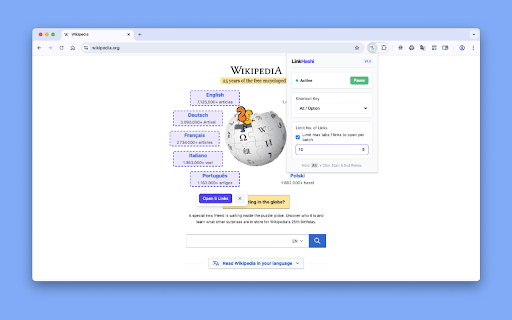
LinkHashi automatically detects the structural column or row and instantly selects every link in between.

Key Features:

1. Smart Range Selection: Deeply integrated logic automatically detects vertical columns or horizontal rows based on your start and end points.

2. Batch Safety Mode: Opening 50 tabs at once can crash your browser. LinkHashi lets you set a safe limit (e.g., 10 tabs). It opens the first batch, pauses, and lets you click "Open Next 10" when your system is ready.

3. Zero Dragging: Perfect for extremely long webpages, endless data tables, and dense search engine results where traditional drag-to-select extensions fail or cause screen-tearing.

4. Customizable Key: Map the tool to fit your existing muscle memory. Choose between Alt, Ctrl, Shift, or Command keys.

5. Live Visual Feedback: A clean, professional UI clearly highlights the exact range of links you are about to open before you execute the command.
Technical
- Version
- 1.2
- Manifest
- V3
- Size
- 13.78KiB
- Min Chrome
- 88
- Languages
- 1
- Featured
- No
Metadata
- ID
- nphdiklopgepmkihmoegdabkofolijfc
- Developer ID
- uec8d9bf50f9317ed2893a2dfa9394f44
- Developer Email
- [email protected]
- Created
- Mar 2, 2026
- Last Updated (Store)
- Mar 2, 2026
- Last Scraped
- Jun 6, 2026
- Website
- https://www.technodify.com/
- Support URL
- —
Similar extensions
Alternatives to LinkHashi | Smart Batch Link Opener, ranked by description similarity.

LinkDragger
Extension that opens links in the drag area in new tabs
6

Bulk Link Picker
Press Shift and draw a box to open multiple links at once.
16

Bulk Link Opener
Automatically open multiple links in new tabs with a set delay and easy start/stop functionality.
22
★ 4.7

Bulk URL Opener
Open multiple URLs at once and select links with a hotkey(Z)
279
★ 5.0

LinkSlinger
Select, open, copy, or bookmark multiple links at once. Part of the dontpoke.me toolkit.
7
★ 5.0

Anchor Copy
Drag to select links, copy or open them, plus clipboard and tab utilities.
7

Hotlink
Chrome extension to quickly open configured URLs
5

Open selected URLs
Select text by dragging the mouse, then open all the URLs.
9
Data sourced from the Chrome Web Store · last verified Jun 6, 2026.