
Upbase - Bookmarks, Tasks, Notes, Calendar
Turn Chrome's New Tab page into your productivity hub with Bookmarks, Tasks, Notes, Calendar.
As of May 2026, Upbase - Bookmarks, Tasks, Notes, Calendar has 2,000 users and a 4.73/5 rating from 15 reviews in the Workflow & Planning category.
Usersno change0%
2.0K
2,000
Ratingno change0%
4.73
15 reviews
Reviewsno change0%
15
Version
1.0.3
Manifest V3
History
1 snapshotsTracking since Apr 25, 2026.
View as table
| Date | Users | Rating | Reviews | Version |
|---|---|---|---|---|
| Apr 25, 2026 | 2.0K | 4.73 | 15 | 1.0.3 |
| Now | 2.0K | 4.73 | 15 | 1.0.3 |
Permissions & access
- Permissions
- tabsstorageidentityunlimitedStorage
- Host access
- <all_urls>
Screenshots



About
With Upbase, you can quickly capture ideas, take notes, make to-do lists, plan your day with time blocking, stay focused with a Pomodoro timer, and many more. Simple, clean, and beautifully designed.

⚫️ FEATURES

◾️ Bookmark manager

Organize your favorite websites on a Kanban-style board. You can drag and drop your bookmarks to quickly change their position and column.

◾️ Private and Team Tasks

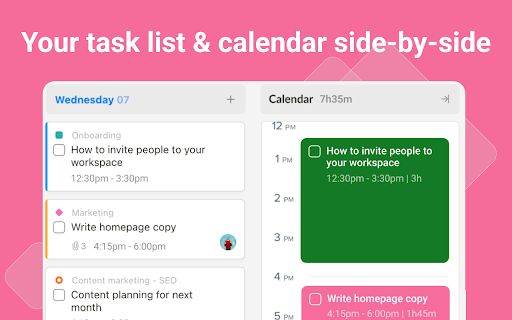
Quickly create monthly, weekly, and daily tasks. Add subtasks, detailed description, set priority, attach files, and collaborate with your teammates.

◾️ Notepad and Daily Notes

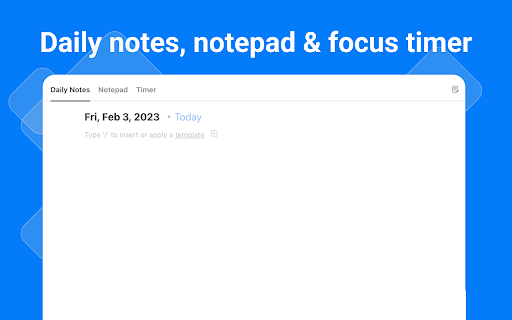
Got something on your mind? Open the Notepad or Daily Notes and quickly jot down your thoughts and ideas.

◾️ Pomodoro Timer

Stay focused and boost productivity with the Pomodoro Technique. Just pick a task you need to work on, start the timer, and focus on the task for 25 minutes. Take a break and repeat. Simple, yet very effective.

◾️ Calendar with Time Blocking

Schedule your daily tasks on the calendar to create a sense of urgency, avoid procrastination and practice deep work.


⚫️ FAQs

➔ Do I need to sign up for an account to use Upbase?

Yes, you need to sign up for an account and create a FREE workspace to be able to use the extension.

➔ What is a workspace?

A workspace is the highest-level organizational unit in Upbase. It's where you organize all your work and collaborate with your teammates. With each account, you can create multiple workspaces.

➔ Is it free to use?

Yes, Upbase is completely free. Also, if you want to use Upbase as a project management tool, you can upgrade to the Premium plan to unlock additional features. Visit upbase.io/pricing for more information.

⚫️ MORE INFORMATION

Website: upbase.io
Help Center: help.upbase.io
Contact Us: [email protected]
Technical
- Version
- 1.0.3
- Manifest
- V3
- Size
- 1.93MiB
- Min Chrome
- 95
- Languages
- 1
- Featured
- Yes
Metadata
- ID
- npgipklllhpdcddkdlgdeoddeedfccnp
- Developer ID
- ue5266ce8ff9c441e812ab06e50fe3ef9
- Developer Email
- [email protected]
- Created
- Feb 13, 2023
- Last Updated (Store)
- Nov 19, 2023
- Last Scraped
- May 21, 2026
- Website
- —
- Support URL
- https://help.upbase.io/
- Privacy Policy
- https://upbase.io/privacy-policy
Similar extensions
Alternatives to Upbase - Bookmarks, Tasks, Notes, Calendar, ranked by description similarity.

BaseTab - Productive New Tab
Transform your new tab into a beautiful productivity dashboard with tasks, Pomodoro timer, weather, quotes & stunning backgrounds.
18

Taskade - AI Agents, Chat Bots, & Task Automation
AI Agents, task lists, and workflow automation. Get work done faster and smarter with Taskade.
60.0K
★ 4.4

Bullet Journal - Notes, Lists, Weekly Planner
Beautiful bullet journal for weekly tasks, todos, agendas. Brainstorm, share, and plan your weekly list.
40.0K
★ 4.2

Organizer
Awesome task manager on every tab. Calendar sync, Google Tasks, Todoist, sticky notes, and dark mode. Stay organized effortlessly.
6

ClickUp: Tasks, Screenshots, Email, Time
ClickUp is a productivity platform that makes your personal and work lives more productive, saving you time.
200.0K
★ 2.6
Timenotes - Time Tracker
Timenotes.io time trackers for the browser with native support for Basecamp UI and time tracking.
821
★ 4.0

UPtool
Productivity tool with todo manager and website blocker. Stay focused with task priorities and distracting site blocking.
7
★ 5.0

New Tab Todo List: Checklist, Notes, Outliner
Beautiful and sharable checklists, notes, and to-do lists. Collaborate and outline in real-time.
30.0K
★ 4.2
Data sourced from the Chrome Web Store · last verified May 21, 2026.