
pCloud Save
Save your favorite web images, videos, text and more to pCloud - up to 10 GB free storage.
As of June 2026, pCloud Save has 20,000 users and a 3.00/5 rating from 141 reviews in the Workflow & Planning category.
Usersno change0%
20.0K
20,000
Ratingno change0%
3.00
141 reviews
Reviewsno change0%
141
Version
2.0.2
Manifest V3
History
2 snapshotsTracking since Apr 16, 2026.
View as table
| Date | Users | Rating | Reviews | Version |
|---|---|---|---|---|
| Apr 16, 2026 | 20.0K | 3.00 | 141 | 2.0.2 |
| Apr 23, 2026 | 20.0K | 3.00 | 141 | 2.0.2 |
| Now | 20.0K | 3.00 | 141 | 2.0.2 |
Permissions & access
- Permissions
- tabsactiveTabcontextMenusnotificationsstoragewindowsscriptingdeclarativeNetRequest
- Host access
- <all_urls>, http://*/*, https://*/*, https://www.google-analytics.com/
Screenshots


About
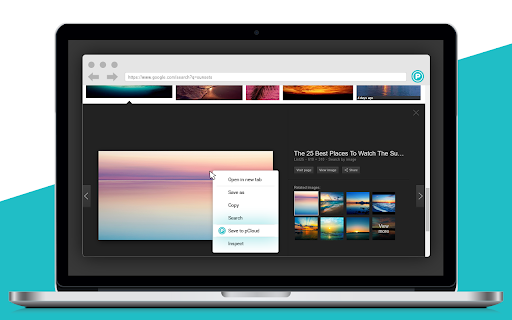
Save to pCloud allows you to save web images, videos, audiobooks and more from the context menu, directly to your pCloud account. Easily get a copy of your favorite web content and access it from your phone, laptop and from the web.
With Save to pCloud, you can:

★ Save web content through the right-click context menu
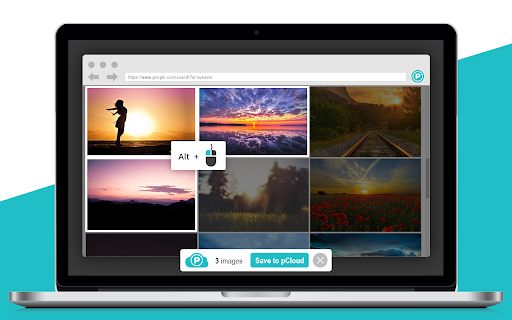
★ Select multiple web images and save them at once
★ Mark articles, paragraphs and other types of text content and save away

Right-click on the file you want to save and select "Save to pCloud" from the context menu. Want to save more than one image at once? Hold the Alt key on your keyboard  every time you choose an image. Then confirm your upload by clicking on the Save to pCloud button at the bottom of the screen.

Every time you save to pCloud, you'll get a notification with details on the location of your files in pCloud and shortcut access.

To enable Save to pCloud in incognito mode, go to chrome://extensions/ and check the "Allow in incognito" box.

What's new:
You can now log into your pCloud account with Google, Facebook or your AppleID

------------
About pCloud

pCloud is the secure place for your photos, documents, and entire digital collection. Once your files are in pCloud, you will be able to easily access, share and collaborate on them, anytime you want, anywhere you go. Sign up now and get up to 10 GB of cloud storage for free. The app is available for all major mobile (Android, iOS and Windows Mobile), desktop (Windows, Mac OS, Linux) and web platforms.
Technical
- Version
- 2.0.2
- Manifest
- V3
- Size
- 2.15MiB
- Min Chrome
- 88
- Languages
- 1
- Featured
- No
Metadata
- ID
- npamdkabjncnnoaofdjcaipmnccofeem
- Developer ID
- u4c4b1e064a1939fbf009ba266a105076
- Developer Email
- [email protected]
- Created
- Jun 9, 2017
- Last Updated (Store)
- Mar 23, 2026
- Last Scraped
- Jun 13, 2026
- Website
- —
- Support URL
- —
- Privacy Policy
- https://www.pcloud.com/privacy_policy.html
Data sourced from the Chrome Web Store · last verified Jun 13, 2026.