
Tab Library
Save, organise, and revisit your browser tabs with reminders, groups, and notes.
As of June 2026, Tab Library has 6 users in the Productivity category.
Usersno change0%
6
6
Ratingno change0%
—
— reviews
Reviewsno change0%
—
Version
1.0.0
Manifest V3
History
4 snapshotsTracking since Apr 7, 2026.
View as table
| Date | Users | Rating | Reviews | Version |
|---|---|---|---|---|
| Apr 7, 2026 | — | — | — | 1.0.0 |
| Apr 19, 2026 | — | — | — | 1.0.0 |
| May 14, 2026 | 4 | — | — | 1.0.0 |
| Jun 3, 2026 | 5 | — | — | 1.0.0 |
| Now | 6 | — | — | 1.0.0 |
Permissions & access
- Permissions
- tabsstoragenotificationsalarms
- Host access
- None declared
Screenshots




About
Tab Library gives you a permanent home for every tab you've ever had open.

SAVE TABS WITHOUT LOSING FOCUS
Hit "Save Tabs to Library" to snapshot your current session without closing anything. Or use "Archive & Close All" to clear your browser instantly and keep everything safe in your library.

NEVER LOSE A TAB AGAIN
Tabs are automatically saved when you close a Chrome window with a 10-second Undo notification so you're always in control.

STAY ORGANISED WITH GROUPS
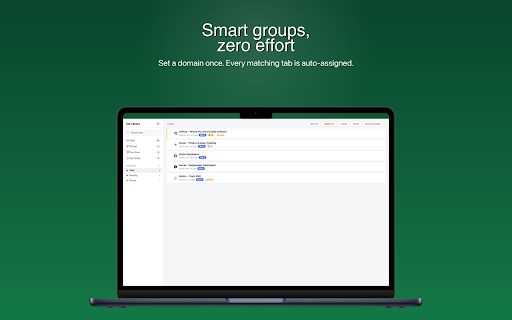
Create color-coded groups and Tab Library will automatically assign new tabs from the same domain. GitHub tabs go to Work, news sites go to Reading without any manual effort.

SET REMINDERS & DEADLINES
Need to revisit a tab later? Set a reminder or a hard deadline. Chrome will notify you when it's time with a single click to reopen the tab.

ADD NOTES TO ANY TAB
Capture context while it's fresh. Attach a note to any saved tab so you remember exactly why you saved it.

POWERFUL SEARCH & FILTER
Search by title, URL, or note content in real time. Filter by Pinned, Due Soon, Has Notes, or any group. Sort by recency, domain, or deadline.

BULK ACTIONS
Select multiple tabs to open or delete them all at once.

EXPORT & IMPORT
Back up your entire library as a JSON file and restore it on any Chrome installation.

PRIVATE BY DESIGN
Everything is stored locally in your browser. No accounts, no servers, no data collection of any kind.
Technical
- Version
- 1.0.0
- Manifest
- V3
- Size
- 38.07KiB
- Min Chrome
- 88
- Languages
- 1
- Featured
- No
Metadata
- ID
- nokfflpbleifhhoihidciploaljennee
- Developer ID
- uff87a3a7d9250d42e012ef2993052c73
- Developer Email
- [email protected]
- Created
- Apr 6, 2026
- Last Updated (Store)
- Apr 6, 2026
- Last Scraped
- Jun 8, 2026
- Website
- —
- Support URL
- —
Data sourced from the Chrome Web Store · last verified Jun 8, 2026.