
Continue Watching? - Auto Skip for Streaming
Auto-skips 'Continue Watching' prompts on Netflix, Prime Video, Disney+, YouTube and Max. Never interrupted again.
As of June 2026, Continue Watching? - Auto Skip for Streaming has 4 users in the Productivity category.
Usersno change0%
4
4
Ratingno change0%
—
— reviews
Reviewsno change0%
—
Version
1.2.0
Manifest V3
90-day change · In the last 90 days this extension 2 version updates, changed permissions.
History
5 snapshotsTracking since May 9, 2026.
View as table
| Date | Users | Rating | Reviews | Version |
|---|---|---|---|---|
| May 9, 2026 | — | — | — | 1.0.0 |
| May 13, 2026 | — | — | — | 1.0.0 |
| May 19, 2026 | 2 | — | — | 1.1.0 |
| May 25, 2026 | 4 | — | — | 1.2.0 |
| Jun 1, 2026 | 2 | — | — | 1.2.0 |
| Now | 4 | — | — | 1.2.0 |
Changelog
- May 13, 2026host_permissions
*://*.netflix.com/*, *://*.primevideo.com/*, *://*.amazon.com/*, *://*.amazon.de/*, *://*.amazon.co.uk/*, *://*.disneyplus.com/*, *://*.hulu.com/*, *://*.youtube.com/*, *://*.max.com/*, *://*.hbomax.com/*
*://*.netflix.com/*, *://*.primevideo.com/*, *://*.amazon.com/*, *://*.amazon.de/*, *://*.amazon.co.uk/*, *://*.disneyplus.com/*, *://*.hulu.com/*, *://*.youtube.com/*, *://*.max.com/*, *://*.hbomax.com/*, https://extensionpay.com/*
Permissions & access
- Permissions
- storage
- Host access
- *://*.netflix.com/*, *://*.primevideo.com/*, *://*.amazon.com/*, *://*.amazon.de/*, *://*.amazon.co.uk/*, *://*.disneyplus.com/*, *://*.hulu.com/*, *://*.youtube.com/*, *://*.max.com/*, *://*.hbomax.com/*, https://extensionpay.com/*
Screenshots



About
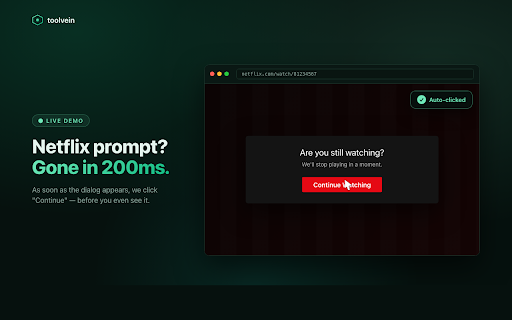
Tired of clicking "Are you still watching?" every two episodes?

Continue Watching Auto-Skip dismisses these interruptions the moment they appear — silently, in the background, on every major streaming platform. Walk away from your screen. Come back to the same show still playing. That's it.

━━━━━━━━━━━━━━━━━━━━━━━━━━━━
✦ WORKS ON
━━━━━━━━━━━━━━━━━━━━━━━━━━━━

• Netflix
• Prime Video (US, UK, DE)
• Disney+ / Hulu
• YouTube
• Max (HBO Max)

━━━━━━━━━━━━━━━━━━━━━━━━━━━━
✦ HOW IT WORKS
━━━━━━━━━━━━━━━━━━━━━━━━━━━━

1. Install. No setup. No accounts.
2. Stream like normal.
3. The moment a "still watching", "continue", or "resume" prompt appears, we click it for you.

That's the whole feature. It just works.

━━━━━━━━━━━━━━━━━━━━━━━━━━━━
✦ WHY YOU'LL LIKE IT
━━━━━━━━━━━━━━━━━━━━━━━━━━━━

⚡ INSTANT — Clicks fire within milliseconds. You won't even see the prompt.

🕶️ ZERO TRACKING — No accounts, no analytics, no servers that see your activity. Your click counter lives locally on your machine, period.

🌍 SIX LANGUAGES — Detects prompts in English, German, Spanish, French, Italian, and Portuguese.

🔋 FEATHER-LIGHT — Under 50 KB. No background noise. Toggle off with one click.

🔒 MINIMUM PERMISSIONS — Only the streaming sites you watch. Manifest V3, the modern Chrome standard.

━━━━━━━━━━━━━━━━━━━━━━━━━━━━
✦ FREE FOREVER
━━━━━━━━━━━━━━━━━━━━━━━━━━━━

The auto-skip feature is free, no strings. An optional Premium upgrade (€3.99 one-time, never a subscription) adds:

• Custom delay before clicking
• Per-site whitelist
• Per-platform analytics
• Priority bug fixes

You don't need it. The free version handles the actual job perfectly.

━━━━━━━━━━━━━━━━━━━━━━━━━━━━
✦ WHO MADE THIS
━━━━━━━━━━━━━━━━━━━━━━━━━━━━

toolvein — a small studio building narrow, sharp Chrome tools that fix everyday web friction.

No VC. No newsletter spam. No analytics dashboards.
Just tools.

→ toolvein.com
→ Support: [email protected]

━━━━━━━━━━━━━━━━━━━━━━━━━━━━
✦ FAQ
━━━━━━━━━━━━━━━━━━━━━━━━━━━━

Q: Does this send my watch data anywhere?
A: No. Zero network calls. Zero. Read our privacy policy at toolvein.com/privacy.

Q: Can Netflix detect this?
A: We click a button that's already on the page — same as you would. Nothing to detect.

Q: Will it slow down my browser?
A: Under 50 KB total. Lighter than a single ad on most sites.

Q: Which browsers does this work on?
A: Any modern Chromium-based browser that supports Manifest V3.
Technical
- Version
- 1.2.0
- Manifest
- V3
- Size
- 31.39KiB
- Min Chrome
- 88
- Languages
- 1
- Featured
- No
Metadata
- ID
- nodmamagikgfgjjllekpajcipppcpkhm
- Developer ID
- u2b8c5a4c045d38a7e0dd19e6d14a5802
- Developer Email
- [email protected]
- Created
- May 8, 2026
- Last Updated (Store)
- May 17, 2026
- Last Scraped
- Jun 7, 2026
- Website
- —
- Support URL
- https://toolvein.com/continue-watching/help
- Privacy Policy
- https://toolvein.com/privacy
Data sourced from the Chrome Web Store · last verified Jun 7, 2026.