
PaletteMaster (Image to color palette generator.)
PaletteMaster is a Chrome extension that automatically generates color palettes from images and suggests complementary colors.
As of June 2026, PaletteMaster (Image to color palette generator.) has 55 users in the art category.
Usersup 10.0 percent+10.0%
55
55
Ratingno change0%
—
— reviews
Reviewsno change0%
—
Version
1.0
Manifest V3
History
3 snapshotsTracking since Apr 1, 2026.
View as table
| Date | Users | Rating | Reviews | Version |
|---|---|---|---|---|
| Apr 1, 2026 | 50 | — | — | 1.0 |
| May 2, 2026 | 56 | — | — | 1.0 |
| Jun 1, 2026 | 59 | — | — | 1.0 |
| Now | 55 | — | — | 1.0 |
Permissions & access
- Permissions
- None declared
- Host access
- None declared
Screenshots
About
PaletteMaster is your ultimate companion for effortlessly creating captivating designs with colors extracted from images. Seamlessly integrated into your Chrome browsing experience, this powerful extension automatically generates vibrant color palettes from any image you encounter online. Whether you're a designer, artist, or enthusiast, PaletteMaster empowers you to explore the endless possibilities of color harmonies and compositions.

Features:

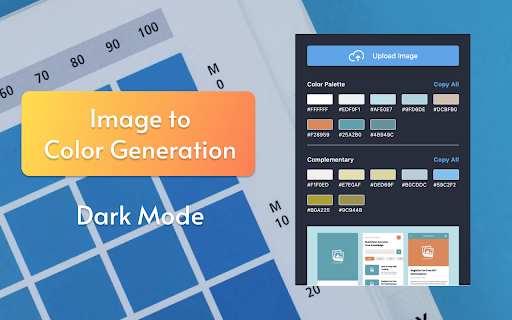
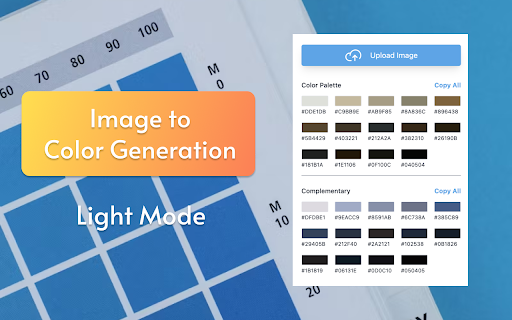
1. Automatic Color Palette Generation: With PaletteMaster, generating color palettes has never been easier. Simply upload an image or copy and paste one into the extension window, and let PaletteMaster do the rest. The extension intelligently analyzes the image and extracts a harmonious palette of colors, ready for your creative endeavors.

2. Complementary Color Suggestions: In addition to the primary color palette, PaletteMaster suggests complementary colors to enhance your designs. These complementary colors are carefully selected to provide striking contrasts and visual interest, ensuring your creations stand out.

3. Copy Individual Colors or All Colors Together: Need to grab a specific color for your project? PaletteMaster allows you to copy individual colors with a single click. Alternatively, you can copy all colors together in a convenient comma-separated format, making it easy to use them in your favorite design tools and applications.

4. Seamless Integration: PaletteMaster seamlessly integrates into your browsing experience, ensuring you can access its powerful features whenever inspiration strikes. Whether you're browsing the web for design inspiration or working on a project, PaletteMaster is always at your fingertips.

5. Optimized Performance: PaletteMaster is designed for performance, ensuring smooth operation even with large or high-resolution images. Say goodbye to long wait times and hello to instant color inspiration.

How to Use:

Step 1. Click on the PaletteMaster icon in your Chrome browser toolbar to open the extension window.

Step 2. Upload an image or copy and paste an image from any source into the extension window.

Step 3. Sit back and watch as PaletteMaster automatically generates a vibrant color palette and suggests complementary colors.

Step 4. Copy individual colors or all colors together in comma-separated format for use in your projects.

Get creative and unleash your imagination with the endless possibilities of color combinations.


Start Creating Today:

Experience the magic of PaletteMaster and unlock a world of color possibilities. Whether you're designing websites, creating art, or crafting marketing materials, PaletteMaster is your go-to tool for bringing your vision to life with beautiful colors extracted from images. Install PaletteMaster now and start creating stunning designs that stand out from the crowd.

Note: PaletteMaster respects your privacy and does not collect any personal information. Your images are processed locally on your device, ensuring your data remains secure at all times.
Technical
- Version
- 1.0
- Manifest
- V3
- Size
- 42.74KiB
- Min Chrome
- 88
- Languages
- 1
- Featured
- No
Metadata
- ID
- nnolgnllnkoghbgofgogkpjlglkgfldm
- Developer ID
- u5f22f24bdaf58de07ec198b257726584
- Developer Email
- [email protected]
- Created
- Mar 5, 2024
- Last Updated (Store)
- Mar 5, 2024
- Last Scraped
- Jun 1, 2026
- Website
- —
- Support URL
- —
- Privacy Policy
- —
Similar extensions
Alternatives to PaletteMaster (Image to color palette generator.), ranked by description similarity.

ColorMaster – Multi-Tool Color Picker & Palette Manager
Pick, analyze, convert, manage, and export colors from webpages and images with pixel-perfect precision.
7

Color Palette Generator
Generate color palettes with 17 methods, adjust hue/saturation/brightness, and export for Tailwind, Figma, Adobe, Sketch, and CSS.
4

Get Site Colors
Effortlessly fetch and save the color palette of any website you visit.
76
★ 5.0

Color Matching Tool
A Chrome extension for effortlessly finding the right colours online
484
★ 5.0

Palettes & Hues 🎨
Extract the dominant color palette from the visible area of any webpage or pick specific colors using a uploaded image
88
★ 5.0

Site Palette 2.0
Extract beautiful color palettes from any website with advanced tools for designers and developers.
14

DesignTap - Design Inspector & Color Tools
Design toolkit: pick colors, detect fonts, generate palettes, inspect designs, export to 18+ formats. For designers & developers.
37

ShadeSurfer Color Picker & Palette Generator
Pick colors from any webpage and generate custom palettes on shadesurfer.io instantly.
1
Data sourced from the Chrome Web Store · last verified Jun 1, 2026.