
GitHub to IDE
Intercept GitHub links and open them in your preferred IDE via a local helper.
As of June 2026, GitHub to IDE has 15 users in the Developer Tools category.
Usersdown 28.6 percent−28.6%
15
15
Ratingno change0%
—
— reviews
Reviewsno change0%
—
Version
0.1.0
Manifest V3
History
5 snapshotsTracking since Apr 1, 2026.
View as table
| Date | Users | Rating | Reviews | Version |
|---|---|---|---|---|
| Apr 1, 2026 | 21 | — | — | 0.1.0 |
| Apr 19, 2026 | 18 | — | — | 0.1.0 |
| May 3, 2026 | 17 | — | — | 0.1.0 |
| May 13, 2026 | 18 | — | — | 0.1.0 |
| Jun 6, 2026 | 17 | — | — | 0.1.0 |
| Now | 15 | — | — | 0.1.0 |
Permissions & access
- Permissions
- scriptingnotificationsnativeMessagingstoragetabswebNavigation
- Host access
- https://github.com/*
Screenshots


About
🚀 GitHub to IDE - Seamless GitHub to Editor Integration

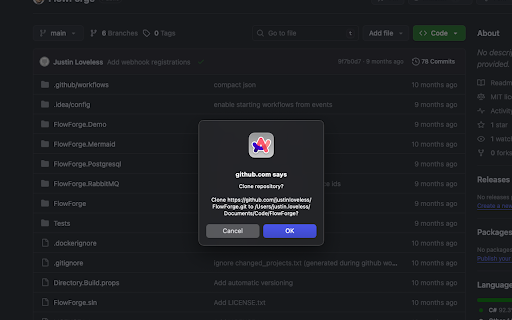
Stop copying repository URLs and manually opening files in your editor. GitHub to IDE intercepts GitHub links and opens them directly in your preferred IDE with a single click.

✨ KEY FEATURES

• One-Click Opening: Click any GitHub link to automatically open repositories and files in your IDE
• Smart File Navigation: Opens files at the exact line number from GitHub code links
• Multiple Editor Support: Works with VS Code, Cursor, JetBrains Rider, and custom editors
• Per-Repository Preferences: Set different editors for different projects
• Flexible Open Modes: Choose between opening the full workspace or just the current file
• Customizable Settings: Configure clone directories, default editors, and per-repo overrides
• Auto-Open Toggle: Enable/disable automatic interception on the fly
• Header UI Integration: Convenient dropdown in GitHub's header for quick editor selection

🎯 HOW IT WORKS

1. Browse GitHub normally
2. Click any repository or file link
3. The extension intercepts the click and opens it in your configured IDE
4. Files open at the exact line number when applicable

The extension uses a local native helper to communicate with your IDE, ensuring secure and reliable operation.

⚙️ SUPPORTED EDITORS

• Visual Studio Code
• Cursor
• JetBrains Rider
• Add your own custom editors through the options page

💡 PERFECT FOR

• Developers who frequently browse GitHub repositories
• Teams collaborating on code reviews
• Anyone tired of manual copy-paste workflows
• Developers working across multiple projects with different editors

📋 SETUP REQUIRED

After installing the extension, you'll need to install a small native helper that communicates with your IDE. Installation is incredibly simple:

Just run this command in your terminal:
  npx gh2ide

The CLI will automatically detect your extension and guide you through setup! Features:
• Auto-detects the extension (no need to find your extension ID)
• Interactive prompts guide you step-by-step
• Installs for Chrome, Arc, Brave, Edge, and Chromium automatically
• "Test Connection" button to verify everything is working
• Clear status indicators showing when setup is complete

Requires Node.js 16+. Full setup instructions are available on the options page or at npmjs.com/package/github-to-ide-host

🔒 PRIVACY & SECURITY

• Works entirely locally - no data sent to external servers
• Only accesses GitHub.com pages
• Open source - inspect the code yourself

🌟 PRODUCTIVITY BOOST

Save countless hours by eliminating the friction between browsing GitHub and editing code. Jump from code review to your IDE instantly, navigate from documentation to implementation seamlessly, and streamline your entire development workflow.

---

Developed by Justin Loveless | Open Source on GitHub
Technical
- Version
- 0.1.0
- Manifest
- V3
- Size
- 48.92KiB
- Min Chrome
- 88
- Languages
- 1
- Featured
- No
Metadata
- ID
- nnjlhioijmplllcdjlecbkihcfdcnldb
- Developer ID
- ufc5f54b78cc5689ad825840a4af79116
- Developer Email
- [email protected]
- Created
- Oct 6, 2025
- Last Updated (Store)
- Oct 6, 2025
- Last Scraped
- Jun 6, 2026
- Website
- —
- Privacy Policy
- —
Similar extensions
Alternatives to GitHub to IDE, ranked by description similarity.

GitRepoTools
Essential tools for GitHub repositories - Web IDE integration, documentation, and repository insights
11

GitHub Clone in VS Code
Adds a 'Clone in VS Code' button to GitHub repositories as if it were a native feature for instant one-click cloning.
114
★ 5.0

GitLab Open Locally
Open GitLab files locally in your IDE (also supports GitHub and Bitbucket)
5

GitHub Helper
Enhanced GitHub experience with file filtering and productivity tools for developers
4

Git2Code
Open GitHub files directly in VSCode with one click
2

Open GitHub in IDE
Open GitHub files links in your IDE
3.0K
★ 4.2

GitHub to Code
Open GitHub files in your IDE with one click
1

GH Highlight Me
Highlights your GitHub username and custom identifiers on issues, PRs, comments, reviews, and commits.
17
Data sourced from the Chrome Web Store · last verified Jun 6, 2026.