
Jiggly Slime
A Chrome extension that animates images with mesh deformation
As of June 2026, Jiggly Slime has 16 users in the fun category.
Usersup 166.7 percent+166.7%
16
16
Ratingno change0%
—
— reviews
Reviewsno change0%
—
Version
1.0.6
Manifest V3
90-day change · In the last 90 days this extension 2 version updates.
History
6 snapshotsTracking since Apr 16, 2026.
View as table
| Date | Users | Rating | Reviews | Version |
|---|---|---|---|---|
| Apr 16, 2026 | 6 | — | — | 1.0.3 |
| Apr 27, 2026 | 9 | — | — | 1.0.3 |
| May 4, 2026 | 10 | — | — | 1.0.3 |
| May 10, 2026 | 9 | — | — | 1.0.4 |
| May 27, 2026 | 13 | — | — | 1.0.6 |
| Jun 9, 2026 | 15 | — | — | 1.0.6 |
| Now | 16 | — | — | 1.0.6 |
Permissions & access
- Permissions
- contextMenusactiveTabscriptingstorageunlimitedStoragedeclarativeNetRequestWithHostAccess
- Host access
- http://*/*, https://*/*
Screenshots

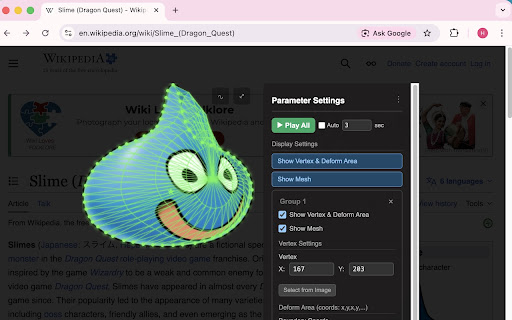

About
Make any image on the web jiggle! Jiggly Slime is a Chrome extension that animates images on web pages using physics-based mesh deformation.

■ Key Features

[Image Selection]
- Right-click any image → "Show Image" to instantly open the modal
- Click "Select Image" in the popup, then click any image on the page
- Supports img elements, canvas elements, CSS background-image, and images inside Shadow DOM

[Mesh Deformation Animation]
Set a vertex (center of deformation) and boundary coordinates (deformation region) on an image, then apply physics-based mesh deformation animation.

Configurable parameters:
- Bounce Amplitude — magnitude of deformation
- Bounce Angle — direction of deformation
- Elastic Coefficient — springiness strength
- Softness — mesh flexibility
- Mesh Resolution — level of mesh detail
- Bulge Strength — expansion effect intensity
- Tap Radius — area of influence for touch/click
- Tap Press Depth — indentation depth for interactions

[Multiple Groups]
Create multiple deformation groups on a single image. Each group has independent parameters and can be played/stopped individually. Play all groups simultaneously with one click.

[Two Interaction Modes]
- Pull Mode: Drag to stretch the image, release to bounce back elastically
- Press & Trace Mode: Tap to indent, trace to apply local deformation, release for spring-back

[Deformation Scope]
- All: Every group deforms simultaneously
- Area: Only the group at the click position deforms (polygon hit-test)

[Motion Sensor Support]
On compatible devices (smartphones, tablets), tilt the device to deform images. Sensitivity is adjustable from 1 to 20.

[Preview Display]
- Vertex shown as ★ markers, boundaries as ● markers
- Toggle wireframe (radial mesh) visibility
- Rainbow color cycling animation

[Auto-Play]
Auto-play per group or for all groups. Playback interval (in seconds) is fully customizable.

■ Collections

Save images and parameters as collections and recall them anytime.

- Thumbnail collection list
- Tag support (comma-separated multiple tags)
- Editable title and URL
- Tracks creation date, update date, and last viewed date

Sorting: Sort by date added, date updated, last viewed, title, or URL. Toggle ascending/descending order.

Tag Filtering: Filter by selecting tags from a dropdown. Multiple tags use AND logic. Filter badges show active selections with individual and clear-all removal options.

Pagination: Collections with more than 50 items are paginated.

■ Parameter Sharing

Export:
- Copy as JSON text
- Auto-generate a QR code (up to 2953 bytes) and download it

Import:
- Paste JSON text
- Load a QR code image (using BarcodeDetector API)
- Automatic coordinate scaling when image dimensions differ

■ Data Backup

Export: Download all extension data as a compressed ZIP file. Filename includes a timestamp.

Import: Select a ZIP file to restore all data. Exported data can be immediately imported for full restoration (round-trip compatible).

■ More

- Fullscreen Mode: View images in fullscreen (hides form and header)
- Keyboard Shortcuts: Escape to close, arrow keys to navigate between collections
- Responsive Design: Canvas auto-resizes to fit screen dimensions
- Bilingual: Japanese and English, auto-detected from browser language settings
Technical
- Version
- 1.0.6
- Manifest
- V3
- Size
- 103KiB
- Min Chrome
- 88
- Languages
- 2
- Featured
- No
Metadata
- ID
- nnhhjcjbmhbnolficemkeecmbhiifcef
- Developer ID
- u52f604d2fa813464dd55426eccf876f5
- Developer Email
- [email protected]
- Created
- Feb 15, 2026
- Last Updated (Store)
- May 9, 2026
- Last Scraped
- Jun 9, 2026
- Website
- —
- Support URL
- —
- Privacy Policy
- —
Similar extensions
Alternatives to Jiggly Slime, ranked by description similarity.

Od Wepkit
Turn any webpage into an interactive visual playground.
15
★ 5.0
Wiggle
Make your screen wiggle!
116
★ 5.0

KeyGlow
Visual Typing Effects for Google, YouTube & Twitch.
71
★ 5.0

Crazy Cursor - Magical Particle Mouse Effects
Beautiful particle mouse effects plugin with stunning presets for dazzling cursor visuals.
343
★ 5.0

Chromatized
A dymamic theme for your browser. Apply visual effects to any webpage.
2

9Gag enhancer
Allows to download images
99
★ 5.0

Let it snow
Beautiful customizable snow falling effect for any website
8
★ 5.0
Magic Meme Machine
Drag and drop Magic Internet Money Memes!
40
★ 5.0
Data sourced from the Chrome Web Store · last verified Jun 9, 2026.