
Extract Page
If you see it you can scrape it! Extract Page is a powerful browser extension that allows you to effortlessly extract structured…
As of June 2026, Extract Page has 42 users in the Productivity category.
Usersno change0%
42
42
Ratingno change0%
—
— reviews
Reviewsno change0%
—
Version
0.0.3
Manifest V3
History
2 snapshotsTracking since May 2, 2026.
View as table
| Date | Users | Rating | Reviews | Version |
|---|---|---|---|---|
| May 2, 2026 | 42 | — | — | 0.0.3 |
| Jun 1, 2026 | 37 | — | — | 0.0.3 |
| Now | 42 | — | — | 0.0.3 |
Permissions & access
- Permissions
- storageactiveTabscriptingcontextMenus
- Host access
- None declared
Screenshots

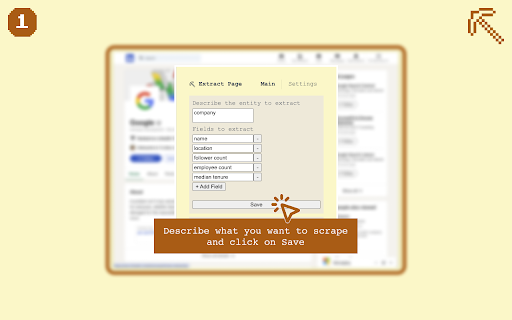


About
If you see it you can scrape it!

Extract Page is a powerful browser extension that allows you to effortlessly extract structured data from any web page. Whether you're a researcher, marketer, or data enthusiast, Extract Page simplifies the process of collecting information from across the web.

Key Features:
• Easy Setup: Define the fields you want to extract with a user-friendly interface
• Fast Extraction: Right-click on any web page to instantly extract data
• Flexible: Works on any website, allowing you to scrape a wide variety of information
• Portable Export: Copy extracted data directly to your spreadsheet application
• Free to Use: Utilize your own OpenAI API key for cost-effective scraping

How It Works:
1. Enter your OpenAI API key in the extension settings
2. Define the entity and fields you want to extract
3. Right-click on any web page and select "Extract data from this page"
4. Open the extension to copy your extracted results
5. Paste the data into your spreadsheet application

Extract Page is perfect for:
• Lead generation
• Market research
• Competitor analysis
• Academic research
• Price monitoring
• And much more!

With Extract Page, web scraping becomes accessible to everyone. No coding skills required – just point, click, and extract the data you need.

[ NOTE ] This extension requires an OpenAI API key to function. Users are responsible for any associated API costs, which are typically less than 1 cent per entity extracted.

Start scraping smarter, not harder. Add Extract Page to your browser today!
Technical
- Version
- 0.0.3
- Manifest
- V3
- Size
- 63.98KiB
- Min Chrome
- 88
- Languages
- 1
- Featured
- No
Metadata
- ID
- nngjipjnllnfaajahmcdobbanpfojgnp
- Developer ID
- u6fca2a621afcb71911adce83a82288fb
- Developer Email
- [email protected]
- Created
- Oct 28, 2024
- Last Updated (Store)
- Nov 6, 2024
- Last Scraped
- Jun 1, 2026
- Website
- —
- Support URL
- —
- Privacy Policy
- https://extractpage.com/privacy-policy
Similar extensions
Alternatives to Extract Page, ranked by description similarity.

Web Scraper - Free AI-Based Data Extractor
Free AI-powered data extraction tool. Scrape any website with AI assistance.
12

ScraperCity - Data Scraper & Table Extractor
Free data scraper to extract tables & lists from any page. One-click CSV export. No code data collector and screen scraper tool.
17

Scrapen.ai Tool
Professional web scraping extension for Scrapen.ai - Extract web content and capture screenshots easily.
—

OnPage.dev - Web Scraper Extension
Professional web scraping tool with element selection and data export capabilities
73

Page Scraper
Simple and easy to use scraper tool.
57

ScrapeBit
Scrape any website in 2-clicks with AI. Extract data using natural language.
—

Easy Data Scraper - Instant Data Scraper
Easy Data Scraper - Automatically detects, scrapes, and highlights data from multiple sections on a page.
308
★ 5.0

Data Scraper
Powerful data extraction from any website. Auto-detect tables, lists, emails, images. Export to CSV, JSON, Excel.
5
Data sourced from the Chrome Web Store · last verified Jun 1, 2026.