
Download All Images
Easily save images with a wide range of customization features, such as file size, dimensions, and image type.
As of June 2026, Download All Images has 200,000 users and a 4.25/5 rating from 282 reviews in the art category.
Usersno change0%
200.0K
200,000
Ratingdown 1.4 percent−1.4%
4.25
282 reviews
Reviewsup 2.9 percent+2.9%
282
Version
1.0.9
Manifest V3
History
7 snapshotsTracking since Apr 16, 2026.
View as table
| Date | Users | Rating | Reviews | Version |
|---|---|---|---|---|
| Apr 16, 2026 | 200.0K | 4.31 | 274 | 1.0.9 |
| Apr 22, 2026 | 200.0K | 4.29 | 275 | 1.0.9 |
| Apr 26, 2026 | 200.0K | 4.29 | 274 | 1.0.9 |
| May 11, 2026 | 200.0K | 4.28 | 275 | 1.0.9 |
| May 14, 2026 | 200.0K | 4.26 | 277 | 1.0.9 |
| May 28, 2026 | 200.0K | 4.27 | 277 | 1.0.9 |
| Jun 5, 2026 | 200.0K | 4.27 | 278 | 1.0.9 |
| Now | 200.0K | 4.25 | 282 | 1.0.9 |
Permissions & access
- Permissions
- storageactiveTabscriptingnotificationsdownloadsunlimitedStoragedeclarativeNetRequest
- Host access
- <all_urls>
Screenshots
About
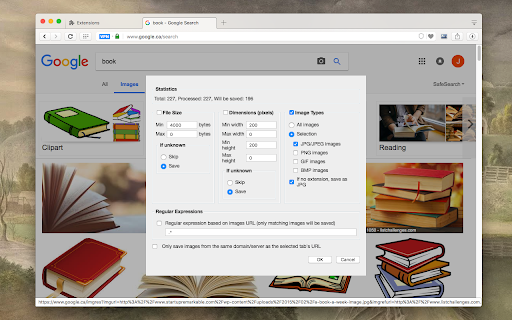
This is a bulk image downloader to extract all photos from the current web page. This online image downloader provides highly customizable filters based on file size, image size, and more!

Usage Preview:
https://www.youtube.com/watch?v=YaT5sWRV6JQ

Features:
1. Detects all images loaded on the current web page (even if they're nested iframes)
2. Filters images by file size, dimension, URL or type
3. Finds images in links, background scripts, and CSS files
4. Displays images in a gallery view before downloading
5. Download blob-type images even if the source is dead

Filters:
1. Filter by file size
2. Filter by image dimension
3. Filter by image type
4. Filter by image URL (regular expression matching)
5. Filter by same-origin policy
6. Detect image width and height by downloading only the header section of the image

Features:
1. Bulk download images
2. Filter based on file properties
3. Filter based on image properties such as width and height
4. Deep image search (extract images from the current page and subsequent pages)
6. Can detect single image path
7. Can download photos in ZIP format
8. Can detect the original image size from thumbnail

Bug reports:
https://github.com/belaviyo/save-images/issues

Download location:
By pressing the "Save" button, the extension downloads all selected images in the default download directory or a specified subfolder.

Change Log:
Version 0.1.1
1. The extension now stores images in a sub-folder (the default sub-folder name is the domain's name)
2. One security bug is fixed.
Version 0.2.0
1. Images are now saved in a zip archive to prevent multiple downloads and better file-naming
2. The image detection algorithm is improved.
Version 0.2.1
1. User preferences are now persistent. It is still possible to reset them from the UI
2. It is now possible to ask for "Save Dialog" from the UI
3. There is progress indicating how many images proceed
4. UI closes itself when all images are downloaded.
Version 0.2.2
1. Deep image searching through all links (up to two levels)
2. Updates JSZip library
Version 0.3.4
1. You can now open "Gallery View" in a new browser tab
2. You can now click on a single image in the "Gallery View"
3. It is possible to download images from multiple tabs at once
Version 0.3.7
1. Two new filters: remove identical images and remove images with forbidden keywords
2. It is now possible to stop the image spider from the UI without closing it
Version 0.5.6
 1. Deeps search level 3 (search for both links and images in the destination HTML pages)
2. Custom RegExp filters to increase the searching speed.
Version 0.9.0
1. Moves to manifest v3
2. Internal module to detect image width and height only by downloading the header section
3. Detects images first, then detects other mime types
4. The extraction of hard-coded image links is improved
Technical
- Version
- 1.0.9
- Manifest
- V3
- Size
- 154KiB
- Min Chrome
- 88
- Languages
- 3
- Featured
- Yes
Metadata
- ID
- nnffbdeachhbpfapjklmpnmjcgamcdmm
- Developer ID
- u5a225ce3ab29da06228223c7abbdd51f
- Developer Email
- [email protected]
- Created
- Feb 6, 2017
- Last Updated (Store)
- Feb 17, 2026
- Last Scraped
- Jun 5, 2026
- Website
- —
- Privacy Policy
- https://add0n.com/policies/mery.dev.txt
Similar extensions
Alternatives to Download All Images, ranked by description similarity.

Bulk Image Downloader - HImage
Easily batch download images from web pages
20.0K
★ 4.2

Bulk Image Downloader
Bulk download, filter and manage images from any webpage.
15

Image Downloader
Browse and download images on the web
755
★ 5.0

Bulk Image Downloader
Bulk download images from multiple tabs in one click. Supports AVIF, WebP & AI-generated images. Filter by resolution and file type.
90.0K
★ 4.0

Image Downloader Pro - Bulk Download Images from Websites
Bulk download and save images from websites in seconds. Use filters, preview results, and customize filenames.
2.0K
★ 4.8

Image Downloader - Bulk Download Images
Browse and download images from any website. View, filter, and save images in bulk or individually with just a few clicks.
393
★ 5.0

Imgler - Any Image Downloader
Allows you to download images from websites in various formats
264

Image Downloader - Image Search
Image downloader free, Image search, multiple image formats. Filter by size and bulk image downloader.
50.0K
★ 4.6
Data sourced from the Chrome Web Store · last verified Jun 5, 2026.