
Plugins
A shortcut to Chrome plugins page
As of June 2026, Plugins has 50,000 users and a 4.17/5 rating from 104 reviews.
Usersdown 16.7 percent−16.7%
50.0K
50,000
Ratingdown 0.2 percent−0.2%
4.17
104 reviews
Reviewsdown 1.0 percent−1.0%
104
Version
6.0.0.0
Manifest V2
90-day change · In the last 90 days this extension lost 10.0K users.
History
2 snapshotsTracking since May 2, 2026.
View as table
| Date | Users | Rating | Reviews | Version |
|---|---|---|---|---|
| May 2, 2026 | 60.0K | 4.18 | 105 | 6.0.0.0 |
| Jun 1, 2026 | 60.0K | 4.17 | 104 | 6.0.0.0 |
| Now | 50.0K | 4.17 | 104 | 6.0.0.0 |
Permissions & access
- Permissions
- None declared
- Host access
- None declared
Screenshots
About
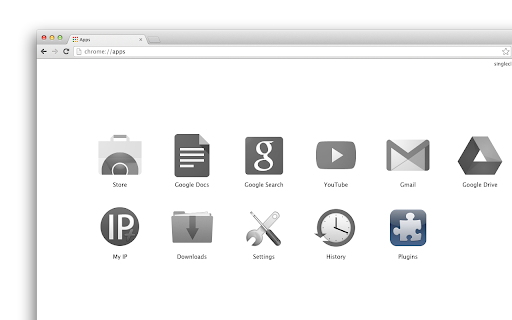
When installed, it will add "Plugins" button to your apps list (on the "New Tab" page and in the Chrome App Launcher).

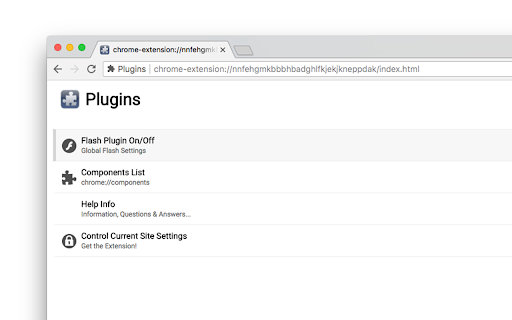
Click the icon and you'll open the "plugins" menu. Here you can access the  internal extension manager (to remove, enable and disable extensions, apps and themes), the "shortcuts" manager (where you can set quick shortcuts for the installed plugins) and the “components” page (which replaced the original plugins page some time ago) is also accessible here.

In the latest versions we added a quick link to the internal Chrome cleaner: useful history eraser where you can clean history, cache and other browsing data. In addition, we integrated the app with our History On/Off extension and now you can stop history recording (and resume it again) with single click. The ability to pause history is not available in Chrome out-of-the-box, that’s why separate history on/off extension is needed if you want this function too work.

Note that this app is also available as extension, which will add the menu to the Chrome toolbar and comes with more features -- with the plugins extension you can control flash player on "per site" basis (allow and block flash on current site). The extension version is not only about controlling adobe flash player -- it adds a shortcut to all the content settings for the current site where you can turn on and of location, camera, microphone, notifications, javascript, flash, images, popups, MIDI devices etc.

Download the Plugins Menu extension here:
https://chrome.google.com/webstore/detail/plugins/mmcblfncjaclajmegihojiekebofjcen
Technical
- Version
- 6.0.0.0
- Manifest
- V2
- Size
- 78.28KiB
- Min Chrome
- —
- Languages
- 1
- Featured
- No
Metadata
- ID
- nnfehgmkbbbhbadghlfkjekjkneppdak
- Developer ID
- uacba69a502d35cf0d566422b1296c5bd
- Developer Email
- [email protected]
- Created
- Nov 5, 2013
- Last Updated (Store)
- Dec 7, 2021
- Last Scraped
- Jun 1, 2026
- Website
- https://singleclickapps.com/
- Support URL
- —
- Privacy Policy
- —
Similar extensions
Alternatives to Plugins, ranked by description similarity.

Plugins
Control and manage your Chrome plugins
400.0K
★ 3.8

Plugins
This extension allows you to go to the Plugins of Google Chrome with just one click.
20.0K
★ 4.7
Extensions
A shortcut to Chrome extensions page
644
★ 4.5

Extension Manager
Comprehensive Chrome extension management with PIN/UNPIN, groups, analytics, and advanced features
14

Extension Manager
Use Extension Manager — a powerful extencion tool to conveniently manage chrome extensions and boost your browser productivity.
573
★ 5.0
ExtManager
Manage the chrome extensions. One click to enable or disable extension. Group extensions and drag it. Sort extensions by drag it.
10.0K
★ 4.0

Extension Manager
One-click enable/disable all extensions, Support backup and restore, Support custom sorting, Support extension notes
138

Extension Manager
A Chrome extension to manage other extensions.
295
★ 4.5
Data sourced from the Chrome Web Store · last verified Jun 1, 2026.