
TubeScript
Extract, view, and download YouTube video transcripts with enhanced metadata and professional formatting.
As of June 2026, TubeScript has 52 users and a 5.00/5 rating from 2 reviews in the Productivity category.
Usersup 300.0 percent+300.0%
52
52
Ratingno change0%
5.00
2 reviews
Reviewsno change0%
2
Version
2.0
Manifest V3
History
8 snapshotsTracking since Apr 1, 2026.
View as table
| Date | Users | Rating | Reviews | Version |
|---|---|---|---|---|
| Apr 1, 2026 | 13 | 5.00 | 2 | 2.0 |
| Apr 16, 2026 | 11 | 5.00 | 2 | 2.0 |
| Apr 24, 2026 | 14 | 5.00 | 2 | 2.0 |
| Apr 30, 2026 | 30 | 5.00 | 2 | 2.0 |
| May 7, 2026 | 40 | 5.00 | 2 | 2.0 |
| May 12, 2026 | 41 | 5.00 | 2 | 2.0 |
| May 24, 2026 | 50 | 5.00 | 2 | 2.0 |
| Jun 3, 2026 | 57 | 5.00 | 2 | 2.0 |
| Now | 52 | 5.00 | 2 | 2.0 |
Permissions & access
- Permissions
- activeTabscripting
- Host access
- None declared
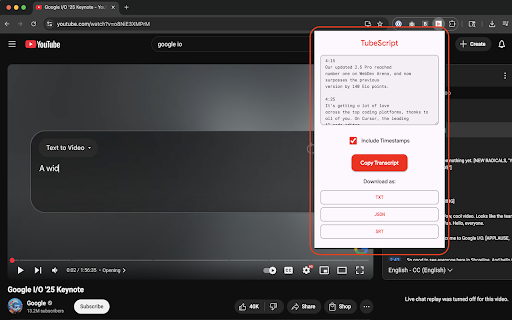
Screenshots
About
The best way to extract transcripts from YouTube videos.

FEATURES

- One-click transcript extraction
- Three export formats (TXT, JSON, SRT)
- Copy to clipboard
- Timestamps toggle
- Full video metadata in every export
- Smart auto-generated filenames
- Works with auto-generated and manual captions
- Material Design interface
- Keyboard shortcuts
- No permissions beyond the active tab

Extract YouTube transcripts with one click — download as TXT, JSON, or SRT, ready for AI tools, research, or content creation.

No API key. No account. No cost. Just open any YouTube video and click TubeScript.

WHAT YOU GET

TubeScript extracts the full transcript from any YouTube video with captions and gives you multiple ways to use it:

- Download as TXT — clean text with timestamps and metadata, ready for notes or documents
- Download as JSON — structured data with timestamps, perfect for AI tools, scripts, or processing
- Download as SRT — standard subtitle format for video editors and media workflows
- Copy to clipboard — instant paste into ChatGPT, Claude, or any text field

Every export includes video metadata: title, channel, publish date, source URL, and save timestamp.

HOW IT WORKS

1. Navigate to any YouTube video with captions
2. Click the TubeScript icon in your toolbar
3. Your transcript appears instantly
4. Toggle timestamps on or off
5. Copy or download in your preferred format — done

SMART FILENAMES

Downloads are automatically named with video metadata:
[Channel Name] Video Title (2025-01-15) - Transcript.txt

No more renaming files manually.

EXPORT FORMATS

TXT: Plain text with optional timestamps, metadata footer, ready to paste or share.

JSON: Structured array of transcript segments with timestamps. Includes metadata object. Perfect for feeding into ChatGPT, Claude, or any LLM — or for programmatic processing.

SRT: Industry-standard subtitle format with sequence numbers and precise timecodes. Import directly into video editors, subtitle tools, or media players.

KEYBOARD SHORTCUTS

- Cmd/Ctrl + C — Copy transcript to clipboard
- Cmd/Ctrl + E — Quick export as TXT

BUILT FOR AI WORKFLOWS

TubeScript exports are formatted for direct use with AI tools:
- JSON output is structured for easy parsing by ChatGPT, Claude, Gemini, or any LLM
- Clean text output pastes directly into any AI chat
- Full metadata included so the AI has context about the source
- No token wasted on formatting artifacts

PERFECT FOR

- AI practitioners preparing transcript data for LLM processing
- Researchers extracting quotes and citations from video content
- Content creators turning videos into blog posts, articles, or social media
- Students creating study notes from lectures and tutorials
- Journalists pulling quotes from interviews and press conferences
- Developers who need structured transcript data for applications
- Anyone who needs text from YouTube videos quickly
Technical
- Version
- 2.0
- Manifest
- V3
- Size
- 2.04MiB
- Min Chrome
- 88
- Languages
- 1
- Featured
- No
Metadata
- ID
- nnaifinjnaimedajeklacjhlobidgdch
- Developer ID
- u8eb13ea37a7640276399012b58d42caa
- Developer Email
- [email protected]
- Created
- Jun 14, 2025
- Last Updated (Store)
- Feb 18, 2026
- Last Scraped
- Jun 3, 2026
- Website
- —
- Support URL
- —
- Privacy Policy
- http://rowanbradley.com/tube-script-privacy
Similar extensions
Alternatives to TubeScript, ranked by description similarity.

TubeScript - YouTube Transcript Extractor
Extract, structure, and export YouTube transcripts for AI, research, and content creation
23

YouTube Transcript Pro
Extract YouTube video transcripts with timestamps. Search, copy, and export transcripts instantly.
32

YouTube Smart Transcript
Extract, view, and export YouTube video transcripts. Copy to clipboard or download as TXT, SRT, or Markdown.
1

TranscriptPro - YouTube Transcript Downloader
Download YouTube transcripts instantly. Export as TXT/SRT/VTT/JSON/PDF. Search, live sync, click timestamps & more!
7
★ 1.0

Copy Youtube Transcript
Copy YouTube video transcripts with one click.
20.0K
★ 4.7

YouTube Transcript
Instant YouTube video transcripts you can view, copy, or download.
138
★ 5.0

YouTube ClipText Pro
Extract, preview, and download YouTube video transcripts instantly. Multiple formats, time-range selection, and image extraction.
100
★ 5.0

YouTube Transcript & AI Summary Generator – Powered by ChatGPT
Transcribe YouTube videos and create AI-powered summaries. Simple, accurate, and free.
216
★ 3.0
Data sourced from the Chrome Web Store · last verified Jun 3, 2026.