
Loggy
Your friendly Jira time logging companion
As of June 2026, Loggy has — users in the Developer Tools category.
Usersno change0%
—
—
Ratingno change0%
—
— reviews
Reviewsno change0%
—
Version
4.7
Manifest V3
History
1 snapshotsTracking since Jun 30, 2026.
Not enough history yet for this metric — the chart fills in as we collect more snapshots.
View as table
| Date | Users | Rating | Reviews | Version |
|---|---|---|---|---|
| Jun 30, 2026 | — | — | — | 4.7 |
| Now | — | — | — | 4.7 |
Permissions & access
- Permissions
- storage
- Host access
- https://*.atlassian.net/*
Screenshots



About
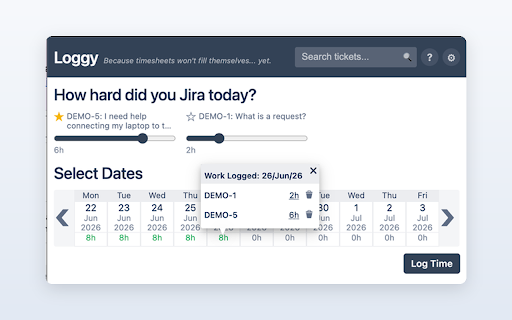
Loggy is the fastest way to log time against your Jira Cloud tickets. Open the popup from your toolbar, drag a slider, pick your days, and you're done - no switching tabs, no separate login.

HOW IT WORKS
Loggy uses your existing Jira session in the same browser, so there's nothing extra to sign into. Enter your Jira Cloud URL once in settings and you're ready to go.

KEY FEATURES
- Log time without leaving the tab you're on
- Your tickets appear automatically - anything you've recently logged against, plus tickets you pin so they're always one click away
- Optionally auto-load the tickets assigned to you that are in progress
- Search any ticket by key or summary, with project, status, and "assigned to me" filters
- Set hours with a simple slider in half-hour steps
- Log the same time across multiple days in one go
- See at a glance how full each day is - green when a day is complete, red when it's over or under
- Open any day to view a per-ticket breakdown, and edit or delete entries inline
- Make it yours: choose your working days, the hours in your working day, and a theme colour

PRIVACY
Loggy keeps your settings on your own device and communicates only with the Jira Cloud instance you configure. It never stores your Jira password and never sends your data to the developer or any third party. No analytics, no trackers.

Because timesheets won't fill themselves... yet.
Technical
- Version
- 4.7
- Manifest
- V3
- Size
- 24.33KiB
- Min Chrome
- 88
- Languages
- 1
- Featured
- No
Metadata
- ID
- nmkmncnocndpjkknmoilaiajgillajpm
- Developer ID
- u2025756d8c2e8723622dccff50a22bc1
- Developer Email
- [email protected]
- Created
- Jun 29, 2026
- Last Updated (Store)
- Jun 29, 2026
- Last Scraped
- Jun 30, 2026
- Website
- —
- Support URL
- —
Data sourced from the Chrome Web Store · last verified Jun 30, 2026.