
mini authenticator
minimal open source authenticator that never store your secret keys
As of May 2026, mini authenticator has 1,000 users and a 4.50/5 rating from 6 reviews in the Workflow & Planning category.
Usersno change0%
1.0K
1,000
Ratingno change0%
4.50
6 reviews
Reviewsno change0%
6
Version
1.0.2
Manifest V3
Permissions & access
- Permissions
- None declared
- Host access
- None declared
Screenshots

About
## Features

- no special permission need: we don't read / write your web pages
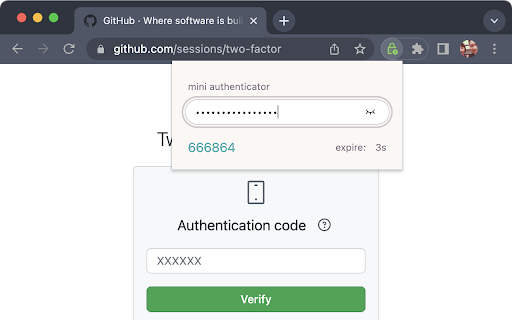
- simple, single-purpose: just paste your key and we generate the time-base onetime password(TOTP) for two factor aurthentication(2FA)
- secure: we do **NOT** store your keys in any places (cookies, chrome storage, cloud ... etc)
- offline: no sensitive data transmitted over the internet
- open source: everyone can check the source code integrity

## How to use

🎬 https://youtu.be/64P0G7dOpKY

1. click on the extension button
2. paste your secret key
3. get your 2FA passcode 🎉

## Motivation

I've used authenticators that are packed with features. They allow you to save your secret keys, sync them across different devices through the internet, also import/export the keys by QRCode. If you are looking for tools like that, I recommend https://authenticator.cc , it's handy, open source and well documented 👍

However, password managers such as Bitwarden, Apple Keychain ... etc already did a very good job in storing and syncing keys across devices. I want to rely on them in secret key management, and let the authenticator extension do only one thing - generate TOTP for 2FA, nothing more.

This is where Mini Authenticator comes in. It designed with a "less is more" philosophy in mind. I cut all functionalities that already handled by password managers, and only perform the pure mathematical calculation of TOTP. So it doesn't require storage, read/write your web pages, internet access, special permissions... etc. And most importantly, it's open source, so everyone can inspect and help improving it in future.

I agree that this extension is not for everyone, but only those already using password mangers to manage their secret keys, also those who concern about chrome extension permissions and abilities.

## Need Help?

Visit the project repository:

https://github.com/hoishing/mini-authenticator

for technicial details. You may also open issues in the project repo, or ping me on Twitter https://twitter.com/hoishing
Technical
- Version
- 1.0.2
- Manifest
- V3
- Size
- 70.61KiB
- Min Chrome
- 88
- Languages
- 1
- Featured
- No
Metadata
- ID
- nmhjblhloefhbhgbfkdgdpjabaocnhha
- Developer ID
- ubabfcbeb3c081bc92d64a861428a3a31
- Developer Email
- [email protected]
- Created
- Oct 4, 2022
- Last Updated (Store)
- Oct 6, 2022
- Last Scraped
- May 31, 2026
- Website
- —
- Privacy Policy
- —
Similar extensions
Alternatives to mini authenticator, ranked by description similarity.

2! Authenticator
The private, offline 2FA Authenticator. Import accounts from mobile apps and generate TOTP codes securely
10.0K
★ 3.9

Locker – Hide & Lock Tabs, Private Bookmarks
Protect your tabs and bookmarks. Hide everything in one click — even in incognito.
1.0K
★ 4.3

EasyPass – Secure Passwords in One Click
Create secure passwords instantly – simple, smart, and safe with EasyPass.
3

Easy To Remember password generator
A simple extension which generates password that are easier to remember instead of passwords like '!Y4SPMvZvfp'
75

Freemindtronic Extension
For data encryption and auto login to websites. Compatible with NFC products using Freemindtronic® technology.
220
★ 3.7

Task Manager
Track your tasks with a countdown timer and task management
2

BruteBookmarks Quick Save
Save pages to BruteBookmarks from any tab, with or without an account.
—

Credentials
Encrypted Password Manager
7
Data sourced from the Chrome Web Store · last verified May 31, 2026.