
No Thanks, ChatGPT
Blocks ChatGPT popups and lets you locally export loaded conversations as Markdown, JSON, HTML, or TXT.
As of June 2026, No Thanks, ChatGPT has 110 users and a 5.00/5 rating from 3 reviews in the Productivity category.
Usersdown 16.7 percent−16.7%
110
110
Ratingno change0%
5.00
3 reviews
Reviewsno change0%
3
Version
3.0.0
Manifest V3
90-day change · In the last 90 days this extension 2 version updates.
History
8 snapshotsTracking since Apr 1, 2026.
View as table
| Date | Users | Rating | Reviews | Version |
|---|---|---|---|---|
| Apr 1, 2026 | 132 | 5.00 | 3 | 2.0.0 |
| Apr 19, 2026 | 135 | 5.00 | 3 | 2.0.0 |
| Apr 29, 2026 | 127 | 5.00 | 3 | 2.0.0 |
| May 8, 2026 | 117 | 5.00 | 3 | 2.0.0 |
| May 16, 2026 | 113 | 5.00 | 3 | 2.0.0 |
| May 22, 2026 | 112 | 5.00 | 3 | 2.1.0 |
| Jun 5, 2026 | 111 | 5.00 | 3 | 2.1.0 |
| Jun 11, 2026 | 125 | 5.00 | 3 | 2.1.0 |
| Now | 110 | 5.00 | 3 | 3.0.0 |
Changelog
- Jun 11, 2026description
No Thanks, ChatGPT removes annoying interruptions when browsing ChatGPT while logged out:

- "Thanks for trying ChatGPT" dialog - clicks "Stay logged out"
- "Try Go, Free" upsell popup - clicks "Maybe later"
- Google sign-in prompt - blocks or removes the account chooser
- Cookie consent banner - clicks "Reject non-essential"
- Top-bar "Sign up for free" button - hides/removes it
- Sidebar login pane - hides/removes the "Get responses tailored to you" prompt
- Promotional cards above the input box - removes them automatically

After dismissing popups, it focuses the prompt textarea so you can start typing immediately.

Lightweight and private: no background pages, no storage, no analytics, and no external network requests. It runs only as a content script on ChatGPT pages.

The extension works on chat.openai.com and chatgpt.com. If ChatGPT UI text changes, the extension still attempts to dismiss dialogs by matching known text patterns and stable UI selectors.
No Thanks, ChatGPT keeps ChatGPT quieter and easier to use by removing common interruptions and adding local conversation export.

🟥 It blocks or dismisses:

- "Thanks for trying ChatGPT" dialogs
- "Try Go, Free" upsell popups
- Google sign-in prompts
- Cookie consent notices
- Signup buttons
- Sidebar login panes
- Promotional cards above the input box

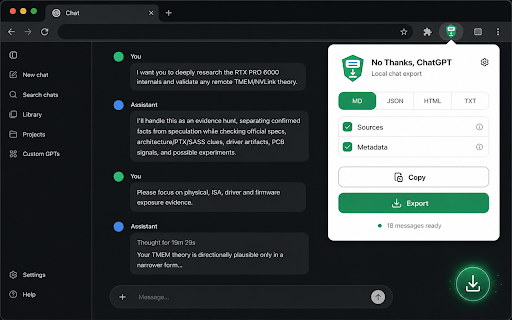
🆕 New in 3.0: export the currently loaded ChatGPT conversation from the in-page floating button or the extension toolbar popup.

Export formats:

- Markdown (`.md`)
- JSON (`.json`)
- HTML (`.html`)
- Plain text (`.txt`)

Exports include clear User and Assistant messages, preserve common formatting such as headings, lists, links, tables, and code blocks, and can include detected source links and metadata.

Privacy-first by design:

- No analytics
- No background page
- No storage permission
- No downloads permission
- No external network requests
- No remote code
- Conversation exports are generated locally in your browser

This extension runs only on ChatGPT domains and is not affiliated with or endorsed by OpenAI.
- Jun 11, 2026short_description
Blocks ChatGPT popups, Google sign-in prompts, cookie notices, signup buttons, sidebar upsells, and promo cards.
Blocks ChatGPT popups and lets you locally export loaded conversations as Markdown, JSON, HTML, or TXT.
- May 16, 2026description
No Thanks, ChatGPT removes all the annoying interruptions when browsing ChatGPT logged out:

• "Thanks for trying ChatGPT" dialog — clicks "Stay logged out"
• "Try Go, Free" upsell popup — clicks "Maybe later"
• Cookie consent banner — clicks "Reject non-essential"
• Promotional cards above the input box — removes them automatically

After dismissing popups, it focuses the prompt textarea so you can start typing immediately.

🪶 Lightweight and private: no background pages, no storage, no analytics, and no network requests. It runs only as a content script on ChatGPT pages.

The extension works on chat.openai.com and chatgpt.com. If the UI text changes, the extension will still attempt to dismiss dialogs by matching text patterns.
No Thanks, ChatGPT removes annoying interruptions when browsing ChatGPT while logged out:

- "Thanks for trying ChatGPT" dialog - clicks "Stay logged out"
- "Try Go, Free" upsell popup - clicks "Maybe later"
- Google sign-in prompt - blocks or removes the account chooser
- Cookie consent banner - clicks "Reject non-essential"
- Top-bar "Sign up for free" button - hides/removes it
- Sidebar login pane - hides/removes the "Get responses tailored to you" prompt
- Promotional cards above the input box - removes them automatically

After dismissing popups, it focuses the prompt textarea so you can start typing immediately.

Lightweight and private: no background pages, no storage, no analytics, and no external network requests. It runs only as a content script on ChatGPT pages.

The extension works on chat.openai.com and chatgpt.com. If ChatGPT UI text changes, the extension still attempts to dismiss dialogs by matching known text patterns and stable UI selectors.
- May 16, 2026short_description
Automatically dismisses popups, cookie notices, and promotional cards on ChatGPT so you can start chatting immediately.
Blocks ChatGPT popups, Google sign-in prompts, cookie notices, signup buttons, sidebar upsells, and promo cards.
Permissions & access
- Permissions
- None declared
- Host access
- *://chat.openai.com/*, *://chatgpt.com/*, *://*.chatgpt.com/*
Screenshots

About
No Thanks, ChatGPT keeps ChatGPT quieter and easier to use by removing common interruptions and adding local conversation export.

🟥 It blocks or dismisses:

- "Thanks for trying ChatGPT" dialogs
- "Try Go, Free" upsell popups
- Google sign-in prompts
- Cookie consent notices
- Signup buttons
- Sidebar login panes
- Promotional cards above the input box

🆕 New in 3.0: export the currently loaded ChatGPT conversation from the in-page floating button or the extension toolbar popup.

Export formats:

- Markdown (`.md`)
- JSON (`.json`)
- HTML (`.html`)
- Plain text (`.txt`)

Exports include clear User and Assistant messages, preserve common formatting such as headings, lists, links, tables, and code blocks, and can include detected source links and metadata.

Privacy-first by design:

- No analytics
- No background page
- No storage permission
- No downloads permission
- No external network requests
- No remote code
- Conversation exports are generated locally in your browser

This extension runs only on ChatGPT domains and is not affiliated with or endorsed by OpenAI.
Technical
- Version
- 3.0.0
- Manifest
- V3
- Size
- 39.15KiB
- Min Chrome
- 88
- Languages
- 1
- Featured
- No
Metadata
- ID
- nmgfghmecclnpobkngegmeaimijaojag
- Developer ID
- ua5188099864f69ab056e89a8c1cf4854
- Developer Email
- [email protected]
- Created
- Oct 11, 2025
- Last Updated (Store)
- Jun 10, 2026
- Last Scraped
- Jun 11, 2026
- Website
- deepakness.com
- Support URL
- —
- Privacy Policy
- —
Similar extensions
Alternatives to No Thanks, ChatGPT, ranked by description similarity.

adblockerGPT - Ad-Free ChatGPT
Remove ads from ChatGPT. Enjoy a clean, distraction-free AI experience.
10
★ 5.0

ClearChat - Ad-Free ChatGPT
Remove sponsored ads from ChatGPT. Enjoy a clean, distraction-free AI chat experience.
—

GPT Performance Optimizer
Clamps ChatGPT conversations to last N messages keeping long chats fast.
248
★ 5.0

MiniGPT
Open ChatGPT in a resizable side popup window.
8
★ 5.0

Simple ChatGPT Sidebar
Quick access to ChatGPT in a sidebar. Select text and ask ChatGPT about it, or reference entire pages with customizable prompts.
37

GPT Chat Compressor
Keep AI chats fast and clean by showing only the latest messages. Lightweight, private, and easy to use.
3

HideMyGPT
Disguise ChatGPT as an internal notes app
68
★ 5.0

ChatGPT Chat Trim
Automatically keeps only the last few messages visible on ChatGPT.
66
★ 5.0
Data sourced from the Chrome Web Store · last verified Jun 11, 2026.