
EasyAccess ZTNA
Browser extension for EasyAccess ZTNA - routes traffic through SOCKS5 proxy based on whitelist rules
As of June 2026, EasyAccess ZTNA has 4 users and a 5.00/5 rating from 1 reviews in the Productivity category.
Usersup 33.3 percent+33.3%
4
4
Ratingno change0%
5.00
1 reviews
Reviewsno change0%
1
Version
2.3.2
Manifest V3
History
8 snapshotsTracking since Apr 1, 2026.
View as table
| Date | Users | Rating | Reviews | Version |
|---|---|---|---|---|
| Apr 1, 2026 | 3 | 5.00 | 1 | 2.3.2 |
| Apr 16, 2026 | 4 | 5.00 | 1 | 2.3.2 |
| Apr 22, 2026 | 3 | 5.00 | 1 | 2.3.2 |
| Apr 27, 2026 | 4 | 5.00 | 1 | 2.3.2 |
| May 10, 2026 | 5 | 5.00 | 1 | 2.3.2 |
| May 15, 2026 | — | 5.00 | 1 | 2.3.2 |
| May 24, 2026 | 6 | 5.00 | 1 | 2.3.2 |
| Jun 3, 2026 | 5 | 5.00 | 1 | 2.3.2 |
| Now | 4 | 5.00 | 1 | 2.3.2 |
Permissions & access
- Permissions
- alarmsstorageproxy
- Host access
- http://plugin.api.ztna.local:19876/*, http://plugin.api.ztna.local:19877/*, http://plugin.api.ztna.local:19878/*, http://plugin.api.ztna.local:19879/*, http://plugin.api.ztna.local:19880/*, http://127.0.0.1:19876/*, http://127.0.0.1:19877/*, http://127.0.0.1:19878/*, http://127.0.0.1:19879/*, http://127.0.0.1:19880/*
Screenshots

About
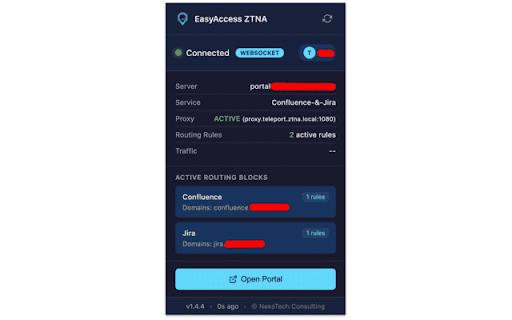
EasyAccess ZTNA is a companion browser extension for the EasyAccess Zero Trust Network Access desktop client. It enables secure, policy-based routing of browser traffic through an encrypted SOCKS5 tunnel to corporate resources — without a full VPN.

How it works:
The extension communicates with the locally running EasyAccess ZTNA desktop client to automatically configure browser proxy settings. Only traffic matching administrator-defined whitelist rules is routed through the secure tunnel — all other traffic goes directly to the internet.

Key features:
- Automatic proxy configuration via PAC script — no manual setup required
- Whitelist-based traffic routing — only specified domains and IPs go through the tunnel
- Real-time status indicator in the toolbar showing connection state and active rule count
- Secure tunnel transport over QUIC or WebSocket
- Live traffic statistics (bytes sent/received)
- Quick access to the EasyAccess management portal
- Periodic background sync with the desktop client every 5 seconds

Requirements:
- EasyAccess ZTNA desktop client must be installed and running
- A valid EasyAccess account with an active subscription

How to get started:
1. Install and launch the EasyAccess ZTNA desktop client
2. Log in with your corporate credentials
3. The extension will automatically detect the client, apply routing rules, and display connection status in the toolbar

Privacy:
This extension only communicates with the locally running EasyAccess desktop client (localhost). It does not collect, store, or transmit any user data to external servers. All traffic routing is controlled by your organization's administrator-defined policies.
Technical
- Version
- 2.3.2
- Manifest
- V3
- Size
- 26.75KiB
- Min Chrome
- 102
- Languages
- 1
- Featured
- No
Metadata
- ID
- nmgddncfkhpghephalklolkfkncnkdhm
- Developer ID
- u809fec95b4bc451cd61b89b82af61c9e
- Developer Email
- [email protected]
- Created
- Feb 11, 2026
- Last Updated (Store)
- Feb 11, 2026
- Last Scraped
- Jun 3, 2026
- Website
- nexatech.dev
- Support URL
- https://nexatech.dev/easyaccess-ztna.html
- Privacy Policy
- https://nexatech.dev/ztna-browser-privacy-policy.html
Similar extensions
Alternatives to EasyAccess ZTNA, ranked by description similarity.
Symantec Network Protection
This extension supports Secure Web Gateway (SWG) and Zero Trust Network Access (ZTNA)
2.0K
★ 5.0

ZANE Browser Bridge
Connect your browser to your ZANE AI assistant. Let your assistant browse the web, research topics, and work alongside you.
—

Automated NetAccess
Automatically logs into, approves, and logs out of NetAccess portal at IIT Madras.
394
★ 5.0

Glassdoor Easy Access
Bypass Glassdoor login wall
3.0K
★ 3.7

GeoSet by Trusted Proxies
Secure proxy management with advanced features and enterprise-grade security
167
★ 5.0

Espot Access Extension
Espot Solutions — Secure internet access extension for clients
9

Zoom Link Interceptor
Intercepts and modifies Zoom meeting links
—

PAC Proxy Manager
🚀 Take full control of your proxy settings with intelligent automation. Set rules once, browse comfortably forever!
7.0K
★ 4.8
Data sourced from the Chrome Web Store · last verified Jun 3, 2026.