
Distraction Blocker with Focus Timer
Block distracting websites with a focus timer system for productive work sessions
As of May 2026, Distraction Blocker with Focus Timer has 3 users in the Productivity category.
Usersno change0%
3
3
Ratingno change0%
—
— reviews
Reviewsno change0%
—
Version
1.1
Manifest V3
History
2 snapshotsTracking since May 6, 2026.
View as table
| Date | Users | Rating | Reviews | Version |
|---|---|---|---|---|
| May 6, 2026 | 3 | — | — | 1.1 |
| May 18, 2026 | 5 | — | — | 1.1 |
| Now | 3 | — | — | 1.1 |
Permissions & access
- Permissions
- storagetabsalarmsdeclarativeNetRequestscriptingnotifications
- Host access
- <all_urls>
Screenshots


About
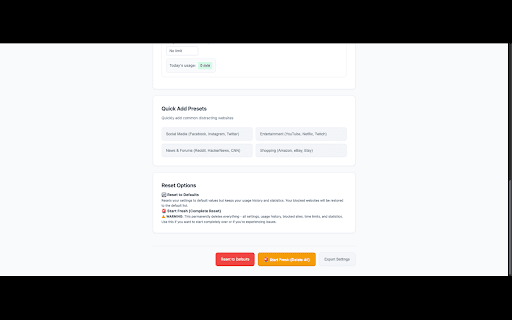
# Distraction Blocker — Focus Timer for the Web ✨ A Chrome extension that helps you stay focused by setting daily time limits per website, giving you a gentle nudge when time is up, and keeping controls at your fingertips via a floating button and right-side sidebar. ## 🌟 Highlights - 🟦 Floating, draggable right-edge button showing remaining time - 🧭 Slide‑in sidebar from the right with quick controls - ⏱️ Per‑site Daily Time Limits (1–1440 minutes) - 🔔 Polite, motivational full‑page modal when time is up - ☕ Temporary break (15 min) blocking when you choose to take a pause - ♻️ Reset Today’s Timer instantly (sidebar and button update immediately) - 🧠 Heartbeat tracking (no tab switching needed; time accrues automatically) - ⚙️ Robust Options page with presets and full settings ## 🧑💻 How It Works - The extension tracks time per hostname. You set a daily limit for each site. - A small rectangular floating button sits on the right edge. It shows remaining time and can be dragged vertically. It expands on hover. - Click the button to open a right‑side sidebar with: - Current site: set/remove limit, quick time buttons, usage summary - Today’s usage across your blocked sites - “Open Full Settings” (Options page) - When your time is up, a friendly modal appears in the center of the page with options: - Set New Limit & Continue - Reset Today’s Timer (usage→0 for current site) - Take a 15 min Break (temporarily blocks the site) - Continue without changes - A background heartbeat (every minute) accrues time even when you stay on the same tab, so the time‑up modal shows without needing to switch tabs. ## 🔧 Key Features - 🕹️ Floating Button - Shows remaining time - Draggable on the right edge - Expands on hover - 📊 Sidebar Controls - Set per‑site limit (1–1440 minutes) - Quick add: 15m / 30m / 1h / 2h - Remove limit - See current site usage + remaining time - Open Full Settings - 🧘 Time‑Up Modal (Polite & Motivational) - Clear, friendly language encouraging focus - Choose to continue, reset, take a break, or set a new limit - Blocks page interaction until you choose (persistent modal) - ♻️ Instant UI Refresh - Reset Today’s Timer updates the sidebar and floating button immediately - Background sends a message to refresh visible UI - ⏳ Heartbeat Tracking - A 1‑minute alarm accrues time periodically - Time‑up is detected even without tab switching ## ⚙️ Options (Full Settings) - Add/remove blocked sites - Set reminder block duration (temporary block after reminder) - Preset adders for common distracting sites - Start Fresh: clear all local data (with confirmation) ## 🚀 Quick Start 1. Load the extension (see Install). 2. Visit a site like YouTube. 3. Click the floating button → set a Daily Time Limit (e.g., 15 minutes). 4. Work/browse; when time’s up, you’ll see the modal. 5. Use the sidebar at any time to adjust limits. ## 🧪 Testing Tips - To see the modal quickly, set a 1‑minute limit. The heartbeat will trigger the modal after about a minute even if you don’t leave the tab. - You can also switch tabs briefly to force an immediate time update.
Technical
- Version
- 1.1
- Manifest
- V3
- Size
- 64.77KiB
- Min Chrome
- 88
- Languages
- 1
- Featured
- No
Metadata
- ID
- nmdegdfncjhaiapngoohabcgoeihoipn
- Developer ID
- u171569891c11e4fa1846d2a790d6da93
- Developer Email
- [email protected]
- Created
- Aug 30, 2025
- Last Updated (Store)
- Aug 30, 2025
- Last Scraped
- May 31, 2026
- Website
- —
- Privacy Policy
- http://coderubix.com/public/distraction-blocker/
Similar extensions
Alternatives to Distraction Blocker with Focus Timer, ranked by description similarity.

Site Blacklist
Block or unblock specific domains with a single click.
210
★ 3.0

BlockDistractions - Domain & Keywords Blocker
Take Control of Your Digital Focus
24
★ 5.0

Website Blocker: Block Any Site with SimpleBlocksite
Block distracting websites or set daily time limits to stay focused. Includes schedules, stats and custom blocked URLs. 100% free.
86

Ask Everytime
Block addictive sites and enhance your productivity with 'Ask Everytime' - session limiter.
20
★ 2.0

Website Blocker Extension
Use Website Blocker Extension to stay focused: block site distractions, blacklist sites with a website blocker Chrome extension.
449
★ 5.0

URL Blocker & Focus Mode
A powerful URL blocker with Focus Mode, synchronization, and password protection.
2

Blockie | Block Websites & Be Productive
manifest.json description
7

Monk Mode — Website Blocker & Focus Timer
Block distracting websites, set focus timers, and track screen time. Strict mode, auto-schedules, and productivity stats built in.
92
★ 4.8
Data sourced from the Chrome Web Store · last verified May 31, 2026.