
Image Picker
Elegant image picker — select, download, copy, or open images with style.
As of June 2026, Image Picker has 403 users and a 5.00/5 rating from 3 reviews in the Productivity category.
Usersup 276.6 percent+276.6%
403
403
Ratingno change0%
5.00
3 reviews
Reviewsup 50.0 percent+50.0%
3
Version
1.1.1
Manifest V3
History
10 snapshotsTracking since Apr 1, 2026.
View as table
| Date | Users | Rating | Reviews | Version |
|---|---|---|---|---|
| Apr 1, 2026 | 107 | 5.00 | 2 | 1.1.1 |
| Apr 16, 2026 | 146 | 5.00 | 2 | 1.1.1 |
| Apr 22, 2026 | 251 | 5.00 | 3 | 1.1.1 |
| Apr 27, 2026 | 269 | 5.00 | 3 | 1.1.1 |
| May 4, 2026 | 277 | 5.00 | 3 | 1.1.1 |
| May 10, 2026 | 286 | 5.00 | 3 | 1.1.1 |
| May 15, 2026 | 353 | 5.00 | 3 | 1.1.1 |
| May 21, 2026 | 364 | 5.00 | 3 | 1.1.1 |
| Jun 3, 2026 | 376 | 5.00 | 3 | 1.1.1 |
| Jun 9, 2026 | 392 | 5.00 | 3 | 1.1.1 |
| Now | 403 | 5.00 | 3 | 1.1.1 |
Permissions & access
- Permissions
- activeTabstoragedownloadsclipboardWriteoffscreencontextMenus
- Host access
- None declared
Screenshots



About
Image Picker — Download, Copy & Convert Images from Any Website

Hover over any image on any webpage and a sleek toolbar instantly appears. Download in your preferred format, copy to clipboard, crop, view EXIF data, or grab every image on the page at once — all without leaving the site.

━━━━━━━━━━━━━━━━━━━━━━━━━━━━━
🖼️ HOVER TOOLBAR
━━━━━━━━━━━━━━━━━━━━━━━━━━━━━
• Instantly shows image dimensions and file size
• Open image in a new tab at full resolution
• One-click download — tap for quick save, hold for advanced options
• Copy image directly to clipboard (PNG-ready)
• Inline image info panel with EXIF data (camera, lens, focal length, aperture, ISO, GPS)
• Crop tool with free, 1:1, 4:3, and 16:9 aspect ratio lock
• Custom filename before downloading
• Group / gallery download — detects image carousels and grabs all slides

━━━━━━━━━━━━━━━━━━━━━━━━━━━━━
📥 DOWNLOAD OPTIONS
━━━━━━━━━━━━━━━━━━━━━━━━━━━━━
• Formats: Original, PNG, JPG, WebP
• Size presets: Small (≤480px), Medium (≤1024px), Large (≤2048px), Full resolution
• Always gets the highest-resolution version available — reads srcset, data-src, data-original, and platform-specific CDN patterns (Twitter/X, YouTube, Google, Pinterest, Imgur, Flickr, Cloudinary, Shopify, and more)
• Smart filenames generated from page title and image alt text
• Custom rename with a single click

━━━━━━━━━━━━━━━━━━━━━━━━━━━━━
📦 BATCH DOWNLOAD
━━━━━━━━━━━━━━━━━━━━━━━━━━━━━
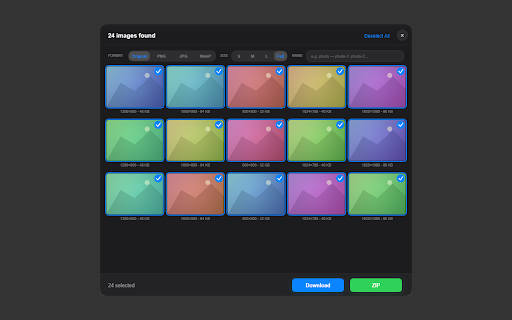
• Scan the entire page and preview all images in a grid
• Select / deselect individual images or use Select All
• Set format and size for the whole batch at once
• Download all selected images individually or pack them into a single ZIP file
• Custom base name for batch files (e.g. product-1.jpg, product-2.jpg…)
• Works with lazy-loaded images, background images, SVGs, videos, and canvases

━━━━━━━━━━━━━━━━━━━━━━━━━━━━━
⚙️ CUSTOMIZATION
━━━━━━━━━━━━━━━━━━━━━━━━━━━━━
• Two activation modes: Hold hotkey (Ctrl / Alt / Shift) while hovering, or Always-on
• Adjustable toolbar scale (0.8× – 1.4×)
• Light, Dark, or System theme
• Fully customizable keyboard shortcuts (toggle mode, open batch panel)
• Right-click context menu with all download and info options
• 10 interface languages: English, Turkish, Spanish, French, German, Portuguese, Russian, Japanese, Korean, Chinese (Simplified)

━━━━━━━━━━━━━━━━━━━━━━━━━━━━━
🔍 BROAD IMAGE SUPPORT
━━━━━━━━━━━━━━━━━━━━━━━━━━━━━
• <img>, <picture>, <svg>, CSS background-image, mask-image
• <canvas> elements (exported as PNG)
• <video> poster images and live frame capture
• Shadow DOM images and role="img" elements
• Lazy-loaded images via data-src, data-lazy, data-original and 30+ other attributes
• Embedded raster images inside SVG files

━━━━━━━━━━━━━━━━━━━━━━━━━━━━━
🔒 PRIVACY
━━━━━━━━━━━━━━━━━━━━━━━━━━━━━
• 100% local — no data ever leaves your browser
• No analytics, no tracking, no external servers
• Open source: github.com/ozcanok/img-picker

━━━━━━━━━━━━━━━━━━━━━━━━━━━━━

Works on all websites. Perfect for designers, photographers, researchers, developers, and anyone who regularly saves images from the web.
Technical
- Version
- 1.1.1
- Manifest
- V3
- Size
- 85.38KiB
- Min Chrome
- 88
- Languages
- 9
- Featured
- No
Metadata
- ID
- nmbdckajhpcolpojmkjphichplddieae
- Developer ID
- ucce3e04890fa8de7fed749e4c6c98da1
- Developer Email
- [email protected]
- Created
- Mar 2, 2026
- Last Updated (Store)
- Mar 12, 2026
- Last Scraped
- Jun 9, 2026
- Website
- —
- Support URL
- https://github.com/ozcanok/img-picker/issues
Similar extensions
Alternatives to Image Picker, ranked by description similarity.

Bulk Image Downloader
Save all images from a page in one click. Filter by size/type, rename by pattern, download directly or as a ZIP.
806
★ 5.0

Image Download Button
Adds a download button to images on hover with format options.
144

Image Downloader
Download all images from any webpage with preview, filtering, and batch download capabilities
15

Quick Image Downloader – Bulk & Filter Images
Find, preview, filter and download all images from any website in one click.
68
★ 5.0

Bulk Image Downloader — Fast & Clean
Download all images on any page. Filter by size, type, and dimensions. Download as individual files or ZIP.
8

Image Downloader Assistant - Batch Save Images
Download all images from any website instantly. Batch image downloader with filters, preview & smart detection.
246
★ 5.0

Yi Image Grabber
Find, select, and download images, icons, and SVGs from the current webpage with advanced options.
25

Image Hover Download
Easily download and copy images by hovering over them
28
★ 5.0
Data sourced from the Chrome Web Store · last verified Jun 9, 2026.