
Schedio
Highlight text to create Google Calendar events instantly
As of June 2026, Schedio has 4 users and a 5.00/5 rating from 1 reviews in the Workflow & Planning category.
Usersup 100.0 percent+100.0%
4
4
Ratingno change0%
5.00
1 reviews
Reviewsno change0%
1
Version
1.0.0
Manifest V3
History
2 snapshotsTracking since May 31, 2026.
View as table
| Date | Users | Rating | Reviews | Version |
|---|---|---|---|---|
| May 31, 2026 | 2 | — | — | 1.0.0 |
| Jun 6, 2026 | 2 | — | — | 1.0.0 |
| Now | 4 | 5.00 | 1 | 1.0.0 |
Changelog
- Jun 6, 2026description
Schedio turns any highlighted text on the web into a Google Calendar event — instantly. Highlight a meeting time, right-click and select "Create Event with Schedio" (or use Alt+Shift+S), review a pre-filled Raycast-style modal (title, date, time, location), and confirm. Behind the scenes Schedio uses Gemini (LLM) to parse natural language into structured event data and the Chrome Identity + Google Calendar API to create events in your account.

Key features
- One-click creation: highlight → right-click → confirm
- AI parsing: robust date/time and location extraction using Gemini
- Minimal verification UI: Raycast-style modal to review & edit parsed fields
- Local-first: no external server required for core event creation (Gemini calls go directly to Google’s API from the extension)
- Settings: add your own Gemini API key for higher rate limits

How to use
1. Install the extension from the Chrome Web Store
2. Highlight any event text on a page
3. Right-click → Create Event with Schedio, or press Alt+Shift+S
4. Review parsed title/date/time/location in the modal and click "Create Event"

Permissions explained
- identity: sign in with Google to create Calendar events
- storage: save user settings (custom Gemini key)
- contextMenus: add the right-click menu item
- activeTab & scripting: read selection and inject the modal UI
- host permissions: allow parsing/interaction across sites

Support & privacy
Privacy policy: https://schedio-privacy.vercel.app/
Support email: [email protected]
Schedule anything you read — without leaving the page.

 Schedio is an AI-powered Chrome extension that turns highlighted text into a Google Calendar event in seconds. Whenever you come across a meeting time, an invitation, a deadline, or a reservation, just highlight it — Schedio reads the details and schedules it for you.

 Highlight the text, then right-click and choose "Create Event with Schedio" (or press Alt+Shift+S). Schedio's AI extracts the title, date, time, and location, presents them in a clean review modal, and adds the event to your Google Calendar the moment you confirm. The whole flow takes under five seconds.

 No copy-pasting. No switching tabs. No setup — Schedio works the moment you sign in with Google.

 AVAILABLE NOW
 • One-step capture: highlight, right-click (or Alt+Shift+S), confirm
 • AI parsing that understands natural-language dates, times, and locations
 • A clean review modal to verify and adjust details before saving
 • Direct Google Calendar integration — events land in your real calendar
 • Sign in once with Google — nothing else to configure
 • Global keyboard shortcut (Alt+Shift+S)

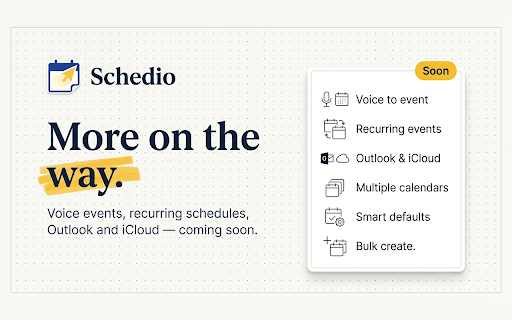
 COMING SOON
 • Voice-to-event: speak an event and Schedio schedules it
 • Recurring events ("every Tuesday at 4 PM")
 • Outlook, iCloud, and CalDAV calendar support
 • Multiple calendars — choose where each event goes
 • Smart defaults: durations, reminders, and locations
 • Bulk creation: turn a list of items into several events at once

 Your privacy comes first. Schedio activates only on the text you choose to highlight, and never sells your data or runs advertising trackers.
Permissions & access
- Permissions
- identitystoragecontextMenusactiveTabscripting
- Host access
- https://*/*
Screenshots


About
Schedule anything you read — without leaving the page.

 Schedio is an AI-powered Chrome extension that turns highlighted text into a Google Calendar event in seconds. Whenever you come across a meeting time, an invitation, a deadline, or a reservation, just highlight it — Schedio reads the details and schedules it for you.

 Highlight the text, then right-click and choose "Create Event with Schedio" (or press Alt+Shift+S). Schedio's AI extracts the title, date, time, and location, presents them in a clean review modal, and adds the event to your Google Calendar the moment you confirm. The whole flow takes under five seconds.

 No copy-pasting. No switching tabs. No setup — Schedio works the moment you sign in with Google.

 AVAILABLE NOW
 • One-step capture: highlight, right-click (or Alt+Shift+S), confirm
 • AI parsing that understands natural-language dates, times, and locations
 • A clean review modal to verify and adjust details before saving
 • Direct Google Calendar integration — events land in your real calendar
 • Sign in once with Google — nothing else to configure
 • Global keyboard shortcut (Alt+Shift+S)

 COMING SOON
 • Voice-to-event: speak an event and Schedio schedules it
 • Recurring events ("every Tuesday at 4 PM")
 • Outlook, iCloud, and CalDAV calendar support
 • Multiple calendars — choose where each event goes
 • Smart defaults: durations, reminders, and locations
 • Bulk creation: turn a list of items into several events at once

 Your privacy comes first. Schedio activates only on the text you choose to highlight, and never sells your data or runs advertising trackers.
Technical
- Version
- 1.0.0
- Manifest
- V3
- Size
- 389KiB
- Min Chrome
- 88
- Languages
- 1
- Featured
- No
Metadata
- ID
- nlnkjghkddopgocdbhhkefmjbchlpjnc
- Developer ID
- u1d767b09df87644d4308f8e53608bd11
- Developer Email
- [email protected]
- Created
- Mar 16, 2026
- Last Updated (Store)
- Jun 3, 2026
- Last Scraped
- Jun 6, 2026
- Website
- —
- Support URL
- —
- Privacy Policy
- https://schedio-privacy.vercel.app/
Data sourced from the Chrome Web Store · last verified Jun 6, 2026.