
ConfuteGPT Extension
ConfuteGPT - Your trustworthy information analyst
As of May 2026, ConfuteGPT Extension has — users and a 5.00/5 rating from 1 reviews in the Productivity category.
Usersno change0%
—
—
Ratingno change0%
5.00
1 reviews
Reviewsno change0%
1
Version
1.0
Manifest V3
History
2 snapshotsTracking since Apr 1, 2026.
Not enough history yet for this metric — the chart fills in as we collect more snapshots.
View as table
| Date | Users | Rating | Reviews | Version |
|---|---|---|---|---|
| Apr 1, 2026 | — | 5.00 | 1 | 1.0 |
| May 31, 2026 | 2 | 5.00 | 1 | 1.0 |
| Now | — | 5.00 | 1 | 1.0 |
Permissions & access
- Permissions
- activeTabstorage
- Host access
- None declared
Screenshots



About
CONFUTEGPT is a Chrome extension that acts as your trustworthy information analyst. It uses the power of OpenAI's GPT-3.5 Turbo model to analyze articles from the web and identify fake news and misleading information. The extension provides explanations and confutations for any inaccuracies found in the article, giving it a score from 0 (completely unreliable) to 10 (fact-based). It responds using the same language as the user in the article.

Features
- Analyze articles using the OpenAI GPT-3.5 Turbo model
- Identify and explain fake news and misleading information
- Provide a score for the article's reliability
- Easy-to-use Chrome extension with a simple interface

Getting Started
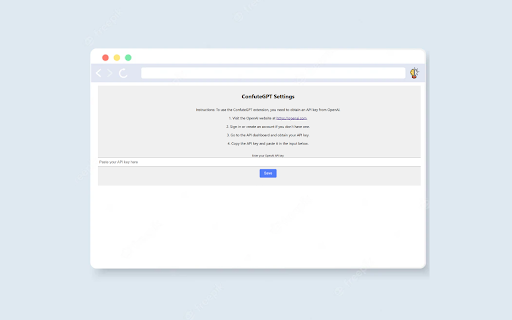
To get started, you'll need an API key from OpenAI. Follow these steps:

- Visit the OpenAI website at https://openai.com and sign in or create an account if you don't have one.
- Go to the API dashboard and obtain your API key.
- Copy the API key and paste it in the extension's settings page.
Installation
- Download the CONFUTEGPT Chrome Extension from the Chrome Web Store (Coming Soon!)

After installation, click on the extension icon to open the popup. Click on the "Start Analysis" button to analyze the current webpage's article using CONFUTEGPT.

Settings
The extension provides a settings page where you can set your OpenAI API key. To access the settings page:

- Click on the extension icon to open the popup.
- Click on the settings icon (gear/bolt nut) located at the top right corner.

Feedback and Issues
If you encounter any issues or have suggestions for improvement, feel free to submit an issue on the GitHub repository or contact me directly.
Technical
- Version
- 1.0
- Manifest
- V3
- Size
- 20.16KiB
- Min Chrome
- 88
- Languages
- 1
- Featured
- No
Metadata
- ID
- nlmchcpbcdhppnagjfhjlmdfngafcjki
- Developer ID
- u49fb5342c2660afca96baaf9fe29843d
- Developer Email
- [email protected]
- Created
- Jul 24, 2023
- Last Updated (Store)
- Jul 25, 2023
- Last Scraped
- May 31, 2026
- Website
- —
- Support URL
- —
- Privacy Policy
- —
Similar extensions
Alternatives to ConfuteGPT Extension, ranked by description similarity.

GPT Search Companion
Add GPT-generated insights to Google Search results.
6

FactTrust
Extension Chrome pour évaluer la fiabilité des articles web avec un indicateur de confiance basé sur l'analyse croisée de sources
—

KauGPT
This extension gives you access to GPT-4 with access to GPTs and file
75
★ 5.0

ChromeGPT for ChatGPT
The easiest way to use ChatGPT.
889
★ 5.0

ChatGPT Webpage Summarizer
Summarize web pages using OpenAI's GPT-4 model
2.0K
★ 4.4

AskGPT
Unlock the Speed of GPT Anywhere Online: Experience the quickest and most efficient way to harness the power of GPT across the web.
53

QuizGPT
Auto-fill quiz answers using ChatGPT
151

Ask GPT
Empowering users with AI, this extension can swiftly produce answers, replies, and essays about any topic.
2.0K
★ 4.7
Data sourced from the Chrome Web Store · last verified May 31, 2026.