
Loop Speed Screenshot for YouTube
Loop videos, control playback speed, and capture screenshots on YouTube - all in one tool
As of June 2026, Loop Speed Screenshot for YouTube has — users and a 5.00/5 rating from 1 reviews in the Productivity category.
Usersno change0%
—
—
Ratingno change0%
5.00
1 reviews
Reviewsno change0%
1
Version
1.0.1
Manifest V3
History
2 snapshotsTracking since May 9, 2026.
Not enough history yet for this metric — the chart fills in as we collect more snapshots.
View as table
| Date | Users | Rating | Reviews | Version |
|---|---|---|---|---|
| May 9, 2026 | — | 5.00 | 1 | 1.0.1 |
| Jun 2, 2026 | 1 | 5.00 | 1 | 1.0.1 |
| Now | — | 5.00 | 1 | 1.0.1 |
Permissions & access
- Permissions
- activeTabscriptingstorage
- Host access
- *://*.youtube.com/*
Screenshots

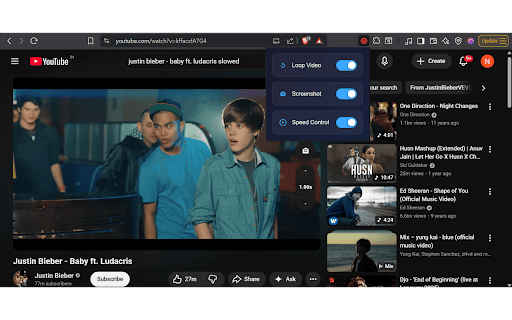
About
🎯 Loop Speed Screenshot for YouTube - Your Ultimate YouTube Companion

Transform your YouTube viewing experience with three powerful features in one lightweight extension:

🔁 LOOP VIDEO
• One-click video looping - perfect for music, tutorials, and repeated viewing
• Visual indicator shows when loop is active
• Works seamlessly with all YouTube videos

📸 SMART SCREENSHOT
• Capture perfect frames with automatic pause
• Generates professional filenames: Channel_VideoTitle_Timestamp_Date.png
• Saves AND copies to clipboard automatically
• High-quality PNG format preserves video quality

⚡ SPEED CONTROLLER
• Fine-tune playback speed from 0.25x to 16x
• Quick increment/decrement buttons (±0.25x)
• Manual input for precise speed control
• Perfect for learning, reviewing, or entertainment

✨ KEY FEATURES:
• Clean, non-intrusive vertical button layout
• Settings popup to toggle features on/off
• Persistent settings across sessions
• Works on all YouTube pages (videos, shorts, embedded)
• No data collection or tracking
• Fully offline - no external connections

Made with ❤️ for YouTube power users
Technical
- Version
- 1.0.1
- Manifest
- V3
- Size
- 205KiB
- Min Chrome
- 88
- Languages
- 1
- Featured
- No
Metadata
- ID
- nlglkageaaicgpmgglkmjcmfigjdpgpk
- Developer ID
- ufadb3236fb59dbc3ae49f742986140e3
- Developer Email
- [email protected]
- Created
- Feb 9, 2026
- Last Updated (Store)
- Feb 11, 2026
- Last Scraped
- Jun 2, 2026
- Website
- —
- Support URL
- —
- Privacy Policy
- https://dev-duo777.github.io/YT/
Similar extensions
Alternatives to Loop Speed Screenshot for YouTube, ranked by description similarity.

YouTube Speed Controller
Master YouTube playback speed with one click — slow down, speed up, and control every moment precisely!
17

YouTube Speed Controller
Control YouTube playback speed with your keyboard up to 16x!
298
★ 5.0

Video Fast Forward, Speed & Loop Controller
Fast forward, skip seconds, adjust playback speed, and set AB loop points on any video player. Control your video experience easily.
125
★ 5.0

YT Speed+
Premium YouTube playback speed controller with keyboard shortcuts and custom presets.
1

Video Speed Controller Pro
Speed up or slow down videos on YouTube, Netflix & any site. Volume boost 400%, screenshots, A-B loop, filters & hotkeys.
106

YouTube Speed Controller - Video Playback Control
The Ultimate Speed Controller for YouTube, Netflix, Bilibili & ALL Videos
258
★ 5.0

YouTube Loop Repeater: Music Practice Tool
Loop any video/song on YouTube with custom controls, incrementally increase speed, save loops. No more clicking through videos!
127
★ 5.0

YouTube Multi-Tool: Skip Sponsors, Screenshot, Popout, Speed & More
Skip sponsors, take screenshots, pop out videos, control speed, jump time, auto quality & hide clutter — all in one click! 🚀
116
★ 4.5
Data sourced from the Chrome Web Store · last verified Jun 2, 2026.