
Subtitle Downloader for YouTube
Download YouTube subtitles (manual, auto-generated, and auto-translated) as SRT, VTT, or TXT.
As of June 2026, Subtitle Downloader for YouTube has 6 users in the Productivity category.
Usersno change0%
6
6
Ratingno change0%
—
— reviews
Reviewsno change0%
—
Version
2.0.0
Manifest V3
History
3 snapshotsTracking since May 27, 2026.
View as table
| Date | Users | Rating | Reviews | Version |
|---|---|---|---|---|
| May 27, 2026 | — | — | — | 2.0.0 |
| Jun 3, 2026 | — | — | — | 2.0.0 |
| Jun 8, 2026 | 4 | — | — | 2.0.0 |
| Now | 6 | — | — | 2.0.0 |
Permissions & access
- Permissions
- downloadscontextMenusstorage
- Host access
- https://www.youtube.com/*, https://*.youtube.com/*
Screenshots


About
Subtitle Downloader for YouTube lets you save the captions of any YouTube video to your computer in seconds — as SRT, VTT, or TXT.

Whether the captions were uploaded by the creator, auto-generated by YouTube's speech recognition, or auto-translated into your language, this extension grabs the exact text and saves it as a clean subtitle file.

★ KEY FEATURES
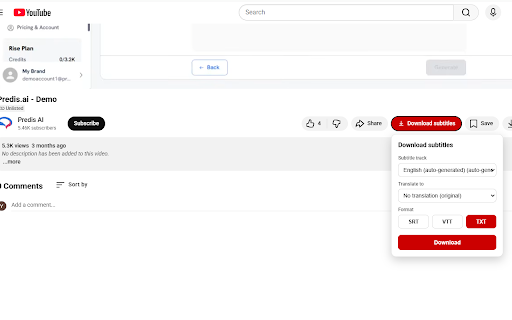
• One-click download — a clear "Download subtitles" button appears right under the video.
• All caption types — manual, auto-generated (ASR), and auto-translated tracks.
• Any language — download the original track, or translate it into any of YouTube's ~125 target languages.
• Three formats — SRT (video players & editors), VTT (web/HTML5), or TXT (plain transcript).
• Right-click menu — quickly grab the default track without opening the panel.
• Remembers your preferred default format.
• Fully localized interface — English, 中文(简体/繁體), 日本語, 한국어, Español, Français, Deutsch, Português, Русский.

★ HOW TO USE
1. Open any YouTube video.
2. Click the "Download subtitles" button below the player.
3. Choose the subtitle track, an optional translation language, and a format.
4. Click Download — the file is saved to your downloads folder.

Tip: If a track has not been shown yet, turn on the player's "Subtitles (CC)" once (the extension can also trigger this automatically) so it can fetch the subtitle data.

★ PRIVACY
• No accounts, no tracking, no ads.
• Runs only on youtube.com.
• Does not collect, store, or transmit any personal data. Your format preference is saved locally on your device only.

★ NOTE
This extension is an independent tool and is not affiliated with, endorsed by, or sponsored by YouTube or Google LLC. "YouTube" is a trademark of Google LLC. Subtitles belong to their respective owners; please use downloaded content responsibly and in accordance with copyright law. Auto-generated and machine-translated captions may contain inaccuracies.
Technical
- Version
- 2.0.0
- Manifest
- V3
- Size
- 43.47KiB
- Min Chrome
- 111
- Languages
- 10
- Featured
- No
Metadata
- ID
- nldpjmcadgbeilajdkeagjfbndeopfpm
- Developer ID
- uc2938615694f71e4fe50be37a82b77eb
- Developer Email
- [email protected]
- Created
- May 26, 2026
- Last Updated (Store)
- May 26, 2026
- Last Scraped
- Jun 8, 2026
- Website
- —
- Support URL
- —
- Privacy Policy
- https://privacy.krymodo.cc/zimu/
Data sourced from the Chrome Web Store · last verified Jun 8, 2026.