
Laze Agent
A browser agent that searches, reads pages, clicks, types, and shows each tool step.
As of June 2026, Laze Agent has 1 users in the Workflow & Planning category.
Usersno change0%
1
1
Ratingno change0%
—
— reviews
Reviewsno change0%
—
Version
0.1.2
Manifest V3
90-day change · In the last 90 days this extension 2 version updates, changed permissions.
History
4 snapshotsTracking since May 4, 2026.
View as table
| Date | Users | Rating | Reviews | Version |
|---|---|---|---|---|
| May 4, 2026 | — | — | — | 0.1.0 |
| May 27, 2026 | — | — | — | 0.1.0 |
| Jun 3, 2026 | 1 | — | — | 0.1.1 |
| Jun 9, 2026 | 3 | — | — | 0.1.2 |
| Now | 1 | — | — | 0.1.2 |
Changelog
- Jun 3, 2026description
Turn Chrome into an AI-powered browser assistant.

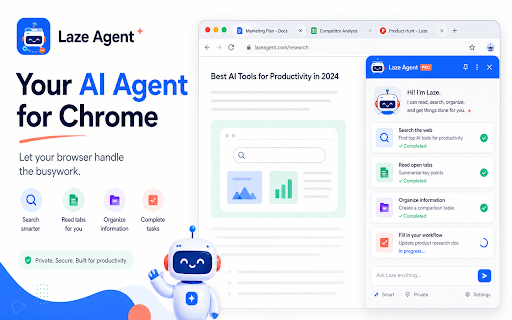
Laze Agent is an AI browser agent that lives in your Chrome side panel and helps you automate everyday web tasks. Ask it to read pages, search the web, summarize content, manage tabs, interact with websites, and work with local files from one simple chat interface.

Use Laze Agent to:
- Read and summarize the current webpage
- Search the web and compare information
- Click buttons, type text, scroll pages, and extract data
- Open, switch, and close browser tabs
- Search bookmarks and browsing history
- Read, write, preview, and organize local files in an authorized folder
- Create reminders and browser notifications
- Use OpenAI, Anthropic, or any compatible AI endpoint

Laze Agent is built for people who want a practical AI assistant inside the browser, not just another chatbot. It can see your current browsing context, operate Chrome tools, and show each step it takes so you stay in control.

Your API keys and settings are stored locally in Chrome. Local file access only works after you authorize a folder, and tools can be enabled or disabled from settings.

Whether you are researching, summarizing articles, collecting data, managing tabs, or handling repetitive browser work, Laze Agent helps your browser do the busywork.
Turn Chrome into an AI browser assistant that can read pages, search, click, type, manage tabs, and show every step.

Laze Agent turns Chrome into an AI browser assistant that can read pages, search the web, click, type, manage tabs, and show every tool step it takes.
It lives in your Chrome side panel, so you can ask it to work with the page you are already viewing instead of copying text into another chatbot.
Use Laze Agent to:
• Summarize the current page, article, document, or product page
• Search the web and compare multiple sources
• Click buttons, type into inputs, scroll pages, and extract information
• Open, switch, and organize browser tabs
• Search bookmarks and browsing history
• Create reminders and scheduled browser checks
• Connect your browser to Claude Code, Cursor, OpenCode, or other MCP clients through Local Browser Bridge
Why Laze Agent?
• Visible: every browser action is shown as a tool trace
• Controllable: clicks, typing, downloads, and tab-changing actions can require approval
• Local-first + your API: settings, API keys, and task history stay in Chrome; AI requests go to the model endpoint you configure
• Bring your own model: use OpenAI, Anthropic, or any OpenAI-compatible API endpoint
• No required Laze account: configure your own provider and keep control of your workflow
• Non-intrusive: the tiny page edge button stays out of the way and hides automatically during fullscreen video
• Practical: built for real browser work, not just chat
Use it for research, reading, comparison shopping, data collection, repetitive web tasks, and scheduled page checks.
Let your browser do the busywork.
- Jun 3, 2026short_description
Browser busywork agent with visible tool traces and approvals
A browser agent that searches, reads pages, clicks, types, and shows each tool step.
- Jun 3, 2026permissions
activeTab, tabs, scripting, storage, sidePanel, bookmarks, history, downloads, alarms, notifications, contextMenus
tabs, scripting, storage, sidePanel, bookmarks, history, downloads, alarms, notifications, contextMenus
- May 27, 2026description
An AI browser agent that helps you search, read, summarize, and automate everyday Chrome tasks securely.
Turn Chrome into an AI-powered browser assistant.

Laze Agent is an AI browser agent that lives in your Chrome side panel and helps you automate everyday web tasks. Ask it to read pages, search the web, summarize content, manage tabs, interact with websites, and work with local files from one simple chat interface.

Use Laze Agent to:
- Read and summarize the current webpage
- Search the web and compare information
- Click buttons, type text, scroll pages, and extract data
- Open, switch, and close browser tabs
- Search bookmarks and browsing history
- Read, write, preview, and organize local files in an authorized folder
- Create reminders and browser notifications
- Use OpenAI, Anthropic, or any compatible AI endpoint

Laze Agent is built for people who want a practical AI assistant inside the browser, not just another chatbot. It can see your current browsing context, operate Chrome tools, and show each step it takes so you stay in control.

Your API keys and settings are stored locally in Chrome. Local file access only works after you authorize a folder, and tools can be enabled or disabled from settings.

Whether you are researching, summarizing articles, collecting data, managing tabs, or handling repetitive browser work, Laze Agent helps your browser do the busywork.
- May 27, 2026short_description
let your browser do the busywork
Browser busywork agent with visible tool traces and approvals
- May 27, 2026permissions
activeTab, tabs, scripting, storage, sidePanel, bookmarks, history, downloads, alarms, notifications, contextMenus, offscreen
activeTab, tabs, scripting, storage, sidePanel, bookmarks, history, downloads, alarms, notifications, contextMenus
Permissions & access
- Permissions
- tabsscriptingstoragesidePanelbookmarkshistorydownloadsalarmsnotificationscontextMenus
- Host access
- <all_urls>
Screenshots


About
Turn Chrome into an AI browser assistant that can read pages, search, click, type, manage tabs, and show every step.

Laze Agent turns Chrome into an AI browser assistant that can read pages, search the web, click, type, manage tabs, and show every tool step it takes.
It lives in your Chrome side panel, so you can ask it to work with the page you are already viewing instead of copying text into another chatbot.
Use Laze Agent to:
• Summarize the current page, article, document, or product page
• Search the web and compare multiple sources
• Click buttons, type into inputs, scroll pages, and extract information
• Open, switch, and organize browser tabs
• Search bookmarks and browsing history
• Create reminders and scheduled browser checks
• Connect your browser to Claude Code, Cursor, OpenCode, or other MCP clients through Local Browser Bridge
Why Laze Agent?
• Visible: every browser action is shown as a tool trace
• Controllable: clicks, typing, downloads, and tab-changing actions can require approval
• Local-first + your API: settings, API keys, and task history stay in Chrome; AI requests go to the model endpoint you configure
• Bring your own model: use OpenAI, Anthropic, or any OpenAI-compatible API endpoint
• No required Laze account: configure your own provider and keep control of your workflow
• Non-intrusive: the tiny page edge button stays out of the way and hides automatically during fullscreen video
• Practical: built for real browser work, not just chat
Use it for research, reading, comparison shopping, data collection, repetitive web tasks, and scheduled page checks.
Let your browser do the busywork.
Technical
- Version
- 0.1.2
- Manifest
- V3
- Size
- 2.46MiB
- Min Chrome
- 116
- Languages
- 1
- Featured
- No
Metadata
- ID
- nldingjigidebocbajaimgejfhlbimbk
- Developer ID
- u871057e23999ee4487cb5a92d8197ea1
- Developer Email
- [email protected]
- Created
- May 3, 2026
- Last Updated (Store)
- May 28, 2026
- Last Scraped
- Jun 9, 2026
- Website
- —
- Support URL
- —
Data sourced from the Chrome Web Store · last verified Jun 9, 2026.