
Copy as Markdown
Browser extension to copy hyperlinks, images, and selected text as Markdown
As of May 2026, Copy as Markdown has 10,000 users and a 3.86/5 rating from 44 reviews in the Developer Tools category.
Usersno change0%
10.0K
10,000
Ratingdown 0.8 percent−0.8%
3.86
44 reviews
Reviewsdown 2.2 percent−2.2%
44
Version
25.6.9
Manifest V3
History
2 snapshotsTracking since Apr 20, 2026.
View as table
| Date | Users | Rating | Reviews | Version |
|---|---|---|---|---|
| Apr 20, 2026 | 10.0K | 3.89 | 45 | 25.6.9 |
| May 17, 2026 | 10.0K | 3.89 | 45 | 25.6.9 |
| Now | 10.0K | 3.86 | 44 | 25.6.9 |
Permissions & access
- Permissions
- contextMenusactiveTab
- Host access
- None declared
Screenshots

About
Features:

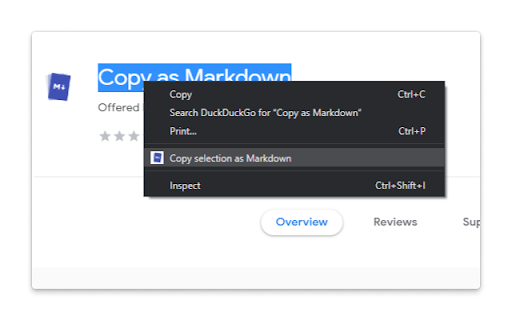
The extension allows you to copy selected text on a page as Markdown with support for features including the following

- Ability to copy links, images, and selected text as Markdown.
- Linked images, will have options to individually select link or images.
- Formatted text such as Italic, bold, strike-through, and inline code.
- Unordered and ordered lists, with task lists support.
- Tables, with respect to GFM.
- Fenced code blocks, with language detection using info strings.

Note: When copying links and images, Chrome doesn’t let you extract images alt text or anchors text content to be used in Markdown, instead the links themselves are used as link title. Firefox doesn’t have this limitation though.

Permissions:

The extension requires the following permission from you for working.

1. `contextMenus`: to show option when right-clicking.
2. `activeTab`: to be able to access content on page.

The extension can only write to your clipboard and not read from it in any way.

File an issue at https://github.com/notlmn/copy-as-markdown/issues for bug reports or requesting new features.
Technical
- Version
- 25.6.9
- Manifest
- V3
- Size
- 162KiB
- Min Chrome
- 88
- Languages
- 1
- Featured
- Yes
Metadata
- ID
- nlaionblcaejecbkcillglodmmfhjhfi
- Developer ID
- udb0c4edf856797504ecba5a80a01fe38
- Developer Email
- [email protected]
- Created
- Aug 2, 2019
- Last Updated (Store)
- Jun 11, 2025
- Last Scraped
- May 30, 2026
- Website
- —
- Privacy Policy
- —
Similar extensions
Alternatives to Copy as Markdown, ranked by description similarity.

Copy as Markdown
Browser extension to copy hyperlinks, images, and selected text as Markdown
1

Copy as Markdown
Convert selected webpage content to Markdown and copy to clipboard
6

MarkTab Copier
Copy current tab or all tabs as Markdown links
22
★ 5.0

Copy Markdown Source
This Chrome extension allows you to copy webpage Markdown source when a website provides it.
Click the extension icon to copy the…
1

Markdown Copier Pro
Right-click to copy highlighted content as clean, high-quality Markdown. Export as .md files or copy to clipboard instantly.
42
★ 5.0

Copy URL and Title as Markdown
Copy current page title and URL as Markdown format
543

DevTools to Markdown
Copy HTML elements from DevTools as Markdown
22

View Markdown Source
This Chrome extension allows you to view webpage content in Markdown when a Markdown version is available.
Click the extension…
—
Data sourced from the Chrome Web Store · last verified May 30, 2026.