
Hatch
Your friendly neighbourhood writing companion, living in your browser.
As of June 2026, Hatch has 10 users in the Communication category.
Usersno change0%
10
10
Ratingno change0%
—
— reviews
Reviewsno change0%
—
Version
0.1.1
Manifest V3
90-day change · In the last 90 days this extension 1 version update.
History
11 snapshotsTracking since Apr 1, 2026.
View as table
| Date | Users | Rating | Reviews | Version |
|---|---|---|---|---|
| Apr 1, 2026 | — | — | — | 0.1.0 |
| Apr 17, 2026 | — | — | — | 0.1.0 |
| Apr 22, 2026 | 1 | — | — | 0.1.0 |
| Apr 27, 2026 | 2 | — | — | 0.1.0 |
| May 4, 2026 | — | — | — | 0.1.0 |
| May 10, 2026 | 3 | — | — | 0.1.0 |
| May 15, 2026 | 2 | — | — | 0.1.0 |
| May 22, 2026 | 3 | — | — | 0.1.0 |
| May 28, 2026 | 5 | — | — | 0.1.1 |
| Jun 4, 2026 | 4 | — | — | 0.1.1 |
| Jun 10, 2026 | 8 | — | — | 0.1.1 |
| Now | 10 | — | — | 0.1.1 |
Permissions & access
- Permissions
- storage
- Host access
- http://*/*, https://*/*
Screenshots


About
Hatch: Your friendly neighbourhood writing companion, living in your browser.

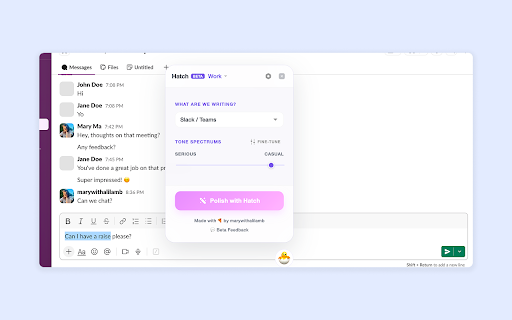
Hatch is a Chrome extension that helps you polish, continue, and draft text with a focus on context, tone, and privacy.

Whether you’re writing a LinkedIn post, a quick Slack DM, or a text to your crush, Hatch is there to help you find the right words.

Key Features:
🎯 Context-Aware Suggestions: Hatch adapts its suggestions based on the platform and your specific writing goal.
🎭 Interactive Tone Spectrums: Fine-tune your writing with sliders for Serious ↔︎ Casual, Analytical ↔︎ Creative, and more.
👤 Your Unique Voice: Teach Hatch how you sound, ensuring suggestions stay authentic to your style.
🛡️ Privacy-First (BYOK): Currently Hatch only operates on a Bring Your Own Key model. Data stays in your browser and goes directly to your provider.

How to get started:
1. Install Hatch and enter your Anthropic or OpenAI key.
2. Look for the 🥚 icon when clicking into any text field.
3. Start writing and fine-tune your voice instantly!
Technical
- Version
- 0.1.1
- Manifest
- V3
- Size
- 1.1MiB
- Min Chrome
- 88
- Languages
- 1
- Featured
- No
Metadata
- ID
- nknhlikafjnchcdfoadempcgpjaddpbp
- Developer ID
- u86fe1bf1d5cfa55cfdee2d6985af1a3d
- Developer Email
- [email protected]
- Created
- Mar 28, 2026
- Last Updated (Store)
- May 19, 2026
- Last Scraped
- Jun 10, 2026
- Website
- —
- Support URL
- https://tally.so/r/rjEK0X
Data sourced from the Chrome Web Store · last verified Jun 10, 2026.