
Tabbed Copy/Paste to Form Fields
Paste tabbed content from the clipboard across multiple form fields from the context menu
As of June 2026, Tabbed Copy/Paste to Form Fields has 5 users in the Productivity category.
Usersno change0%
5
5
Ratingno change0%
—
— reviews
Reviewsno change0%
—
Version
1.0
Manifest V3
90-day change · In the last 90 days this extension changed permissions.
History
6 snapshotsTracking since Apr 1, 2026.
View as table
| Date | Users | Rating | Reviews | Version |
|---|---|---|---|---|
| Apr 1, 2026 | — | — | — | 1.0 |
| Apr 17, 2026 | — | — | — | 1.0 |
| May 10, 2026 | — | — | — | — |
| May 16, 2026 | 1 | — | — | 1.0 |
| May 29, 2026 | 3 | — | — | 1.0 |
| Jun 4, 2026 | 2 | — | — | 1.0 |
| Now | 5 | — | — | 1.0 |
Changelog
- May 10, 2026description
(empty)
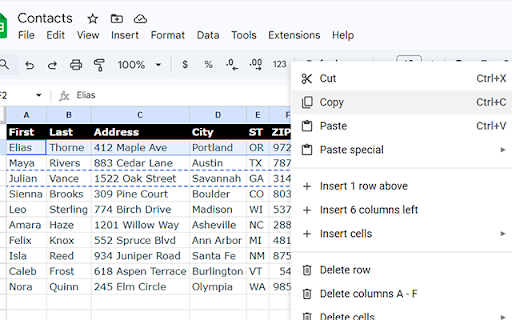
The Tabbed Copy/Paste to Form Fields extension allows you to copy tabbed content -  such as from an html table or a spreadsheet - and then paste it into a web form skipping to the next field for each tab.

Simply copy the content, place your mouse in the first field to receive the content, then right-click to select the "Paste Tabbed Data" option.

If you like it and it's useful, feel free to buy me a coffee!
- May 10, 2026short_description
(empty)
Paste tabbed content from the clipboard across multiple form fields from the context menu
- May 10, 2026name
Unknown
Tabbed Copy/Paste to Form Fields
- May 10, 2026category
(empty)
productivity/tools
- May 10, 2026host_permissions
(empty)
*://*/*
- May 10, 2026permissions
(empty)
contextMenus, clipboardRead, activeTab, scripting
- Apr 17, 2026description
The Tabbed Copy/Paste to Form Fields extension allows you to copy tabbed content -  such as from an html table or a spreadsheet - and then paste it into a web form skipping to the next field for each tab.

Simply copy the content, place your mouse in the first field to receive the content, then right-click to select the "Paste Tabbed Data" option.

If you like it and it's useful, feel free to buy me a coffee!
(empty)
- Apr 17, 2026short_description
Paste tabbed content from the clipboard across multiple form fields from the context menu
(empty)
- Apr 17, 2026name
Tabbed Copy/Paste to Form Fields
Unknown
- Apr 17, 2026category
productivity/tools
(empty)
- Apr 17, 2026host_permissions
*://*/*
(empty)
- Apr 17, 2026permissions
contextMenus, clipboardRead, activeTab, scripting
(empty)
Permissions & access
- Permissions
- contextMenusclipboardReadactiveTabscripting
- Host access
- *://*/*
Screenshots


About
The Tabbed Copy/Paste to Form Fields extension allows you to copy tabbed content -  such as from an html table or a spreadsheet - and then paste it into a web form skipping to the next field for each tab.

Simply copy the content, place your mouse in the first field to receive the content, then right-click to select the "Paste Tabbed Data" option.

If you like it and it's useful, feel free to buy me a coffee!
Technical
- Version
- 1.0
- Manifest
- V3
- Size
- 15.62KiB
- Min Chrome
- 88
- Languages
- 1
- Featured
- No
Metadata
- ID
- njnpddmlhjcjofmfkiedikkklhbehcoj
- Developer ID
- uf77f9076b6f0ca34316637c48c6face3
- Developer Email
- [email protected]
- Created
- Mar 27, 2026
- Last Updated (Store)
- Mar 27, 2026
- Last Scraped
- Jun 11, 2026
- Website
- —
- Support URL
- https://jimjamdesign.com/
- Privacy Policy
- —
Data sourced from the Chrome Web Store · last verified Jun 11, 2026.