
Select and translate (Google or DeepL)
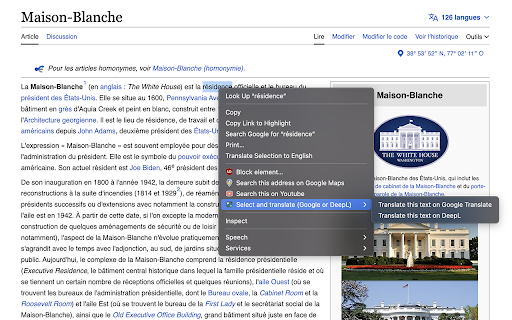
Select a text, right click and translate it on Google Translate or DeepL. Directly translate text found on a website with 2 clicks.
As of May 2026, Select and translate (Google or DeepL) has 205 users and a 5.00/5 rating from 1 reviews in the Productivity category.
Usersup 14.5 percent+14.5%
205
205
Ratingno change0%
5.00
1 reviews
Reviewsno change0%
1
Version
1.0
Manifest V3
History
3 snapshotsTracking since Apr 1, 2026.
View as table
| Date | Users | Rating | Reviews | Version |
|---|---|---|---|---|
| Apr 1, 2026 | 179 | — | — | 1.0 |
| Apr 30, 2026 | 188 | 5.00 | 1 | 1.0 |
| May 27, 2026 | 202 | 5.00 | 1 | 1.0 |
| Now | 205 | 5.00 | 1 | 1.0 |
Permissions & access
- Permissions
- contextMenus
- Host access
- None declared
Screenshots
About
This extension will add a button when you select and right click on a text. This button will ask if you want to translate on Google Translate or DeepL the text you selected.
No need to copy/paste and waste time.
Technical
- Version
- 1.0
- Manifest
- V3
- Size
- 705KiB
- Min Chrome
- 88
- Languages
- 1
- Featured
- Yes
Metadata
- ID
- njnnbglfjjljakkacbhjnhbdajpaiiad
- Developer ID
- u58720b4051267eae4ade5f45d65a8b45
- Developer Email
- [email protected]
- Created
- Sep 22, 2023
- Last Updated (Store)
- Sep 22, 2023
- Last Scraped
- May 27, 2026
- Website
- —
- Support URL
- —
- Privacy Policy
- —
Similar extensions
Alternatives to Select and translate (Google or DeepL), ranked by description similarity.

Youtube select and search
Select text, right click and search it on Youtube directly. Directly find a video from a text on a website with 2 clicks.
518
★ 5.0

Right-click Translate
Translate selected text from the context menu with multiple providers, targets, and quick preview.
74

Translator Helper
Translator Helper provides an easier and less distractive way to translate during browsing web pages.
126

Quick translator
Translate selected text on the screen
11

Simple Translate
Quickly translate selected or typed text on web pages. Supports Google Translate and DeepL API.
200.0K
★ 4.5

DeepL Переводчик
Перевод между английским и русским языками через DeepL API
89

dict.cc context menu
add a context-menu for dict.cc
1.0K
★ 4.8

Modern Context Menu
A modern context menu for quick actions like search and translate.
10
★ 4.0
Data sourced from the Chrome Web Store · last verified May 27, 2026.