
DraftGuard
DraftGuard saves form drafts locally, restores lost work, and helps you reuse your own saved answers with optional AI adaptation.
As of June 2026, DraftGuard has — users in the Productivity category.
Usersno change0%
—
—
Ratingno change0%
—
— reviews
Reviewsno change0%
—
Version
2.0.0
Manifest V3
90-day change · In the last 90 days this extension 1 version update.
History
2 snapshotsTracking since May 30, 2026.
Not enough history yet for this metric — the chart fills in as we collect more snapshots.
View as table
| Date | Users | Rating | Reviews | Version |
|---|---|---|---|---|
| May 30, 2026 | — | — | — | 1.0.0 |
| Jun 12, 2026 | — | — | — | 1.0.0 |
| Now | — | — | — | 2.0.0 |
Changelog
- Jun 12, 2026description
Never lose or retype anything online again.

Chrome remembers your address. DraftGuard remembers your answers.

DraftGuard auto-saves everything you type on any website, recovers lost work after crashes, timeouts, and refreshes, and helps you reuse your best answers on similar forms.

RECOVER
Auto-saves every keystroke in real time. Browser crash? Session timeout? Accidentally closed a tab? Your work is still there. One click to restore.

REUSE
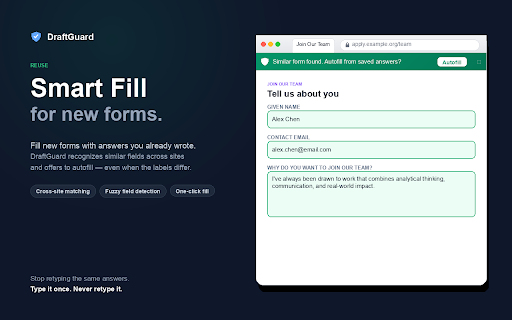
Saved a great answer on one application? DraftGuard recognizes similar forms and offers to autofill your previous responses. No copy-pasting between tabs.

AUTOFILL FROM HISTORY
Search everything you have ever typed online. Find old answers, copy them, or fill them directly into new forms.

WHO IS THIS FOR?
- Job seekers tired of retyping the same answers across dozens of applications
- Students filling out scholarship, college, and internship forms
- Freelancers responding to project briefs and client questionnaires
- Anyone who types important things into web forms

PRIVATE BY DESIGN
- All data stored locally on your device
- Never saves passwords or payment fields
- No accounts, no servers, no tracking
- Your writing never leaves your computer

Free: Auto-save on all sites, restore most recent draft, 7-day history
Founding Pro ($4.99 one-time): Unlimited history, search, smart fill, saved answer templates, favorites, export/import
Recover. Reuse. Draft in your voice. Ever lost a long application essay to a page crash? Or retyped the same answers across a dozen job forms? DraftGuard fixes both — and now it can draft brand-new answers in your own writing voice. 🔵 RECOVER — never lose work again DraftGuard auto-saves what you type into web forms every few seconds. If the page crashes, times out, or you navigate away, a recovery bar restores your work in one click. 100% local. 📋 REUSE — your best answers, everywhere Save a great cover letter or application answer once. On the next form, DraftGuard recognizes similar fields and offers to autofill from your saved answers — even when the labels differ ("First Name" vs "Given Name"). ✨ DRAFT IN YOUR VOICE (optional AI) Turn on Voice AI and DraftGuard learns your writing style and the facts you give it (your "Fact Vault"). Then, on any question, it can Adapt one of your saved answers or draft a brand-new one from your voice — grounded only in facts you've provided. It never invents awards, numbers, or employers; missing details appear as fill-in-the-blank placeholders. You always preview before anything is inserted — nothing auto-submits. WHY DRAFTGUARD? ✅ Local by default — recovery, autofill, history, and your profile never leave your device. AI is optional, off by default, and clearly marked. ✅ Private by design — no accounts, no trackers, no analytics. ✅ Skips sensitive fields — passwords, payment cards, CVV, SSN, and one-time codes are never captured, autofilled, or sent to AI. ✅ Your facts, your control — the Fact Vault is fully visible and editable; switch any fact off and it's never used. ✅ Works everywhere — Workday, Greenhouse, Lever, LinkedIn, Common App, university portals, contact forms, and more. PERFECT FOR Job seekers, students writing essays, freelancers answering RFPs, and anyone who hates retyping. HOW IT WORKS 1. Install — recovery + autofill start protecting your forms immediately. 2. Fill out any form; if you lose work, click Restore on the blue bar. 3. Save good answers to reuse later. 4. (Optional) Enable Voice AI in Settings, then use the ✨ chip to Adapt or Draft — preview, then insert. PRIVACY Recovery, autofill, history, and your profile are stored locally in your browser and never transmitted. The only data that leaves your device is when you explicitly use an AI feature: the form's question and relevant on-page context (excluding password / payment / CVV / SSN / OTP-2FA / hidden / file fields) are sent to DraftGuard's first-party proxy to generate that one result, then discarded — never stored, never sold, never used for tracking. Full policy: https://draftguardapp.com/privacy WHAT'S NEW IN 2.0 Voice AI: learn your writing voice and draft new answers from your own facts ("Draft from my voice"); Adapt saved answers to new questions; the Fact Vault (visible, editable, opt-in); dark mode; opt-in passive learning. All AI is off by default. - Jun 12, 2026short_description
Auto-saves everything you type online. Recover lost work, reuse answers on similar forms. 100% local.
DraftGuard saves form drafts locally, restores lost work, and helps you reuse your own saved answers with optional AI adaptation.
Permissions & access
- Permissions
- activeTabstoragealarmstabs
- Host access
- <all_urls>
Screenshots


About
Recover. Reuse. Draft in your voice.

Ever lost a long application essay to a page crash? Or retyped the same answers across a dozen job forms? DraftGuard fixes both — and now it can draft brand-new answers in your own writing voice.

🔵 RECOVER — never lose work again
DraftGuard auto-saves what you type into web forms every few seconds. If the page crashes, times out, or you navigate away, a recovery bar restores your work in one click. 100% local.

📋 REUSE — your best answers, everywhere
Save a great cover letter or application answer once. On the next form, DraftGuard recognizes similar fields and offers to autofill from your saved answers — even when the labels differ ("First Name" vs "Given Name").

✨ DRAFT IN YOUR VOICE (optional AI)
Turn on Voice AI and DraftGuard learns your writing style and the facts you give it (your "Fact Vault"). Then, on any question, it can Adapt one of your saved answers or draft a brand-new one from your voice — grounded only in facts you've provided. It never invents awards, numbers, or employers; missing details appear as fill-in-the-blank placeholders. You always preview before anything is inserted — nothing auto-submits.

WHY DRAFTGUARD?
✅ Local by default — recovery, autofill, history, and your profile never leave your device. AI is optional, off by default, and clearly marked.
✅ Private by design — no accounts, no trackers, no analytics.
✅ Skips sensitive fields — passwords, payment cards, CVV, SSN, and one-time codes are never captured, autofilled, or sent to AI.
✅ Your facts, your control — the Fact Vault is fully visible and editable; switch any fact off and it's never used.
✅ Works everywhere — Workday, Greenhouse, Lever, LinkedIn, Common App, university portals, contact forms, and more.

PERFECT FOR
Job seekers, students writing essays, freelancers answering RFPs, and anyone who hates retyping.

HOW IT WORKS
1. Install — recovery + autofill start protecting your forms immediately.
2. Fill out any form; if you lose work, click Restore on the blue bar.
3. Save good answers to reuse later.
4. (Optional) Enable Voice AI in Settings, then use the ✨ chip to Adapt or Draft — preview, then insert.

PRIVACY
Recovery, autofill, history, and your profile are stored locally in your browser and never transmitted. The only data that leaves your device is when you explicitly use an AI feature: the form's question and relevant on-page context (excluding password / payment / CVV / SSN / OTP-2FA / hidden / file fields) are sent to DraftGuard's first-party proxy to generate that one result, then discarded — never stored, never sold, never used for tracking. Full policy: https://draftguardapp.com/privacy

WHAT'S NEW IN 2.0
Voice AI: learn your writing voice and draft new answers from your own facts ("Draft from my voice"); Adapt saved answers to new questions; the Fact Vault (visible, editable, opt-in); dark mode; opt-in passive learning. All AI is off by default.
Technical
- Version
- 2.0.0
- Manifest
- V3
- Size
- 2.2MiB
- Min Chrome
- 88
- Languages
- 1
- Featured
- No
Metadata
- ID
- njjmfphifdpclglgmljjiegjijnajeap
- Developer ID
- ua19424f70d2d2565495248f2d56f0935
- Developer Email
- [email protected]
- Created
- May 29, 2026
- Last Updated (Store)
- Jun 8, 2026
- Last Scraped
- Jun 12, 2026
- Website
- —
- Support URL
- —
- Privacy Policy
- https://draftguardapp.com/privacy
Data sourced from the Chrome Web Store · last verified Jun 12, 2026.