
Sidebar Browser & Translate Minimalist
Open websites in Chrome's side panel with built-in translation. Bookmark, browse, and translate text inline.
As of June 2026, Sidebar Browser & Translate Minimalist has — users in the Productivity category.
Usersno change0%
—
—
Ratingno change0%
—
— reviews
Reviewsno change0%
—
Version
1.0.0
Manifest V3
History
1 snapshotsTracking since Jun 20, 2026.
Not enough history yet for this metric — the chart fills in as we collect more snapshots.
View as table
| Date | Users | Rating | Reviews | Version |
|---|---|---|---|---|
| Jun 20, 2026 | — | — | — | 1.0.0 |
| Now | — | — | — | 1.0.0 |
Permissions & access
- Permissions
- storagesidePaneldeclarativeNetRequestWithHostAccessscripting
- Host access
- <all_urls>
Screenshots
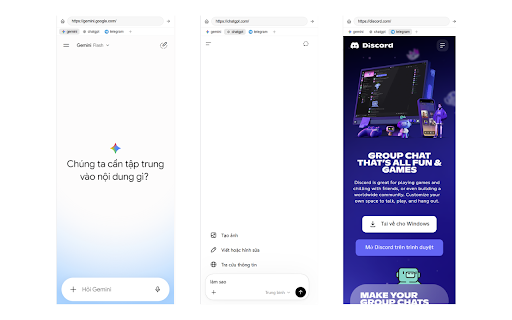


About
Sidebar Browser & Translate Minimalist turns Chrome's side panel into a persistent mini-browser. Open your favorite web apps side-by-side with what you're reading, switch between them without losing state, and translate any text on the fly — all without leaving your current tab.

WHY YOU NEED THIS EXTENSION:

✓ Browse in the Sidebar — Open any website (Telegram, ChatGPT, Notion, dictionaries, docs) inside Chrome's side panel. Keep it visible while you work in the main tab.

✓ Persistent Bookmarks — Pin your favorite sites. Each bookmark keeps its own state, so switching between them doesn't reload the page. Telegram keeps your chat, Google keeps your search, your notes stay where you left them.

✓ Built-in Translator — Select any text on any webpage and see the translation instantly in the sidebar. Double-click a word for quick lookup with phonetic transcription. Translate your own notes too.

✓ Reorder by Drag — Drag and drop bookmarks to rearrange them however you like. Your layout, your way.

✓ Always Starts at Home — Open the sidebar and land on a clean translate workspace. Your bookmarks are one click away.

✓ Zero Bloat — Minimalist design, system font, no clutter. Fast, quiet, gets out of your way.

KEY FEATURES:

PERSISTENT SIDEBAR BROWSER
• Open any URL in the side panel iframe
• Bookmark sites with one click — favicons auto-loaded
• Each bookmark runs in its own iframe — switching preserves state (no reload)
• Drag bookmarks to reorder
• Home button resets to a clean workspace
• Smart URL bar: type a URL to navigate, or type keywords to search Google

INSTANT TRANSLATION (16 LANGUAGES)
• Select text on any webpage → translation appears in the Paragraph pane
• Double-click a word → word + phonetic + translation in the Word pane
• Notes pane auto-translates what you type
• Supports Vietnamese, English, Chinese, French, German, Japanese, Korean, Russian, Spanish, Portuguese, Italian, Thai, Indonesian, Malay, Arabic, Hindi
• Source language auto-detected — no manual setup

PRONUNCIATION HELP
• Phonetic transcription for English words (IPA)
• Click the speaker icon to hear pronunciation
• Works on both paragraph and word translations

SMART URL HANDLING
• Type "google" → searches Google
• Type "chatgpt.com" → navigates directly
• Clear the URL bar and press Enter → back to Home

PERFECT FOR:

Researchers — Keep reference sites, translators, and dictionaries open alongside your reading.
Language Learners — Instant word lookup with phonetics and pronunciation while browsing foreign content.
Multitaskers — Chat on Telegram, check ChatGPT, take notes — all without switching tabs.
Minimalists — One quiet sidebar that does browsing and translation without the noise.

PRIVACY FIRST:

• All bookmarks and notes stored locally in your browser
• Translation requests go directly to Google Translate (no middleman server)
• No tracking, no analytics, no accounts
• Phonetic data from the free dictionaryapi.dev

KEYBOARD & MOUSE:

• Click extension icon — toggle sidebar open/closed
• Click Home — clean translate workspace
• Double-click word on any page — quick word lookup
• Select text on any page — paragraph translation
• Select text inside the Paragraph pane — drill down to word translation
• Drag bookmarks — reorder

Try it now and turn your sidebar into the most useful panel in your browser.
Technical
- Version
- 1.0.0
- Manifest
- V3
- Size
- 12.99KiB
- Min Chrome
- 114
- Languages
- 1
- Featured
- No
Metadata
- ID
- njbjhijidkjaiakmnbdjmolgffoankbc
- Developer ID
- u815b130d19cbe0c277698b0e4b2579dc
- Developer Email
- [email protected]
- Created
- Jun 19, 2026
- Last Updated (Store)
- Jun 19, 2026
- Last Scraped
- Jun 20, 2026
- Website
- https://quoc.app/
- Support URL
- https://quoc.app/
- Privacy Policy
- —
Data sourced from the Chrome Web Store · last verified Jun 20, 2026.