
SnapShotz — Full Page Capture for AI Workflows
One-click full-page screenshots. Sharp chunks, clipboard-ready, AI-friendly.
As of June 2026, SnapShotz — Full Page Capture for AI Workflows has — users in the Developer Tools category.
Usersno change0%
—
—
Ratingno change0%
—
— reviews
Reviewsno change0%
—
Version
2.0.0
Manifest V3
History
1 snapshotsTracking since May 31, 2026.
Not enough history yet for this metric — the chart fills in as we collect more snapshots.
View as table
| Date | Users | Rating | Reviews | Version |
|---|---|---|---|---|
| May 31, 2026 | — | — | — | 2.0.0 |
| Now | — | — | — | 2.0.0 |
Changelog
- Jun 6, 2026description
Stop screenshotting one viewport at a time. SnapShotz captures any webpage as sharp, pasteable chunks built for the way you actually use AI. 🎯
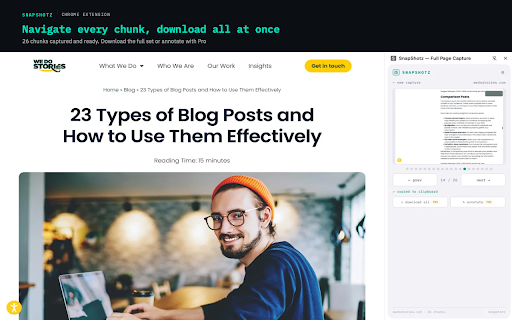
Instead of one tall compressed image nobody can read, SnapShotz splits full pages into crisp viewport-sized screenshots that paste beautifully into Claude, ChatGPT, Gemini, or any AI chat.

⚡ HOW IT WORKS
📌 Open the side panel. It stays pinned while you switch tabs.
📸 Click CAPTURE on any page.
🔄 Step through chunks. Each one auto-copies to clipboard.
💬 Paste directly into your AI chat and ask away.

🆓 FREE TIER
✓ 4 captures per day
✓ Full-page scroll capture
✓ Chunk navigator with auto-copy
✓ Side panel that stays open across tabs

👑 PRO — $9.99 ONE-TIME (launch price)
✓ Unlimited daily captures
✓ Download All chunks as numbered PNGs in one click
✓ Annotation layer with arrows, boxes, and text
✓ Chunk selector to jump to any chunk instantly
✓ Organized download folders by site or date
✓ No subscription. Ever. 🙌
Standard price returns to $19.99 after launch. Early adopters lock in $9.99 for life.

🔒 PRIVACY FIRST
Everything stays on your machine. Screenshots are never uploaded or shared with anyone. The only network call SnapShotz makes is to verify your license key. That's it.

⚠️ LIMITATIONS
Cannot capture chrome:// pages or the Chrome Web Store. This is a Chrome security restriction that applies to all extensions, not specific to SnapShotz.
Stop screenshotting one viewport at a time. SnapShotz captures any webpage as sharp, pasteable chunks built for the way you actually use AI. 🎯
Instead of one tall compressed image nobody can read, SnapShotz splits full pages into crisp viewport-sized screenshots that paste beautifully into Claude, ChatGPT, Gemini, or any AI chat.

⚡ HOW IT WORKS
📌 Open the side panel. It stays pinned while you switch tabs.
📸 Click CAPTURE on any page.
🔄 Step through chunks. Each one auto-copies to clipboard.
💬 Paste directly into your AI chat and ask away.

🆓 FREE TIER
✓ 4 captures per day
✓ Full-page scroll capture
✓ Chunk navigator with auto-copy
✓ Side panel that stays open across tabs

👑 PRO — $7.99 ONE-TIME (launch price)
✓ Unlimited daily captures
✓ Download All chunks as numbered PNGs in one click
✓ Annotation layer with arrows, boxes, and text
✓ Chunk selector to jump to any chunk instantly
✓ Organized download folders by site or date
✓ No subscription. Ever. 🙌
Standard price returns to $14.99 after launch. Early adopters lock in $7.99 for life.

🔒 PRIVACY FIRST
Everything stays on your machine. Screenshots are never uploaded or shared with anyone. The only network call SnapShotz makes is to verify your license key. That's it.

⚠️ LIMITATIONS
Cannot capture chrome:// pages or the Chrome Web Store. This is a Chrome security restriction that applies to all extensions, not specific to SnapShotz.
Permissions & access
- Permissions
- activeTabscriptingdownloadstabsclipboardWritestorageunlimitedStoragesidePanelwindows
- Host access
- <all_urls>
Screenshots



About
Stop screenshotting one viewport at a time. SnapShotz captures any webpage as sharp, pasteable chunks built for the way you actually use AI. 🎯
Instead of one tall compressed image nobody can read, SnapShotz splits full pages into crisp viewport-sized screenshots that paste beautifully into Claude, ChatGPT, Gemini, or any AI chat.

⚡ HOW IT WORKS
📌 Open the side panel. It stays pinned while you switch tabs.
📸 Click CAPTURE on any page.
🔄 Step through chunks. Each one auto-copies to clipboard.
💬 Paste directly into your AI chat and ask away.

🆓 FREE TIER
✓ 4 captures per day
✓ Full-page scroll capture
✓ Chunk navigator with auto-copy
✓ Side panel that stays open across tabs

👑 PRO — $7.99 ONE-TIME (launch price)
✓ Unlimited daily captures
✓ Download All chunks as numbered PNGs in one click
✓ Annotation layer with arrows, boxes, and text
✓ Chunk selector to jump to any chunk instantly
✓ Organized download folders by site or date
✓ No subscription. Ever. 🙌
Standard price returns to $14.99 after launch. Early adopters lock in $7.99 for life.

🔒 PRIVACY FIRST
Everything stays on your machine. Screenshots are never uploaded or shared with anyone. The only network call SnapShotz makes is to verify your license key. That's it.

⚠️ LIMITATIONS
Cannot capture chrome:// pages or the Chrome Web Store. This is a Chrome security restriction that applies to all extensions, not specific to SnapShotz.
Technical
- Version
- 2.0.0
- Manifest
- V3
- Size
- 25.9KiB
- Min Chrome
- 88
- Languages
- 1
- Featured
- No
Metadata
- ID
- nipfdohdfpcigcmfdclojpkcledecahe
- Developer ID
- uc96fcdf2d914b1a9ad46f02419fdf543
- Developer Email
- [email protected]
- Created
- May 30, 2026
- Last Updated (Store)
- Jun 2, 2026
- Last Scraped
- Jun 6, 2026
- Website
- —
- Support URL
- —
- Privacy Policy
- https://getsnapshotz.com/privacy
Data sourced from the Chrome Web Store · last verified Jun 6, 2026.