
Split Long Text for Chat GPT
Split Long Text for Chat GPT
As of May 2026, Split Long Text for Chat GPT has 5,000 users and a 3.50/5 rating from 16 reviews in the Workflow & Planning category.
Usersdown 16.7 percent−16.7%
5.0K
5,000
Ratingno change0%
3.50
16 reviews
Reviewsno change0%
16
Version
1.0
Manifest V3
90-day change · In the last 90 days this extension lost 1.0K users.
History
2 snapshotsTracking since Apr 30, 2026.
View as table
| Date | Users | Rating | Reviews | Version |
|---|---|---|---|---|
| Apr 30, 2026 | 6.0K | 3.50 | 16 | 1.0 |
| May 27, 2026 | 6.0K | 3.50 | 16 | 1.0 |
| Now | 5.0K | 3.50 | 16 | 1.0 |
Permissions & access
- Permissions
- activeTabscripting
- Host access
- None declared
Screenshots

About
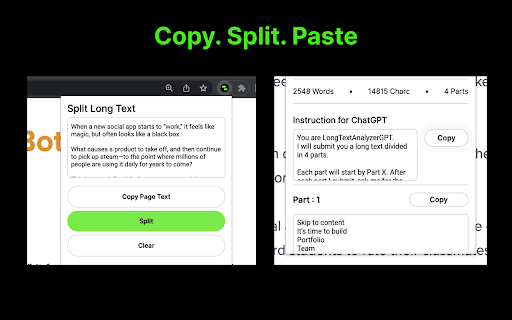
Easily split a long text, and paste each part in your chat with GPT.

***
Introducing Split Long Text for Chat GPT – a must-have Chrome extension for all Chat GPT users. If you ever wanted to easily feed long text, over 4000 characters, to your chat with GPT, this extension is the perfect solution to save time and effort. No more struggling to manually divide your text; Split Long Text will do it for you in just a few simple steps.

How to use Split Long Text for Chat GPT:

1. Install and open the Split Long Text Chrome extension.
2. Click on the "Copy Page" button to start the process.
3. The extension will automatically divide the long text into manageable parts.
4. Copy each part one by one, and paste it seamlessly into your chat with GPT.

Experience the ease and convenience of interacting with your AI model without the character limit constraints. With Split Long Text, you can focus on what matters most – getting valuable insights from your AI-powered conversations.

Key Features:

• Hassle-free splitting of long text exceeding 4000 characters.
• User-friendly interface for quick and easy copying and pasting.
• Time-saving solution for an efficient Chat GPT experience.

Please note that Split Long Text for Chat GPT is not provided or endorsed by OpenAI. It is an independent extension designed to enhance your Chat GPT user experience.

Don't miss out on the opportunity to simplify your Chat GPT interactions. Install the Split Long Text for Chat GPT Chrome extension now and revolutionize the way you engage with your AI model. Click the "Add to Chrome" button and unlock a smoother, more streamlined Chat GPT experience today!
Technical
- Version
- 1.0
- Manifest
- V3
- Size
- 75.96KiB
- Min Chrome
- 88
- Languages
- 1
- Featured
- Yes
Metadata
- ID
- ninfbacppokhhaekjbgfhemhmlalfmmn
- Developer ID
- uf7596041621979d824bec50a8e42d7a6
- Developer Email
- [email protected]
- Created
- Mar 24, 2023
- Last Updated (Store)
- Mar 26, 2023
- Last Scraped
- May 27, 2026
- Website
- —
- Support URL
- https://www.splitlongtext.com/help
- Privacy Policy
- https://www.splitlongtext.com/privacy
Similar extensions
Alternatives to Split Long Text for Chat GPT, ranked by description similarity.

Chunkyfy for ChatGPT
An extension to divide large texts into chunks for ChatGPT
502
★ 4.3
Scribe GPT
Download ChatGPT conversations as text files.
170

ChatGPT to PNG
Capture ChatGPT conversations as a single long vertical image.
273
★ 1.3

ChatGPT, Gemini, Claude Chat Export & Navigator
Download and export ChatGPT, Gemini, and Claude conversations in PDF, Markdown, JSON, HTML, or Text, plus smart prompt navigation.
2.0K
★ 4.9

ChatGPT Helper - GPTab
Supercharge your ChatGPT experience with the ChatGPT Helper - GPTab Chrome Extension!
28
★ 5.0

ChatClipper
It provides a function to copy conversations in ChatGPT as images to the clipboard
49
★ 5.0

ChatGPT File Uploader & Conversation Saver
Help you upload files to ChatGPT and save ChatGPT conversation as pdf.
7.0K
★ 3.0

ChatGPT Conversation Exporter
A simple extension to export ChatGPT conversation as an HTML file.
366
★ 3.4
Data sourced from the Chrome Web Store · last verified May 27, 2026.