
Text Field Auto-Save & Recover
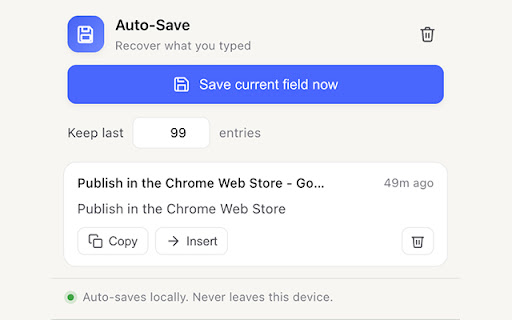
Automatically saves what you type in text fields so you can recover it after a crash, reload, or accidental close.
As of June 2026, Text Field Auto-Save & Recover has 5 users in the Productivity category.
Usersno change0%
5
5
Ratingno change0%
—
— reviews
Reviewsno change0%
—
Version
1.0.0
Manifest V3
History
3 snapshotsTracking since May 11, 2026.
View as table
| Date | Users | Rating | Reviews | Version |
|---|---|---|---|---|
| May 11, 2026 | — | — | — | 1.0.0 |
| May 16, 2026 | — | — | — | 1.0.0 |
| May 29, 2026 | 3 | — | — | 1.0.0 |
| Now | 5 | — | — | 1.0.0 |
Permissions & access
- Permissions
- storageunlimitedStorageactiveTab
- Host access
- <all_urls>
Screenshots
About
Automatically saves what you type in text fields so you can recover it after a crash, reload, or accidental close. Restores fields automatically and shows a blue modal at the particular text field. Works also in Typeform. Make sure that you increase the amount of entries to be saved, so that also complex multi-step form content is saved. Default 10 entries. Entries are saved 100% locally and never leave your device. The extensions does not connect to any online services or APIs and does not send or collect telemetry. Privacy summary: zero network requests; no telemetry; no analytics; no remote code; no chrome.storage.sync. Password fields are never captured (type="password" is excluded at the field-detector level). All saved drafts and settings live in the user's local browser profile.
Technical
- Version
- 1.0.0
- Manifest
- V3
- Size
- 20.34KiB
- Min Chrome
- 88
- Languages
- 1
- Featured
- No
Metadata
- ID
- nijcoejahdgilhlplcleaoaopmilcanf
- Developer ID
- ud5f3bc7785be8798266e897ab18bac38
- Developer Email
- [email protected]
- Created
- May 10, 2026
- Last Updated (Store)
- May 10, 2026
- Last Scraped
- Jun 11, 2026
- Website
- —
- Support URL
- —
- Privacy Policy
- —
Data sourced from the Chrome Web Store · last verified Jun 11, 2026.