
KeepTabs
Save tabs into named folders, close them, and reopen anytime. No account, no servers — your data stays on your device.
As of June 2026, KeepTabs has — users in the Workflow & Planning category.
Usersno change0%
—
—
Ratingno change0%
—
— reviews
Reviewsno change0%
—
Version
0.1.2
Manifest V3
History
1 snapshotsTracking since Jun 30, 2026.
Not enough history yet for this metric — the chart fills in as we collect more snapshots.
View as table
| Date | Users | Rating | Reviews | Version |
|---|---|---|---|---|
| Jun 30, 2026 | — | — | — | 0.1.2 |
| Now | — | — | — | 0.1.2 |
Permissions & access
- Permissions
- tabsstorage
- Host access
- None declared
Screenshots
About
Drowning in open tabs you can't close because you might need them later?

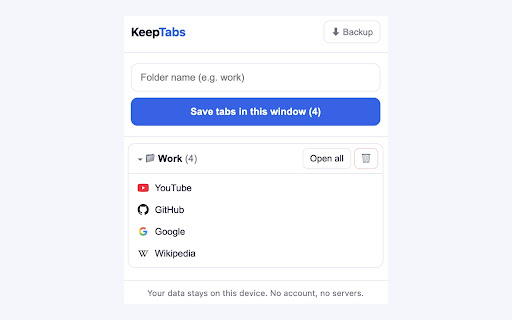
KeepTabs lets you save a whole window of tabs into a named folder ("work", "research", "shopping"), close them to clear the clutter, and reopen the folder — or any single tab — whenever you want.

What makes KeepTabs different:

• 🗂️ Named folders — organize saved tabs the way you think
• ↩️ One-click reopen — bring back a whole folder or a single tab
• 💾 One-click backup — export everything to a JSON file, so you never lose your tabs
• 🔒 100% local — no account, no sign-in, no servers. Your data stays on your device.
• 🚫 No tracking, no ads
• 🌗 Light & dark — automatically matches your system theme

Many tab managers lose your saved tabs, force you to create an account, or hide basic features behind a paywall. KeepTabs is the honest opposite: simple, private, and yours.

Your tabs. Your device. Kept.
Technical
- Version
- 0.1.2
- Manifest
- V3
- Size
- 10.78KiB
- Min Chrome
- 88
- Languages
- 1
- Featured
- No
Metadata
- ID
- nijbfneffphambkhnpfjldfdhkikgmkl
- Developer ID
- uac955e7600c3ab7ca91001df0723a116
- Developer Email
- [email protected]
- Created
- Jun 29, 2026
- Last Updated (Store)
- Jun 29, 2026
- Last Scraped
- Jun 30, 2026
- Website
- —
- Support URL
- —
Data sourced from the Chrome Web Store · last verified Jun 30, 2026.