
BizzyDesk extension
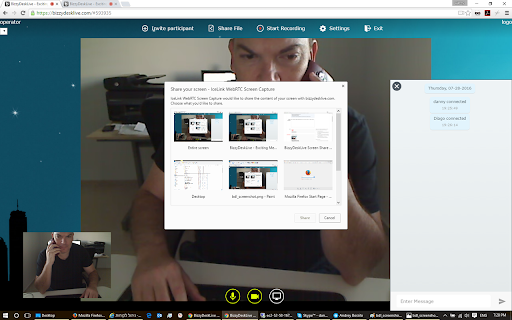
With this extension you will be able to provide Remote Control to other participants in BizzyDesk meetings
As of May 2026, BizzyDesk extension has 49 users in the Social & Communication category.
Usersup 11.4 percent+11.4%
49
49
Ratingno change0%
—
— reviews
Reviewsno change0%
—
Version
2.10.5
Manifest V3
History
3 snapshotsTracking since Apr 1, 2026.
View as table
| Date | Users | Rating | Reviews | Version |
|---|---|---|---|---|
| Apr 1, 2026 | 44 | — | — | 2.10.5 |
| Apr 30, 2026 | 46 | — | — | 2.10.5 |
| May 27, 2026 | 47 | — | — | 2.10.5 |
| Now | 49 | — | — | 2.10.5 |
Permissions & access
- Permissions
- tabsnativeMessagingscripting
- Host access
- https://*.maspick.co.il/*, https://*.bizzydesk.com/*
Screenshots
About
This is our essential Chrome extension, which is designed to facilitate secure and efficient communication between the browser and a dedicated native application. This native application is integral to the Remote Control (RC) feature that our customers rely on for seamless screen sharing and remote management.

Purpose and Functionality:
Our extension uses the nativeMessaging API to establish a communication channel between the web-based interface and our native C++ application. This setup allows the extension to transmit commands and receive responses in real-time, enabling functionalities such as starting or stopping screen broadcasting, managing user sessions, and granting or revoking remote control access to specific users. The native application is responsible for executing these commands, interfacing directly with the operating system to manage screen capture, input control, and other critical operations that cannot be handled purely within the browser environment.

Technical Implementation:
The communication between the extension and the native application is handled through standard input/output pipes (stdin/stdout). This method ensures that data is securely transmitted between the two processes, with strict controls over what information is sent and received. The native application only processes predefined commands from the extension, reducing the risk of unauthorized actions or data leakage.

The nativeMessaging API is utilized exclusively for this communication. No other communication channels or third-party services are involved, ensuring that user data remains secure and confined to the user's local environment. The extension does not access or transmit any data beyond what is necessary to perform its intended functions, and all interactions are logged and monitored to ensure transparency and security.

Security Measures:
To safeguard user privacy, the extension employs several security measures:

Restricted Access: The nativeMessaging API is configured to only communicate with our specific native application, which is deployed securely alongside the extension. This ensures that no other applications can misuse the communication channel.
Data Minimization: The extension only transmits essential data needed to execute the RC features. No personal information, browsing data, or other unrelated data is accessed or transmitted.
User Control: Users have full control over when and how the extension interacts with the native application. The extension only activates the nativeMessaging channel in response to user actions, such as initiating a remote control session.
Compliance with Chrome Web Store Policies:
Our use of the nativeMessaging permission is fully compliant with Chrome Web Store policies. We request this permission because it is the narrowest and most appropriate permission available to achieve the extension’s purpose. Without this permission, the extension would be unable to provide the RC functionalities that are central to its purpose. We do not use this permission to access any additional data or perform any actions beyond the scope of the RC feature.

We understand the importance of adhering to the principle of least privilege, and we have carefully designed the extension to ensure that the nativeMessaging permission is used in a secure, limited, and transparent manner. This approach not only aligns with Google’s best practices but also ensures that our users can trust the extension to operate securely and reliably.

Future Updates and Continuous Improvement:
We are committed to continuously improving the security and functionality of our extension. We regularly review our use of permissions and update the extension to ensure ongoing compliance with Chrome Web Store policies and industry best practices. Any future enhancements to the extension will be carefully evaluated to ensure they align with our commitment to security, privacy, and user control.
Technical
- Version
- 2.10.5
- Manifest
- V3
- Size
- 12.54KiB
- Min Chrome
- 88
- Languages
- 2
- Featured
- No
Metadata
- ID
- nifacomhbhkofkfkeialaakkpngjfihc
- Developer ID
- ue828e8dce76ace56fa81c84898ac955c
- Developer Email
- [email protected]
- Created
- May 30, 2016
- Last Updated (Store)
- Aug 27, 2024
- Last Scraped
- May 27, 2026
- Website
- —
- Support URL
- —
- Privacy Policy
- —
Similar extensions
Alternatives to BizzyDesk extension, ranked by description similarity.

Chat Multi Messenger
Merges all Social Media chats in one App. Support for twitter, tiktok, telegram and many more! Direct message DM your friends!
2.0K
★ 3.6

AI VPN
Secure and fast AI-powered VPN extension
144
★ 1.3

White Messenger
Skype for Web. Microsoft Skype App Lite for Google Chrome. Messages, SMS, Calls, Video-Calls, Share, Profile, Contacts on Browser.
413
★ 5.0

Work Hub for Teams
Manage your team on this low profile client for Microsoft Teams. Meetings, calls, video available on mobile looking App.
734
★ 5.0

Web for Google Messages
Access to Chat - Android Messages on Desktop Computer. Google Messages for Web. Plus Google Meet for calls and video-calls.
10.0K
★ 3.3

Netvyne Extension
Comment, share, and discuss your favorite websites.
50
★ 5.0

Web for Telegram
Easy access to Telegram for Chrome. Notifications for incoming messages. Share and Save Telegram. Messenger
40.0K
★ 3.3

Local-Chat
Introducing a powerful Chrome extension that brings real-time, location-based messaging right to your fingertips! With this…
—
Data sourced from the Chrome Web Store · last verified May 27, 2026.