
GIF Control
Stop animated images from autoplaying and play them when you choose.
As of June 2026, GIF Control has 8 users in the Functionality & UI category.
Usersno change0%
8
8
Ratingno change0%
—
— reviews
Reviewsno change0%
—
Version
1.1.5
Manifest V3
90-day change · In the last 90 days this extension 4 version updates.
History
8 snapshotsTracking since Apr 17, 2026.
View as table
| Date | Users | Rating | Reviews | Version |
|---|---|---|---|---|
| Apr 17, 2026 | — | — | — | 1.0.0 |
| Apr 22, 2026 | — | — | — | 1.0.0 |
| Apr 27, 2026 | — | — | — | 1.1.0 |
| May 10, 2026 | — | — | — | 1.1.3 |
| May 15, 2026 | 4 | — | — | 1.1.4 |
| May 21, 2026 | 5 | — | — | 1.1.4 |
| Jun 4, 2026 | 5 | — | — | 1.1.5 |
| Jun 9, 2026 | 6 | — | — | 1.1.5 |
| Now | 8 | — | — | 1.1.5 |
Changelog
- May 10, 2026description
➤ What it does
GIF Control stops animated images from autoplaying and lets you play them when you choose. No more distractions, no more unexpected motion.


➤ How it works
When an animated image is detected, it is stopped by default and its first frame is shown. A play button appears so you can start the animation manually, and stop it again whenever you want.


➤ Features
• Stops autoplay on animated images (GIF and WebP)
• Play and stop controls on the image
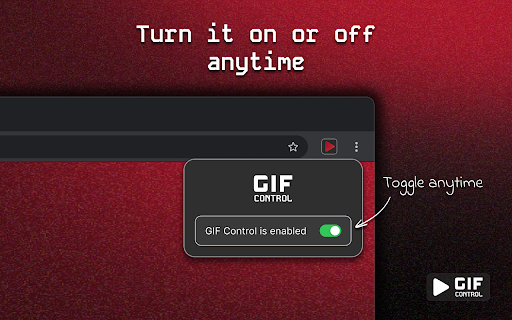
• Enable or disable the extension anytime from the popup
• Lightweight and minimal


➤ Maintenance
GIF Control is actively maintained.
Latest version: 1.1.3, released April 25, 2026
Changelog: https://neonglow.studio/gif-control/#changelog


➤ Privacy
GIF Control works locally in your browser. It does not collect, store, sell, or share personal information.
• Works locally in your browser
• No personal data collection
• No browsing history tracking for advertising or profiling
• No analytics, remote code, or third-party advertising
• No user data is sold or transferred to third parties
View Privacy Policy: https://neonglow.studio/gif-control/#privacy-policy


➤ Links
• About: https://neonglow.studio/gif-control
• Report a bug: https://neonglow.studio/gif-control/#bug-report
• Changelog: https://neonglow.studio/gif-control/#changelog
• Contact: https://neonglow.studio/gif-control/#contact
• Privacy Policy: https://neonglow.studio/gif-control/#privacy-policy


➤ About the creator
Neon Glow is a product studio for building great software. A place to experiment, release, and showcase software.
Website: https://neonglow.studio
➤ What it does
GIF Control stops animated images from autoplaying and lets you play them when you choose. No more distractions, no more unexpected motion.


➤ How it works
When an animated image is detected, it is stopped by default and its first frame is shown. A play button appears so you can start the animation manually, and stop it again whenever you want.


➤ Features
• Stops autoplay on animated images (GIF and WebP)
• Play and stop controls on the image
• Enable or disable the extension anytime from the popup
• Lightweight and minimal


➤ Maintenance
GIF Control is actively maintained.
• Changelog: https://neonglow.studio/gif-control/#changelog
• Report a bug: https://neonglow.studio/gif-control/#bug-report


➤ Privacy
GIF Control works locally in your browser. It does not collect, store, sell, or share personal information.
• Works locally in your browser
• No personal data collection
• No browsing history tracking for advertising or profiling
• No analytics, remote code, or third-party advertising
• No user data is sold or transferred to third parties
View Privacy Policy: https://neonglow.studio/gif-control/#privacy-policy


➤ Links
• About: https://neonglow.studio/gif-control
• Report a bug: https://neonglow.studio/gif-control/#bug-report
• Changelog: https://neonglow.studio/gif-control/#changelog
• Contact: https://neonglow.studio/gif-control/#contact
• Privacy Policy: https://neonglow.studio/gif-control/#privacy-policy


➤ About the creator
Neon Glow is a product studio for building great software. A place to experiment, release, and showcase software.
Website: https://neonglow.studio
- Apr 27, 2026description
➤ What it does
GIF Control stops animated images from autoplaying and lets you play them when you choose. No more distractions, no more unexpected motion.


➤ How it works
When an animated image is detected, it is stopped by default and its first frame is shown. A play button appears so you can start the animation manually, and stop it again whenever you want.


➤ Features
• Stops autoplay on animated images (GIF and WebP)
• Play and stop controls on the image
• Enable or disable the extension anytime from the popup
• Lightweight and minimal


➤ Maintenance
GIF Control is actively maintained.
Latest version: 1.1.0, released April 17, 2026
Changelog: https://neonglow.studio/gif-control/#changelog


➤ Links
• About: https://neonglow.studio/gif-control
• Report a bug: https://neonglow.studio/gif-control/#bug-report
• Changelog: https://neonglow.studio/gif-control/#changelog
• Contact: https://neonglow.studio/gif-control/#contact
• Privacy Policy: https://neonglow.studio/gif-control/#privacy-policy


➤ About the creator
Neon Glow is a product studio for building great software. A place to experiment, release, and showcase software.
Website: https://neonglow.studio
➤ What it does
GIF Control stops animated images from autoplaying and lets you play them when you choose. No more distractions, no more unexpected motion.


➤ How it works
When an animated image is detected, it is stopped by default and its first frame is shown. A play button appears so you can start the animation manually, and stop it again whenever you want.


➤ Features
• Stops autoplay on animated images (GIF and WebP)
• Play and stop controls on the image
• Enable or disable the extension anytime from the popup
• Lightweight and minimal


➤ Maintenance
GIF Control is actively maintained.
Latest version: 1.1.3, released April 25, 2026
Changelog: https://neonglow.studio/gif-control/#changelog


➤ Privacy
GIF Control works locally in your browser. It does not collect, store, sell, or share personal information.
• Works locally in your browser
• No personal data collection
• No browsing history tracking for advertising or profiling
• No analytics, remote code, or third-party advertising
• No user data is sold or transferred to third parties
View Privacy Policy: https://neonglow.studio/gif-control/#privacy-policy


➤ Links
• About: https://neonglow.studio/gif-control
• Report a bug: https://neonglow.studio/gif-control/#bug-report
• Changelog: https://neonglow.studio/gif-control/#changelog
• Contact: https://neonglow.studio/gif-control/#contact
• Privacy Policy: https://neonglow.studio/gif-control/#privacy-policy


➤ About the creator
Neon Glow is a product studio for building great software. A place to experiment, release, and showcase software.
Website: https://neonglow.studio
- Apr 22, 2026description
GIF Control stops animated images from autoplaying and lets you play them when you choose. No more distractions, no more unexpected motion.


➤ How it works
When an animated image is detected, it is paused by default and replaced with a simple control. You can choose when to play or stop it with a clear play/stop button.


➤ Features
• Stops autoplay on animated images (GIF and WebP)
• Play and stop controls on the image
• Enable or disable the extension anytime from the popup
• Lightweight and minimal


➤ Links
• About: https://neonglow.studio/gif-control
• Report a bug: https://neonglow.studio/gif-control/#bug-report
• Changelog: https://neonglow.studio/gif-control/#changelog
• Contact: https://neonglow.studio/gif-control/#contact
• Privacy Policy: https://neonglow.studio/gif-control/#privacy-policy


➤ About the creator
Neon Glow is a product studio for building great software. A place to experiment, release, and showcase software.
Website: https://neonglow.studio
➤ What it does
GIF Control stops animated images from autoplaying and lets you play them when you choose. No more distractions, no more unexpected motion.


➤ How it works
When an animated image is detected, it is stopped by default and its first frame is shown. A play button appears so you can start the animation manually, and stop it again whenever you want.


➤ Features
• Stops autoplay on animated images (GIF and WebP)
• Play and stop controls on the image
• Enable or disable the extension anytime from the popup
• Lightweight and minimal


➤ Maintenance
GIF Control is actively maintained.
Latest version: 1.1.0, released April 17, 2026
Changelog: https://neonglow.studio/gif-control/#changelog


➤ Links
• About: https://neonglow.studio/gif-control
• Report a bug: https://neonglow.studio/gif-control/#bug-report
• Changelog: https://neonglow.studio/gif-control/#changelog
• Contact: https://neonglow.studio/gif-control/#contact
• Privacy Policy: https://neonglow.studio/gif-control/#privacy-policy


➤ About the creator
Neon Glow is a product studio for building great software. A place to experiment, release, and showcase software.
Website: https://neonglow.studio
Permissions & access
- Permissions
- storage
- Host access
- <all_urls>
Screenshots


About
➤ What it does
GIF Control stops animated images from autoplaying and lets you play them when you choose. No more distractions, no more unexpected motion.


➤ How it works
When an animated image is detected, it is stopped by default and its first frame is shown. A play button appears so you can start the animation manually, and stop it again whenever you want.


➤ Features
• Stops autoplay on animated images (GIF and WebP)
• Play and stop controls on the image
• Enable or disable the extension anytime from the popup
• Lightweight and minimal


➤ Maintenance
GIF Control is actively maintained.
• Changelog: https://neonglow.studio/gif-control/#changelog
• Report a bug: https://neonglow.studio/gif-control/#bug-report


➤ Privacy
GIF Control works locally in your browser. It does not collect, store, sell, or share personal information.
• Works locally in your browser
• No personal data collection
• No browsing history tracking for advertising or profiling
• No analytics, remote code, or third-party advertising
• No user data is sold or transferred to third parties
View Privacy Policy: https://neonglow.studio/gif-control/#privacy-policy


➤ Links
• About: https://neonglow.studio/gif-control
• Report a bug: https://neonglow.studio/gif-control/#bug-report
• Changelog: https://neonglow.studio/gif-control/#changelog
• Contact: https://neonglow.studio/gif-control/#contact
• Privacy Policy: https://neonglow.studio/gif-control/#privacy-policy


➤ About the creator
Neon Glow is a product studio for building great software. A place to experiment, release, and showcase software.
Website: https://neonglow.studio
Technical
- Version
- 1.1.5
- Manifest
- V3
- Size
- 77.84KiB
- Min Chrome
- 88
- Languages
- 1
- Featured
- No
Metadata
- ID
- nhoihinodlhjpecbcpgfahddcdgbbimn
- Developer ID
- u45c78697b78f16275313232ececc12b1
- Developer Email
- [email protected]
- Created
- Apr 16, 2026
- Last Updated (Store)
- May 20, 2026
- Last Scraped
- Jun 9, 2026
- Website
- neonglow.studio
- Support URL
- https://neonglow.studio/gif-control/#contact
- Privacy Policy
- https://neonglow.studio/gif-control/
Data sourced from the Chrome Web Store · last verified Jun 9, 2026.