
CalendarKit
Instant access to Google Calendar and essential utilities — all in one place, right from your toolbar.
As of June 2026, CalendarKit has 3 users in the Workflow & Planning category.
Usersno change0%
3
3
Ratingno change0%
—
— reviews
Reviewsno change0%
—
Version
1.0.0
Manifest V3
History
2 snapshotsTracking since Jun 2, 2026.
Not enough history yet for this metric — the chart fills in as we collect more snapshots.
View as table
| Date | Users | Rating | Reviews | Version |
|---|---|---|---|---|
| Jun 2, 2026 | — | — | — | 1.0.0 |
| Jun 8, 2026 | — | — | — | 1.0.0 |
| Now | 3 | — | — | 1.0.0 |
Permissions & access
- Permissions
- storagetabsalarms
- Host access
- https://calendar.google.com/*
Screenshots


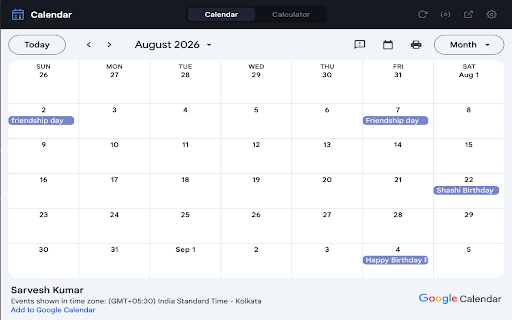


About
Tired of switching apps just to check your calendar or do a quick calculation on Mac?

CalendarKit brings the Windows taskbar experience to your Mac — as a free Chrome extension.

Click the toolbar icon and your full Google Calendar opens instantly — navigate to any month, check upcoming events, and get back to work. No screen switching, no app hopping.

Need to calculate something? Switch to the built-in Calculator tab — with persistent history — without ever leaving your current page.

✅ Full Google Calendar view in a popup
✅ Navigate to any month without leaving your screen
✅ Built-in Calculator with persistent history
✅ Set your default tab (Calendar or Calculator)
✅ Dark theme, clean minimal UI
✅ Zero data collection — everything stays on your device
✅ No accounts, no sign-ups, no tracking

CalendarKit is built for Mac users who want to stay focused and keep everything within reach.
Technical
- Version
- 1.0.0
- Manifest
- V3
- Size
- 42.08KiB
- Min Chrome
- 88
- Languages
- 1
- Featured
- No
Metadata
- ID
- nhcbepdcigkmidijjchdfnngloaemfcn
- Developer ID
- u5c67471bb649d5fd26f9f45040e46d31
- Developer Email
- [email protected]
- Created
- Jun 1, 2026
- Last Updated (Store)
- Jun 1, 2026
- Last Scraped
- Jun 8, 2026
- Website
- —
Data sourced from the Chrome Web Store · last verified Jun 8, 2026.