
ApSIC Xbench Extension for Polyglot
Instantly run QA with ApSIC Xbench on Polyglot files
As of June 2026, ApSIC Xbench Extension for Polyglot has 2,000 users and a 4.17/5 rating from 6 reviews in the Workflow & Planning category.
Usersno change0%
2.0K
2,000
Ratingno change0%
4.17
6 reviews
Reviewsno change0%
6
Version
1.0.20
Manifest V3
History
2 snapshotsTracking since Apr 19, 2026.
View as table
| Date | Users | Rating | Reviews | Version |
|---|---|---|---|---|
| Apr 19, 2026 | 2.0K | 4.17 | 6 | 1.0.20 |
| May 11, 2026 | 2.0K | 4.17 | 6 | 1.0.20 |
| Now | 2.0K | 4.17 | 6 | 1.0.20 |
Permissions & access
- Permissions
- declarativeContentdeclarativeNetRequestWithHostAccessdownloadsscripting
- Host access
- https://localization.google.com/polyglot*
Screenshots
About
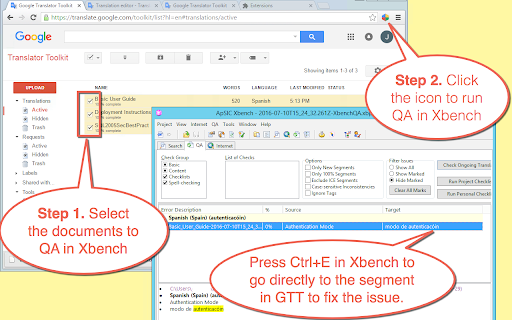
Instantly run QA with ApSIC Xbench on Google Polyglot files in four easy steps:

1. Go to the list of Google Polyglot documents
2. Select the documents to include for the Xbench QA.
3. Click the extension icon and wait for the documents to be downloaded.
4. Run QA with Xbench by double-clicking on the .xbp file that is downloaded.

To fix a translation issue found in Xbench, just select it in Xbench and press Ctrl+E.  The Chrome browser will open the Polyglot document right at the segment.

NOTE: This extension requires Xbench 3.0 build 1602 or later installed on the machine.
Technical
- Version
- 1.0.20
- Manifest
- V3
- Size
- 14.96KiB
- Min Chrome
- 88
- Languages
- 1
- Featured
- No
Metadata
- ID
- nhadbgflnognogbicnbeepnbpehlocgc
- Developer ID
- uf161579eff15df6eeca1ca79c7620884
- Developer Email
- [email protected]
- Created
- Jul 10, 2016
- Last Updated (Store)
- Apr 5, 2025
- Last Scraped
- Jun 6, 2026
- Website
- xbench.net
Similar extensions
Alternatives to ApSIC Xbench Extension for Polyglot, ranked by description similarity.

ApSIC Xbench Extension
Instantly run QA with ApSIC Xbench on cloud-based CAT tools
3.0K
★ 3.9

InQA ATMS
Build for InQA ATMS
68

Same Tab for Xbench
Reuses Chrome tab for existing Matecat, Smartcat, Lingotek or Crowdin job when called from ApSIC Xbench
5.0K
★ 5.0

XTranslateAI - Translate All
Best translator powered by GPT AI, Google Translate and Microsoft Translator. It can translate to 100+ languages for any tones!
459
★ 3.9

1-Click Translator
A Translate Browser Extension
147

Translate Online for Google Chrome™
Quickly open Translation and optional keep them open for later references.
10.0K
★ 4.5

QA Cheklist for VCS
a QA tool for viewing Google Forms for VCS Design Team
10

Quick Translate
This extension provides quick translation of selected texts
30.0K
★ 3.7
Data sourced from the Chrome Web Store · last verified Jun 6, 2026.