
Lett Search With
Search for selected text with any engine.
As of June 2026, Lett Search With has 12 users in the Workflow & Planning category.
Usersdown 20.0 percent−20.0%
12
12
Ratingno change0%
—
— reviews
Reviewsno change0%
—
Version
25.6.15
Manifest V3
History
5 snapshotsTracking since Apr 19, 2026.
View as table
| Date | Users | Rating | Reviews | Version |
|---|---|---|---|---|
| Apr 19, 2026 | 15 | — | — | 25.6.15 |
| May 4, 2026 | 19 | — | — | 25.6.15 |
| May 13, 2026 | 16 | — | — | 25.6.15 |
| May 26, 2026 | 15 | — | — | 25.6.15 |
| Jun 7, 2026 | 13 | — | — | 25.6.15 |
| Now | 12 | — | — | 25.6.15 |
Permissions & access
- Permissions
- storagecontextMenusscriptingactiveTab
- Host access
- None declared
Screenshots
About
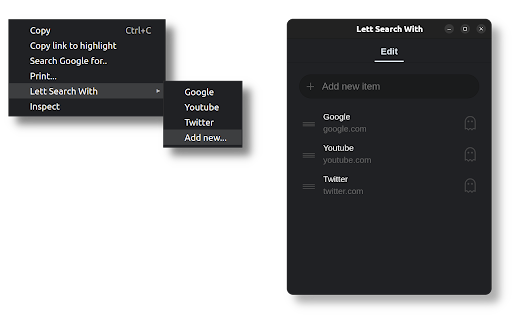
With this extension you can achieve the following:
  - Add multiple custom search engines.
  - Order their presence in the Right-click context menu.
  - Search for images.
  - Search for selected text.
  - Search from the address bar.
  - Search from any website via prompt.
  - Search InPrivate/Incognito mode.

To add a custom search engine you need a Name and URL:
  - Click the extension icon.
  - Type the name that will appear in the Right-click menu.
  - In the URL, put %s where the query should go.

To perform an image search:
  - Add a custom engine named [ImageSearch] with the desired URL
  - Right-click on any Image > Image Search

To search from any website:
  - Go to chrome://extensions/shortcuts
  - Set the shortcut for "Prompt Search"
  - When invoking the shortcut, type the engine name and your query.

To search from the address bar:
  - Type the special keyword "lett" in the address bar.
  - Type the name of the engine and your query.

For example:
	lett youtube etc..
	lett yt etc.. <- this will also work!

For Incognito search, add x to the search engine name:
	lett youtubex etc..
	lett ytx etc.. <- this will also work!

If you need assistance please refer to the Support Hub below.
Technical
- Version
- 25.6.15
- Manifest
- V3
- Size
- 21.82KiB
- Min Chrome
- 100
- Languages
- 1
- Featured
- No
Metadata
- ID
- nhabafbneoijfmkmbhmclhghainbgobc
- Developer ID
- uf0431a97743b903c01fd8afac560995f
- Developer Email
- [email protected]
- Created
- Dec 16, 2021
- Last Updated (Store)
- Jun 15, 2025
- Last Scraped
- Jun 7, 2026
- Website
- lett.app
- Support URL
- —
- Privacy Policy
- https://lett.app/search-with/privacy
Similar extensions
Alternatives to Lett Search With, ranked by description similarity.

Right Click to Search Any Site: Youtube, Reddit, Wikipedia, Twitter & More
Instantly search highlighted text on YouTube, Amazon, Reddit, Wikipedia, Twitter or any custom website using your right-click menu.
21
★ 3.0

Quick Search (Save Search for Later)
Search via popular engines directly from the popup. Add search query to search later.
6

SearchWiz
Enhance your web search experience with shortnets for popular websites.
5

Search Shortcuts
Custom DuckDuckGo bangs/shortcuts using the search bar
16

Search Engine Switch
Easily switch among multiple search engines without having to retype the search repeatedly.
552
★ 4.0

Keyboard Shortcuts
Map custom keyboard shortcuts to any Chrome browser command
18

SearchHub: Change Default Search Engine
Change default search engine instantly. Selection Search via right-click. 16+ engines, shortcuts, 35 languages.
36

Change Default Search Engine
Easily set your browser's default search engine to Bing, Yahoo, or others with the Change Default Search Engine extension.
8.0K
★ 4.3
Data sourced from the Chrome Web Store · last verified Jun 7, 2026.