
Custom home page
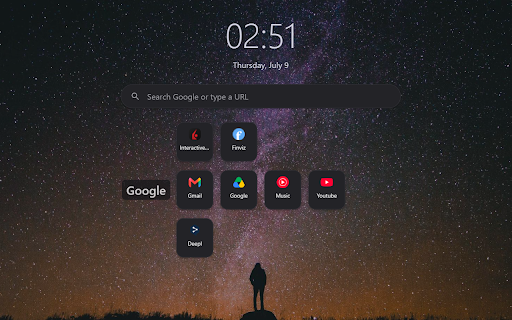
Replace the New Tab page with your own bookmark grid, search bar, clock, and wallpaper. Fully local — no accounts, no tracking.
As of July 2026, Custom home page has — users in the Productivity category.
Usersno change0%
—
—
Ratingno change0%
—
— reviews
Reviewsno change0%
—
Version
1.0
Manifest V3
History
1 snapshotsTracking since Jul 10, 2026.
Not enough history yet for this metric — the chart fills in as we collect more snapshots.
View as table
| Date | Users | Rating | Reviews | Version |
|---|---|---|---|---|
| Jul 10, 2026 | — | — | — | 1.0 |
| Now | — | — | — | 1.0 |
Permissions & access
- Permissions
- storagefavicon
- Host access
- None declared
Screenshots
About
Custom home page turns Chrome's New Tab page into a clean, personal start page — and keeps everything on your device.

WHAT YOU GET • A grid of bookmark tiles you fully control (up to 4 lines × 8 links each). • Drag to reorder tiles and lines. Optionally name each line and style the names. • Per-link icons: the site's favicon, an emoji, or your own image URL. • A search box: Google what you type, or jump straight to a URL. • A clock & date with your choice of font, size, color, 12-/24-hour time, and date format. • Backgrounds: color and gradient presets, a custom color, your own image URL, or a free wallpaper.

PRIVATE BY DESIGN • No accounts, no sign-in, no sync servers. • No analytics and no tracking. • Your bookmarks and settings are stored locally with Chrome's storage API. • Favicons are rendered locally — no favicon is fetched from a server.

The only network requests are the ones features need: Google when you run a search, and a wallpaper service when you pick a wallpaper. No host permissions, no analytics, no developer server.

TIP: Right-click anywhere on the page (or press the ✎ button) to open the customize panel. In any settings dialog, Enter saves and Esc cancels.
Technical
- Version
- 1.0
- Manifest
- V3
- Size
- 23.27KiB
- Min Chrome
- 88
- Languages
- 1
- Featured
- No
Metadata
- ID
- ngokaldagkhcielpoahapldedjbnbpih
- Developer ID
- u626c93e76594e86697ed6fbb7fa6321b
- Developer Email
- [email protected]
- Created
- Jul 9, 2026
- Last Updated (Store)
- Jul 9, 2026
- Last Scraped
- Jul 10, 2026
- Website
- —
- Support URL
- —
- Privacy Policy
- —
Data sourced from the Chrome Web Store · last verified Jul 10, 2026.