
Gmail Bot
Ask ChatGPT about your Gmail messages
As of May 2026, Gmail Bot has 346 users in the Productivity category.
Usersup 8.1 percent+8.1%
346
346
Ratingno change0%
—
— reviews
Reviewsno change0%
—
Version
0.1.10
Manifest V3
History
2 snapshotsTracking since Apr 26, 2026.
View as table
| Date | Users | Rating | Reviews | Version |
|---|---|---|---|---|
| Apr 26, 2026 | 320 | — | — | 0.1.10 |
| May 23, 2026 | 342 | — | — | 0.1.10 |
| Now | 346 | — | — | 0.1.10 |
Permissions & access
- Permissions
- None declared
- Host access
- None declared
Screenshots
About
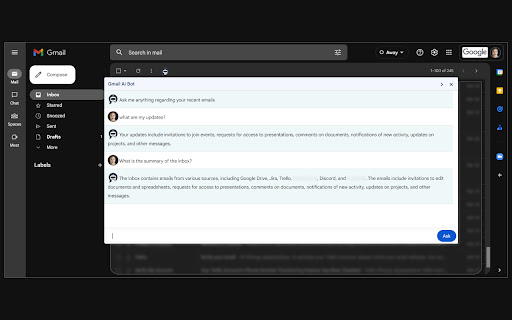
Once installed, refresh your page and you can find the Gmail Bot icon on top of your inbox emails list and Email Thread. Click the icon from the inbox to open the popup.

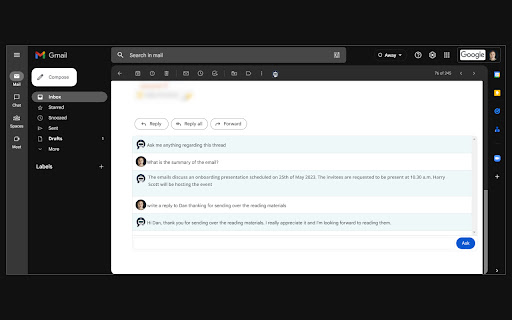
You can ask questions about recent emails or the opened thread, extract important information, or summarize long conversations.
E.g:
* What are my updates
* Summarize this conversation
* Summary of the inbox

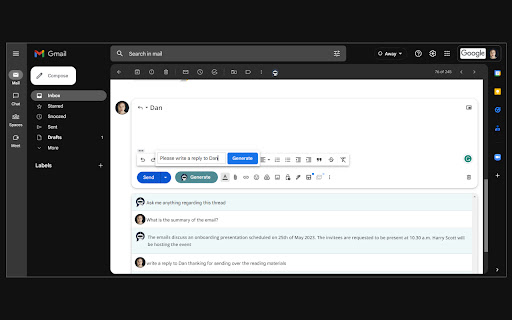
When composing a new message or replying to a thread you can find the Gmail Bot Generate button right next to Send button. This can compose a suitable message for you to modify as necessary.

Let the Gmail bot AI crunch through your inbox for the most important details and save your time.
Technical
- Version
- 0.1.10
- Manifest
- V3
- Size
- 46.36KiB
- Min Chrome
- 88
- Languages
- 1
- Featured
- No
Metadata
- ID
- ngehchibekapmbbbfjpolmhgppgcedka
- Developer ID
- ubd92e71230fa883facc43c7f9f883b66
- Developer Email
- [email protected]
- Created
- Feb 23, 2023
- Last Updated (Store)
- May 15, 2023
- Last Scraped
- May 23, 2026
- Website
- —
- Support URL
- —
- Privacy Policy
- https://www.codimite.com/privacy-policy/
Similar extensions
Alternatives to Gmail Bot, ranked by description similarity.

Google Chat Utility Belt
Adds the best LLMs links & other useful links inside Gmail header.
2

Gmail Assistant
AI-powered assistant for Gmail that helps with composing, replying, and summarizing emails
2
★ 5.0

AI Gmail Assist
Generate professtional AI replies
1

ChatGPT for Gmail — AI Email Assistant
AI email assistant for Gmail: summarize emails, generate replies, improve drafts, and translate—inside Gmail.
207
★ 5.0

GmailGo - Mailto Launcher
Right-click any email link to open it directly in Gmail. Fast, simple, works offline. by AIO.com.ai
6

MailMind AI – Gmail Follow-Up & Task Manager
Never miss a client follow up again. Turn email threads into clear tasks, deadlines, and next steps.
7
★ 4.5

MailMind AI - Smart Gmail Reply Generator
Generate intelligent email replies for Gmail instantly. Free, no API required, works completely offline.
3
★ 4.0

MailBot
This is a Google Chrome Extension to connect Gmail with OpenAI Assistants API
20
Data sourced from the Chrome Web Store · last verified May 23, 2026.