
Comment-AI
💬 Comment-AI 💬 Feeling the pressure to leave a meaningful comment on a post, but struggling with the right words? Introducing…
As of May 2026, Comment-AI has 1,000 users and a 4.56/5 rating from 9 reviews in the Social & Communication category.
Usersno change0%
1.0K
1,000
Ratingno change0%
4.56
9 reviews
Reviewsno change0%
9
Version
1.5
Manifest V3
Permissions & access
- Permissions
- activeTabstorage
- Host access
- https://www.comment-ai.com/validate, https://*.openai.com/*
Screenshots


About
💬 Comment-AI 💬

Feeling the pressure to leave a meaningful comment on a post, but struggling with the right words?

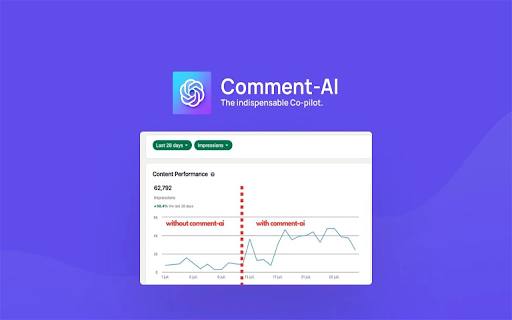
Introducing Comment-AI, your copilot that crafts engaging comments for you, amplifying your presence and engagement across social platforms.

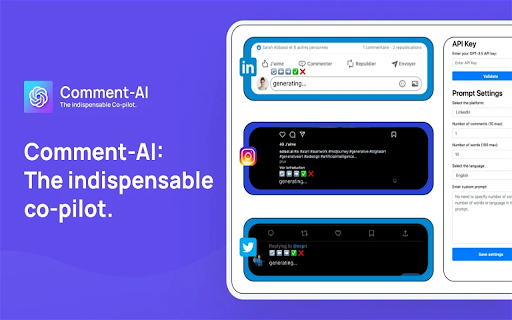
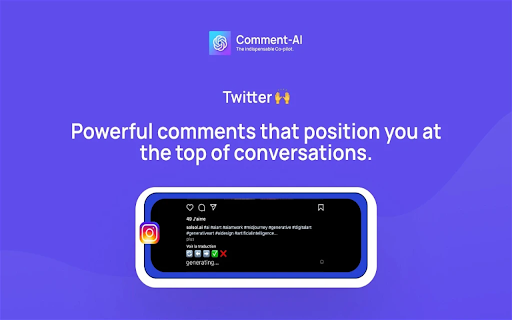
What does it do? Comment-AI is a Chrome extension that crafts engaging and relevant comments for LinkedIn, Instagram, and Twitter, helping you shine and establish genuine connections.

Never let words escape you again. With Comment-AI, enhance your online presence, establish genuine connections, and engage meaningfully across social platforms.

🥳 Key Features 🥳:

- Unlimited custom prompts
- LinkedIn comment generator
- Instagram comment generator
- Twitter comment generator
- Multilingual support
- Word count control
- Comment count control
- Add/edit/delete custom prompts

📘 How to Use It? 📘:

1. License Validation
- Validate your license with your email and license key.
- Add and validate your OpenAI API Key (only GPT-3.5 Turbo is supported currently).

2. Prompt Settings
- Choose your platform (LinkedIn, Instagram, or Twitter).
- Name your prompt.
- Set the number of comments to generate.
- Set the number of words per comment.
- Select the desired language for the comments.
- Add a custom instruction for the AI to follow.
- Save your settings.

3. Comment Generation
- Select the text of the post you want to comment on.
- Click on the comment zone; a menu "🔄 ⬅️ ➡️ ✅ ❌" will appear at the top.
- Click on the generate button "🔄" and let the AI generate your comments.
- Use "⬅️" and "➡️" to navigate through the generated comments list.
- Use "✅" to select and validate your comment. You can refine it if desired.
- Post your comment 🥳.

4. Notes
- When you generate a comment for a post, you must always validate (✅) or cancel (❌) the comment before moving on to another post. Otherwise, the menu will not appear if you try to generate a comment for another post without validating (✅) or canceling (❌) the previous one.

- By default, the system prompt is used if you don't add a custom prompt. Each platform has a default system prompt, so there is no need to add a custom prompt unless you prefer to do so.

- If you add a custom prompt, you can select it from the prompt gallery.

- To make your OpenAI API Key work, you need to enable billing on your OpenAI dashboard -> https://platform.openai.com/account/billing/overview

- If your OpenAI API key initially works and then stops, please try to generate another API key and validate it in the Comment-AI settings.

5. Support
- If you encounter any issues, please send us an email at [email protected]
Technical
- Version
- 1.5
- Manifest
- V3
- Size
- 771KiB
- Min Chrome
- 88
- Languages
- 1
- Featured
- No
Metadata
- ID
- ngaoohdgcaeojdngpdhaafnccgcbhlgl
- Developer ID
- ub7c94b9ead150b7ed3d0bfc09d45398d
- Developer Email
- [email protected]
- Created
- Jul 27, 2023
- Last Updated (Store)
- Nov 22, 2023
- Last Scraped
- May 23, 2026
- Website
- —
- Support URL
- https://comment-ai.com/
- Privacy Policy
- https://comment-ai.com/tos
Similar extensions
Alternatives to Comment-AI, ranked by description similarity.

Social Media AI Comment Writer
Boost engagement using Social Media AI Comment Writer — the AI comment generator and message responder for fast, smart replies.
71

LinkedIn Auto Commenter - AI-Powered Engagement Automation
AI-powered LinkedIn comment automation with smart post detection and engagement analytics
15

LinkedIn Commentator
Generate friendly LinkedIn comments using a local or built-in AI model and insert them into the composer.
—

ReplyBot AI
Welcome to ReplyBot AI Quick summaries, smarter comments
13
★ 5.0

Comment Booster for LinkedIn
Genera comentarios automáticos en LinkedIn usando IA con historial completo de actividad
11
★ 5.0

Involve AI
Generate LinkedIn comments with AI
22
★ 5.0

Brandengine.ai
Using GPT to help you comment better, easier & faster
687
★ 5.0

Clyro AI
Generate AI-powered comments for LinkedIn posts and Twitter replies
7
★ 5.0
Data sourced from the Chrome Web Store · last verified May 23, 2026.