
Link Clipper
A extension for easily clipping and managing links.
As of May 2026, Link Clipper has 2,000 users in the Productivity category.
Usersup 100.0 percent+100.0%
2.0K
2,000
Ratingno change0%
—
— reviews
Reviewsno change0%
—
Version
1.2
Manifest V3
90-day change · In the last 90 days this extension gained 1.0K users.
History
2 snapshotsTracking since Apr 26, 2026.
View as table
| Date | Users | Rating | Reviews | Version |
|---|---|---|---|---|
| Apr 26, 2026 | 1.0K | — | — | 1.2 |
| May 23, 2026 | 1.0K | — | — | 1.2 |
| Now | 2.0K | — | — | 1.2 |
Permissions & access
- Permissions
- tabs
- Host access
- None declared
Screenshots
About
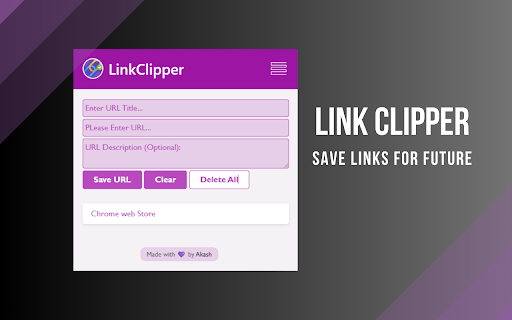
Introducing the "Link Clipper" browser extension – your go-to tool for effortlessly saving and organizing websites you love. With LinkClipper, you can bookmark and store your favorite web pages with a single click, ensuring that the content you cherish is readily available for future reference.

Simplify your online experience by categorizing saved websites into personalized folders, making it easy to retrieve information when you need it most. The extension also provides a user-friendly interface, allowing you to add notes and tags to each saved site, enhancing your ability to recall specific details.

LinkClipper is not just a bookmarking tool; it's a comprehensive solution for curating your online world. Whether you're conducting research, collecting inspiration, or simply bookmarking articles of interest, LinkClipper empowers you to build a personalized library of web content. Never lose track of valuable information again – streamline your digital life with the LinkClipper extension.
Technical
- Version
- 1.2
- Manifest
- V3
- Size
- 127KiB
- Min Chrome
- 88
- Languages
- 1
- Featured
- Yes
Metadata
- ID
- ngamlcpgcbkbgpgkkgnbpkgnfgpccaak
- Developer ID
- u50dc7b26c5adde3858aa257a373fa239
- Developer Email
- [email protected]
- Created
- Feb 20, 2024
- Last Updated (Store)
- Feb 22, 2024
- Last Scraped
- May 23, 2026
- Website
- —
- Support URL
- —
- Privacy Policy
- —
Similar extensions
Alternatives to Link Clipper, ranked by description similarity.

EchoNote
A chrome extension to store the links to interact later
3

Link Library
Save, Search, Share Links with ease! LinkLibrary helps you organize and manage your bookmarks efficiently.
12
★ 5.0

Link Saver
Save up to 20 links for quick access.
14

Save to LinkySave
Save the current page to your LinkySave account with one click.
4

One Click Save and URL Bookmark Tool
Save and organize URLs with custom titles
9

Clippe.me: Save posts in just one click
Save and organize posts from LinkedIn, Reddit, X and across the web - just by clicking an icon below the post.
1.0K
★ 4.8

Save Links
An extension to save and manage links easily.
83
★ 5.0

Link Dropper
Save links effortlessly and rediscover them when you need them
31
★ 5.0
Data sourced from the Chrome Web Store · last verified May 23, 2026.