IPEVO Whiteboard
IPEVO Whiteboard for Chromebook is specifically designed to create an interactive whiteboard with IPEVO IW2 on your Chromebook.
As of May 2026, IPEVO Whiteboard has 40,000 users and a 3.93/5 rating from 14 reviews.
Usersdown 20.0 percent−20.0%
40.0K
40,000
Ratingno change0%
3.93
14 reviews
Reviewsno change0%
14
Version
1.0.1.4
Manifest V2
90-day change · In the last 90 days this extension lost 10.0K users.
History
1 snapshotsTracking since Apr 26, 2026.
View as table
| Date | Users | Rating | Reviews | Version |
|---|---|---|---|---|
| Apr 26, 2026 | 50.0K | 3.93 | 14 | 1.0.1.4 |
| Now | 40.0K | 3.93 | 14 | 1.0.1.4 |
Permissions & access
- Permissions
- webviewfullscreenalwaysOnTopWindowsdesktopCaptureunlimitedStoragefileSystemusbvideoCapturesystem.displayhid
- Host access
- None declared
Screenshots



About
IPEVO Whiteboard for Chromebook

Add Even More Versatility to Your IW2

IPEVO Whiteboard for Chromebook is specifically designed for the IPEVO IW2 Wireless Interactive Whiteboard System on your Chromebook, adding versatility to both! Whiteboard allows you to draw or annotate directly onto a blank whiteboard or imported images in order to highlight, emphasize or clarify areas of interest – for education and for business. In addition, by pairing any one of IPEVO’s document cameras with your Chromebook, or by using the device's built-in webcam, you can stream live image from the document camera/webcam to your Chromebook and annotate that live image as well.

How does IPEVO Whiteboard for Chromebook work?

- IPEVO Whiteboard for Chromebook allows your IW2 to work with Chromebook. Just set up your IW2, open the app, take a minute to calibrate, and you are now ready to use your IW2 with your Chromebook
- When your Chromebook is connected to a projector, this setup gives you a projected interactive whiteboard
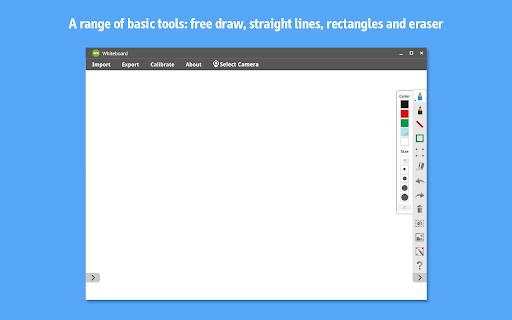
- An easy-to-use annotation toolkit is available in the app. You can import images from your folders or from Google Drive and then draw or annotate on them to emphasize, highlight or clarify key areas of interest using IW2
- Or, you can choose to write, draw and annotate directly onto a blank whiteboard
- After you're done, you can take snapshots of the annotated images/whiteboards and save them temporarily to the app, or you can export them directly to designated folders or Google Drive for future use or sharing

Enjoy quick and simple annotation features

- Draw freely with the Pen tools, or choose a straight line or rectangle for highlighting important areas. There are several different colors and sizes to choose from
- Time-saving Eraser, Undo, Redo, Copy & Paste, and Delete functions

Benefit from effortless image management

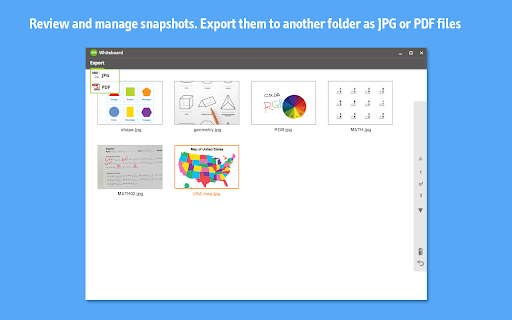
- Take snapshots and save the annotated images/whiteboards to the app, or export the annotated whiteboards directly to your designated folders or Google Drive for future use, archiving, and reference
- One-tap easy access to Review Mode lets you view and manage snapshots saved to the app. From there, you can export them to other folders for archiving
- Choose from two file formats – JPG and PDF – when exporting annotated images/whiteboards or saved snapshots

Don't have IW2? No worries. You can still use IPEVO Whiteboard for Chromebook with a computer mouse or an IPEVO document camera


- IPEVO Whiteboard for Chromebook can also be used with a computer mouse. You’ll enjoy the same features you would with an IW2
- Using Whiteboard with an IPEVO document camera is another option. Stream a live image from the document camera to your Chromebook, then draw or annotate on that live image using Whiteboard's annotation toolkit
- Or, choose Chromebook's built-in webcam to stream a live image to your Chromebook and draw or annotate onto the live image just as you would with the live stream from an IPEVO document camera
- Annotated live images can also be saved as snapshots in the app, or exported to your designated folders or to Google Drive
Technical
- Version
- 1.0.1.4
- Manifest
- V2
- Size
- 488KiB
- Min Chrome
- 38
- Languages
- 9
- Featured
- No
Metadata
- ID
- ngabidjikmpanokhnajohenclgjedjkp
- Developer ID
- uab5f6ec0ed5e703795292145f12a49a1
- Developer Email
- [email protected]
- Created
- Mar 30, 2016
- Last Updated (Store)
- Sep 5, 2019
- Last Scraped
- May 23, 2026
- Website
- http://www.ipevo.com/
- Support URL
- http://www.ipevo.com/
- Privacy Policy
- —
Similar extensions
Alternatives to IPEVO Whiteboard, ranked by description similarity.
IPEVO Presenter
Presenter allows your IPEVO document camera to capture and present class work easily.
—
★ 4.3
IPEVO Presenter for Chrome OS v55 and below
Presenter allows your IPEVO document camera to capture and present class work easily.
—

Whiteboard Vibe - AI Canvas & Mind Maps
AI whiteboard with mind maps, icons, hand gesture drawing, file tools, templates, and PPTX export.
208
★ 4.7

Writeboard
Writeboard is a sleek, intuitive whiteboard extension that lets you quickly sketch, jot down ideas, or annotate your thoughts.
405

Roger's Math Whiteboard
A Chrome App designed specifically for Math Teachers
1.0K
★ 4.0

Page Marker Extension
Use Page Marker Extension — Website Annotation Tool. Draw on page, draw on screen, annotate website, work in whiteboard online mode.
4.0K
★ 4.9

ideaocam
ideaocam
3.0K
★ 5.0

OKIOCAM Live
The perfect app for live presentations. Display your camera's image on a larger screen or share it through conferencing software.
10.0K
★ 5.0
Data sourced from the Chrome Web Store · last verified May 23, 2026.