
ArxivPilot
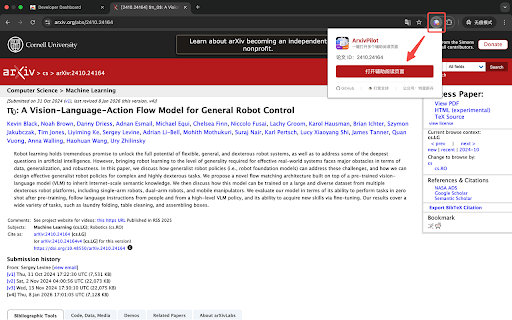
One-click open translation, AI summary, and overview tabs for any arXiv paper. Supports abs/pdf/html URLs and manual input.
As of June 2026, ArxivPilot has 10 users in the Productivity category.
Usersno change0%
10
10
Ratingno change0%
—
— reviews
Reviewsno change0%
—
Version
1.0.0
Manifest V3
History
5 snapshotsTracking since Apr 25, 2026.
View as table
| Date | Users | Rating | Reviews | Version |
|---|---|---|---|---|
| Apr 25, 2026 | — | — | — | 1.0.0 |
| May 9, 2026 | — | — | — | 1.0.0 |
| May 25, 2026 | 4 | — | — | 1.0.0 |
| Jun 1, 2026 | 6 | — | — | 1.0.0 |
| Jun 7, 2026 | 9 | — | — | 1.0.0 |
| Now | 10 | — | — | 1.0.0 |
Permissions & access
- Permissions
- tabstabGroupscontextMenus
- Host access
- https://arxiv.org/*
Screenshots


About
ArxivPilot is a lightweight Chrome extension that helps researchers read arXiv
  papers more efficiently.

With one click on any arXiv paper page, it automatically opens multiple
reading-assistance tabs:
- 🌐 Hallucination-free translation (hjfy.top)
- 🤖 KIMI AI paper summary (papers.cool)
- 📖 AlphaXiv overview (alphaxiv.org)

All tabs are neatly grouped together with a red color label and the paper ID
as the group title, making it easy to manage multiple papers.

Features:
✅ Auto-detects arXiv paper ID from abs/pdf/html URLs
✅ Manual input mode for non-arXiv pages (paste URL or paper ID)
✅ Tab grouping with one-click organization
✅ Lightweight — no background scripts, no data collection

Perfect for researchers, students, and anyone who reads arXiv papers
regularly.

---

ArXiv Reader 是一个轻量级 Chrome 插件,帮助研究者更高效地阅读 arxiv 论文。

在任意 arxiv 论文页面点击一下,自动打开多个辅助阅读标签页:
- 🌐 幻觉翻译(hjfy.top)
- 🤖 KIMI AI 论文解读(papers.cool)
- 📖 AlphaXiv 论文概览(alphaxiv.org)

所有标签页自动归入同一标签组,以红色标注、论文 ID 命名,多论文管理一目了然。

功能亮点:
✅ 自动识别 abs/pdf/html 格式的 arxiv URL
✅ 手动输入模式(支持粘贴链接或直接输入论文 ID)
✅ 无后台脚本,不收集任何数据
Technical
- Version
- 1.0.0
- Manifest
- V3
- Size
- 1.13MiB
- Min Chrome
- 88
- Languages
- 1
- Featured
- No
Metadata
- ID
- nfnhldkeooijgilacfepgbnegboploee
- Developer ID
- udf423441377c9c7ea1c5afd58ddb4cae
- Developer Email
- [email protected]
- Created
- Apr 24, 2026
- Last Updated (Store)
- Apr 24, 2026
- Last Scraped
- Jun 7, 2026
- Website
- —
- Support URL
- —
Data sourced from the Chrome Web Store · last verified Jun 7, 2026.