
Video Speed Control™
Universal speed control for video & audio. Speed up, slow down, rewind on YouTube, Netflix, Spotify and more.
As of June 2026, Video Speed Control™ has — users in the Productivity category.
Usersno change0%
—
—
Ratingno change0%
—
— reviews
Reviewsno change0%
—
Version
2.0.1
Manifest V3
History
4 snapshotsTracking since Apr 16, 2026.
Not enough history yet for this metric — the chart fills in as we collect more snapshots.
View as table
| Date | Users | Rating | Reviews | Version |
|---|---|---|---|---|
| Apr 16, 2026 | — | — | — | 2.0.1 |
| Apr 22, 2026 | — | — | — | 2.0.1 |
| Apr 29, 2026 | — | — | — | 2.0.1 |
| May 11, 2026 | 1 | — | — | 2.0.1 |
| Now | — | — | — | 2.0.1 |
Permissions & access
- Permissions
- contextMenusoffscreenscriptingstoragetabCapturetabsuserScriptswebNavigation
- Host access
- https://*/*, http://*/*
Screenshots



About
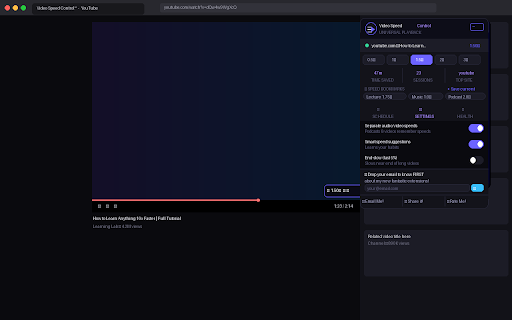
Control the speed of every video and audio on the internet — YouTube, Netflix, Spotify, podcasts, any streaming site. Set it once and it follows you everywhere, automatically. No more watching content at the wrong speed ever again.
Speed up lectures. Slow down tutorials. Never lose your place. This is the one extension you'll use every single day. ⚡
What it does:

⚡ Universal Speed Control — one setting applies to every video and audio tab automatically
🔖 Speed Bookmarks — save named presets like "Lecture fast 1.75×" and apply them in one click
📅 Smart Scheduling — auto-apply a speed by time of day (fast in the morning, normal in evenings)
💡 Smart Suggestions — notices you always watch a site at 2× and asks if you'd like to make it the default
⏱ Timestamp Share — copy a shareable link with the exact timestamp right from the floating HUD
🩺 Health Monitor — tells you clearly if the extension can't control a page and why
🔒 Ghost Mode — hides speed changes from sites that try to detect and fight back
🎨 Video Filters — brightness, contrast, saturation, blur — dial in the perfect picture
🔊 Volume Boost — push audio up to 600% on quiet videos
⌨️ Keyboard Shortcuts — [ and ] to nudge speed, ? for the full shortcut guide, Shift+scroll on any video
📍 Resume Memory — picks up exactly where you left off on any video URL
🌍 19 Languages — English, Spanish, French, German, Japanese, Arabic, and more

🆓 Completely free. No account. No subscription. No ads. Your data never leaves your browser.
Questions? Reach out: wa.me/message/4X4CPESKS4DYK1
If this tool saves you time every day, a small donation helps keep it free and maintained 🙏 → wa.me/message/4X4CPESKS4DYK1
Technical
- Version
- 2.0.1
- Manifest
- V3
- Size
- 535KiB
- Min Chrome
- 88
- Languages
- 19
- Featured
- No
Metadata
- ID
- nfleichnkimfhgapkdgaelfiifiipjep
- Developer ID
- u2614a94cd7e16150b181457d522b3151
- Developer Email
- [email protected]
- Created
- Apr 15, 2026
- Last Updated (Store)
- Apr 15, 2026
- Last Scraped
- Jun 13, 2026
- Website
- —
- Support URL
- https://wa.me/message/4X4CPESKS4DYK1
Data sourced from the Chrome Web Store · last verified Jun 13, 2026.