
Extension Store Asset Pack Generator
Create and edit Chrome Web Store screenshots, icons, and promotional assets.
As of June 2026, Extension Store Asset Pack Generator has — users in the Productivity category.
Usersno change0%
—
—
Ratingno change0%
—
— reviews
Reviewsno change0%
—
Version
0.0.1
Manifest V3
History
1 snapshotsTracking since Jun 28, 2026.
Not enough history yet for this metric — the chart fills in as we collect more snapshots.
View as table
| Date | Users | Rating | Reviews | Version |
|---|---|---|---|---|
| Jun 28, 2026 | — | — | — | 0.0.1 |
| Now | — | — | — | 0.0.1 |
Permissions & access
- Permissions
- tabsstoragesystem.display
- Host access
- https://*.supabase.co/*
Screenshots


About
This extension helps developers create Chrome Web Store listing assets faster and with less design overhead. It removes the need to manually resize, crop, arrange, and export images across multiple design tools. It is especially useful for indie developers, small teams, and extension creators who want to prepare store-ready icons, screenshots, and promotional images efficiently.

1. How to Use
step1, Click the extension icon in your browser to open the standalone editor window.
step2, Enter Black Project and choose the asset size you want to create, such as icon.png, screenshots, or promotional images.
step3, Click an image to open the editor. You can add text, images, SVG files, rectangles, arrows, and customize the background.
step4, Move elements freely, resize them, and adjust fonts, colors, corner radius, and layout.
step5, When finished, save your edits, download individual images, or export the full asset pack as a ZIP file.

2. Key Features
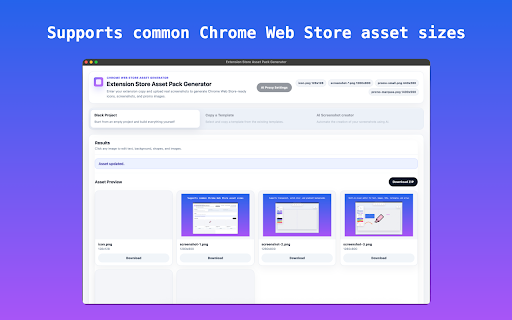
✔ Supports common Chrome Web Store asset sizes.
✔ Built-in visual editor for text, images, SVGs, rectangles, and arrows.
✔ Supports transparent, solid color, and gradient backgrounds.
✔ Adjustable corner radius for images and shapes.
✔ Local editing and exporting, with a simple and focused workflow.
Technical
- Version
- 0.0.1
- Manifest
- V3
- Size
- 204KiB
- Min Chrome
- 88
- Languages
- 1
- Featured
- No
Metadata
- ID
- neohjdlhlehngniaiblacbnmjhhfebdg
- Developer ID
- u8e37ac23e95ff6d5f9b3bcd48bf04b11
- Developer Email
- [email protected]
- Created
- Jun 27, 2026
- Last Updated (Store)
- Jun 27, 2026
- Last Scraped
- Jun 28, 2026
- Website
- —
- Support URL
- —
- Privacy Policy
- —
Data sourced from the Chrome Web Store · last verified Jun 28, 2026.