
Vertical Tabs Side Panel
★ Simplicity defines us - NOW WITH TREE VIEW and AUTOMATIC GROUPING! ★ Open shortcut, CTRL + i (windows), COMMAND + e (macOS) and…
As of May 2026, Vertical Tabs Side Panel has 1,000 users and a 4.32/5 rating from 19 reviews in the Productivity category.
Usersno change0%
1.0K
1,000
Ratingno change0%
4.32
19 reviews
Reviewsno change0%
19
Version
0.1.0.1
Manifest V3
History
1 snapshotsTracking since Apr 26, 2026.
View as table
| Date | Users | Rating | Reviews | Version |
|---|---|---|---|---|
| Apr 26, 2026 | 1.0K | 4.32 | 19 | 0.1.0.1 |
| Now | 1.0K | 4.32 | 19 | 0.1.0.1 |
Permissions & access
- Permissions
- storagetabssidePanel
- Host access
- None declared
Screenshots



About
★ Simplicity defines us - NOW WITH TREE VIEW and AUTOMATIC GROUPING!

★ Open shortcut, CTRL + i (windows), COMMAND + e (macOS) and CTRL + q (linux)

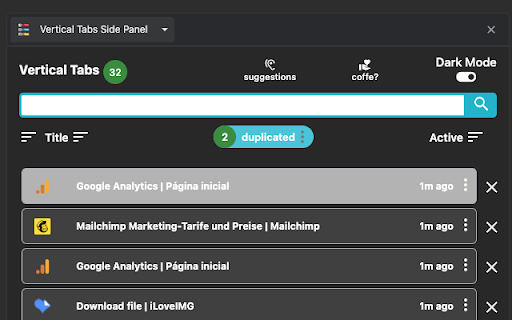
Vertical Tabs View allow you to easily access and search your tabs, using a vertically stacked UI. It also allows you to open, sort and close individual or a group of tabs.

This extension is very useful for those who end up with many tabs open without knowing the last time you even interacted with them, allowing one to easily get rid of old tabs. It also makes it easy to spot duplicated tabs and to navigate to recently opened ones.

See https://www.youtube.com/watch?v=8ow6f5zWRLI for details on how to use it.

Note: Chrome shows a scary popup regarding Vertical Tabs View accessing your browser history. We do react to new tabs as a way to store LOCALLY the last time you interacted with them. However, nothing is ever sent to a server, nothing ever leaves your computer, this extension is completely private. Feel free to check the code at the website link.

★ Vertically sorted tabs.

★ Automatic group by website.

★ White and dark mode

★ Search bar that allows to search for title or url.

★ Sort tabs by url and staleness.

★ See the number of open and duplicated tabs.

★ Highlight duplicated tabs.

★ Delete duplicated tabs with one click.

How to use?

★ Open shortcut, CTRL + i (windows), COMMAND + e (macOS) and CTRL + q (linux)
★ Navigate your tabs using the arrow or TAB (on your keyboard)
★ Open a tab via Enter key.
★ Easily close a specific or multiple tabs.
★ Click on the sort icon to sort by either, url, title or staleness.
★ If you have duplicated tabs, click on the menu to highlight them or get rid of them.
Technical
- Version
- 0.1.0.1
- Manifest
- V3
- Size
- 34.68KiB
- Min Chrome
- 88
- Languages
- 1
- Featured
- Yes
Metadata
- ID
- nelmjkbalflkmcnnnhjgiodpndcebfgo
- Developer ID
- ue1c408c7f893b2ce8e75f929fdd2f39f
- Developer Email
- [email protected]
- Created
- Dec 17, 2022
- Last Updated (Store)
- Jul 3, 2024
- Last Scraped
- May 23, 2026
- Website
- —
- Privacy Policy
- —
Similar extensions
Alternatives to Vertical Tabs Side Panel, ranked by description similarity.

Vertical Tabs Manager
Vertical tab manager with active highlight, ordering, export, and restore from file
11

Tab Groups & Windows List
A 3-level expandable hierarchy of Windows, Tab Groups, and Tabs.
1

Vertical Sidebar Tabs
A Chrome extension that provides vertical sidebar tabs inspired by Arc browser.
—

Tab Overview
View all open tabs, filter by keywords, and close them all in one click with this extension.
56
★ 5.0

Tab Tools
Powerful tab management tools: group, copy, organize, and manage your Chrome tabs efficiently with keyboard shortcuts and modern UI
26
★ 5.0

Tab List
List opened tabs for current window. Tab groups are recognised and displayed. Filter list, focus or close tab, bookmark tab group.
1.0K
★ 3.9

Tree Style Tab Manager
Organize Chrome tabs in a tree. Save & restore sessions, drag & drop, instant search, site exclusions, and recover closed tabs.
163
★ 5.0

Site Group
Group and organize your browser tabs by website for better productivity
4
Data sourced from the Chrome Web Store · last verified May 23, 2026.