
Bite - Summarise Anything
Instantly summarize any webpage or YouTube video into bite-sized insights — then chat with the content to dig deeper
As of June 2026, Bite - Summarise Anything has 26 users and a 5.00/5 rating from 5 reviews in the Workflow & Planning category.
Usersno change0%
26
26
Ratingno change0%
5.00
5 reviews
Reviewsno change0%
5
Version
2.3.0
Manifest V3
90-day change · In the last 90 days this extension 1 version update.
History
6 snapshotsTracking since Apr 5, 2026.
View as table
| Date | Users | Rating | Reviews | Version |
|---|---|---|---|---|
| Apr 5, 2026 | — | — | — | 2.0.0 |
| Apr 18, 2026 | — | — | — | 2.0.0 |
| Apr 25, 2026 | 19 | 5.00 | 5 | 2.3.0 |
| May 9, 2026 | 21 | 5.00 | 5 | 2.3.0 |
| May 20, 2026 | 23 | 5.00 | 5 | 2.3.0 |
| Jun 8, 2026 | 22 | 5.00 | 5 | 2.3.0 |
| Now | 26 | 5.00 | 5 | 2.3.0 |
Changelog
- Apr 18, 2026name
Bite
Bite - Summarise Anything
Permissions & access
- Permissions
- activeTabtabsstoragescriptingsidePanel
- Host access
- <all_urls>
Screenshots
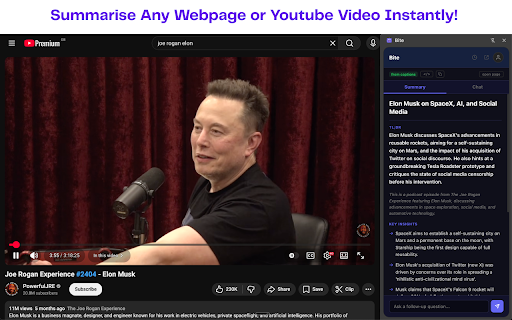


About
Bite turns any webpage or YouTube video into a concise, structured summary — in seconds. Get the key insights without reading the whole thing, then chat with the content to ask follow-up questions.

Features:
• Instant summaries for any webpage or YouTube video
• Chat with the content to dig deeper and ask questions
• Full history of everything you've summarized
• Works in Chrome's side panel — no popups, no new tabs
• Cute animated mascot that bites through content for you

How it works:
1. Click the Bite icon in your toolbar
2. Hit "Bite This Page" on any webpage or YouTube video
3. Get a structured summary with title, TL;DR, and key insights
4. Ask follow-up questions in the chat tab

Bite saves you time by extracting what actually matters — the insights, facts, and takeaways — so you can learn faster without reading or watching everything.
Technical
- Version
- 2.3.0
- Manifest
- V3
- Size
- 47.52KiB
- Min Chrome
- 88
- Languages
- 1
- Featured
- No
Metadata
- ID
- nejgdcmbmkfdpkpflcjiabdbjfjghnfn
- Developer ID
- uc345fdc5b09309501d64c96577937e8d
- Developer Email
- [email protected]
- Created
- Apr 5, 2026
- Last Updated (Store)
- Apr 12, 2026
- Last Scraped
- Jun 8, 2026
- Website
- —
- Support URL
- https://bitesummary.space/
- Privacy Policy
- https://vibhumahendru.github.io/bite-privacy-policy/
Data sourced from the Chrome Web Store · last verified Jun 8, 2026.